

LinkedIn is no longer just a place to post updates. It is part of your digital credibility footprint and can help prospects, referrals, and AI tools understand who you serve and what you do best.
Your profile needs to work for two audiences: people who are quickly deciding whether you feel relevant and credible, and AI/search tools that need clear signals about your role, specialty, location, and expertise.
The highest-impact profile updates are your banner, headline, About section, Featured section, and recent headshot. These are the places that help visitors quickly understand who you help and what action to take next.
A strong LinkedIn content rhythm includes a mix of expertise posts, easy conversation starters, and personal posts that help people understand the human behind the credentials.
Advisors do not need to start from scratch. Existing FMG blogs, educational content, events, videos, and lead magnets can be repurposed into LinkedIn posts, Featured section links, and LinkedIn articles when appropriate and approved.
LinkedIn Quick Action Checklist:
Browse the slides we reviewed during this workshop below.


Friends. Welcome to our May Did You Know? Where we are going to be covering LinkedIn. As always, chime in with where you’re coming in from. I am Elise Lambert, and today we’re gonna be talking about AI search optimization, specifically how that pertains to our LinkedIn strategy. How can we get found utilizing this awesome tool that we all probably have?
Then I’m Elise Lambert, Director of Product Enterprise Marketing here at FMG. This is me and my family, and I love getting to talk to you each and every month about our Did You Know series. So this is Did You Know about a certain product or feature within the FMG platform?
And how can we continue to build upon our digital footprint.
And talking today specifically about LinkedIn, I have a question for you. So we’re gonna launch a poll. And I am curious, before going into this, what’s your biggest LinkedIn challenge right now? Is it you know, I don’t know what to post, I don’t have time.
I post, I just don’t know if it’s actually reaching everyone. So just curious, or maybe just inconsistent, right? I know I need to do it more. I just need that little bit of inspiration to keep going.
And so, so we’re just curious kind of where we are. So we’re gonna launch this poll. And a couple of housekeeping items before we get going.
Recording will be sent afterwards. And if for whatever reason you haven’t received a recording afterwards, please send a q and a to us or chat us on the side and we want to make sure that you’re getting those. We have some amazing giveaways. Like always, we’ve created a LinkedIn checklist that we’re going to provide for you so you have something to take away and and to be able to put into process after this.
So that follow-up will have a recording, it will have we do a transcript of the chat. All the great ideas you share in the chat. That’s one of my favorite features is you guys share so many great ideas. Today we’re going to be really asking for you to share ideas.
If you have an all star LinkedIn, we want to see it.
So feel free to log in to either the FMG dashboard while we’re doing this conversation and or your LinkedIn so you can put into play what what we’re going to talk about so you can use this time valuably. I know how busy you all are wearing so many different hats as financial professionals.
And of course, last month, we’re going share the recording in the chat. But if you missed our April workshop, we talked about marketing delegation. So your playbook to delegate your marketing, whether you have a summer intern, you have an amazing team that helps you, maybe two, and you see the, you know, a quick delegation checklist, we are going to share that in the chat. So that is there, but cadences for daily, weekly and monthly tasks.
And we also have sneak peek of new tools to increase your visibility as well. So thank you. And it’s so exciting. I have people joining from all over the country.
I just saw someone that’s joining from my hometown of Colorado Springs. That makes me so happy.
And today, we want to encourage you guys to share examples of your own LinkedIn, of your own headline, of your banner. And so we are going to be choosing at random a couple of people to win some fun FMG swag items. So we encourage you to share all of your great examples.
And, okay, so we’re talking about LinkedIn today. And I didn’t know if you guys knew this, but LinkedIn, this is one of my favorite new features, and it has nothing to do with getting found on AI.
But they have LinkedIn games now. Just just show of hands in the chat if you utilize LinkedIn games. I’m just curious little icebreaker. I personally they added Sudoku.
And I love them. I think they’re so fun. It’s just a nice, quick brain, brain exercise that I do kind of while I’m eating my lunch some days when I have time. But I think they’re so fun.
And some people I don’t see the purpose in them. Yes, they’re play zip. They’re fun. Just I was just curious how many people are actually utilizing LinkedIn games. Some of my colleagues weren’t didn’t even know they had them. And so I use them as a quick a quick brain teaser in the middle of my day just to refresh and have a little bit of fun.
Okay, So now let’s dive in to all of the LinkedIn things. One of the biggest things that we hear all the time when it comes to LinkedIn, it or getting found. It’s like, man, I want to utilize LinkedIn, but no one comments or likes my LinkedIn posts and like share hands if that’s you and like, a lot of times I’ll create this content. And then I hit send and I wait, you know, I wait, is it going to get shares? Is it going to get likes? And that might sound familiar to you. I know that’s definitely something that I feel.
And you’re not feeling at LinkedIn if you’re having the same sentiment. LinkedIn has changed and not in my many financial professionals know this. And so AI is now your silent audience. It’s reading your profile.
It’s verifying your authority, your credibility, and it either recommends you or it doesn’t. So why should we spend time on LinkedIn? And really the numbers don’t lie. So sixty five million decision makers are on LinkedIn today, sixty one percent of those being high net worth individuals.
So thinking about who your target audience is, and seventy four percent of prospects check a financial advisor’s LinkedIn before agreeing to a meeting. So that means your prospects, your referrals, one of the first places they go to check credibility, to check you out, to see who you are, is your LinkedIn. And so how can we optimize our LinkedIn to build our social credibility to make sure that we are getting found with AI? And it just goes to show that this is where our clients are.
Sixty three percent of adults, thirty to forty nine use LinkedIn, business owners, execs, pre retirees, and it is one of the easiest and best ways for you to build trust before that initial either first meeting, first call, initial handshake, and one of the best parts is there’s zero ad spend, right? This is something that we can do free, you might have the LinkedIn premium option. But for the most part, these are all tools that we can optimize without spending a dollar just, of course, a little bit of time.
And what’s changed? Right? LinkedIn is no longer just an awareness tool and play, but this is how AI is deciding how they recommend you. So your clients, your prospects are going to AI.
Hey, find me a CFP in Austin that works with physicians. Hey, find a financial professional who works with special needs family in XYZ town. Right? AI is reading your LinkedIn, they’re reading initially your headlines, your credentials, your content and your activity.
Those are the main things that we’re going to talk about today. And then it’s verifying, it’s cross referencing your, your experience, your headline, your your keywords with your website and your other digital content places.
And then it cites you or it doesn’t, right? So it’s then utilizing this information to say, okay, great, this is valid, this is credible, this is someone that we can recommend.
And so the number two, right, LinkedIn is number two ranked among most cited AI domains. So think your chat GPs, your Geminis, your Claude’s, this is where they’re going to view as a credible source. And it’s going up.
And it is going up quick. And so as we write content, just for LinkedIn, but our approve of other approved social pages, also our website, your content now has two audiences. Before it just used to be, hey, Google, what people would search in Google, but now we are writing content for the robots, chattybt, Claude’s Geminis, and they’re deciding whether or not to recommend you, but also the human. Right? The human has not gone away. It’s not going away any time soon.
And so when a prospect lands on your page, you have five seconds to grab their attention, you have five seconds to wow them, to capture their attention, to engage them. And so they need to instantly see who you work with, who you are, speak the language that they have, and do you have the solutions to their problem. So what converts them is completely different from how we got there.
So what we’re gonna talk about today is how we can build that awesome LinkedIn profile optimized for answer engine optimization content. Right? What giving you guys some ideas, some inspirations on content, and how how can we get into a weekly rhythm, what should we post and how often, and of course, a couple of other ideas. And at the end, we’re gonna share new FMG products that we have coming out.
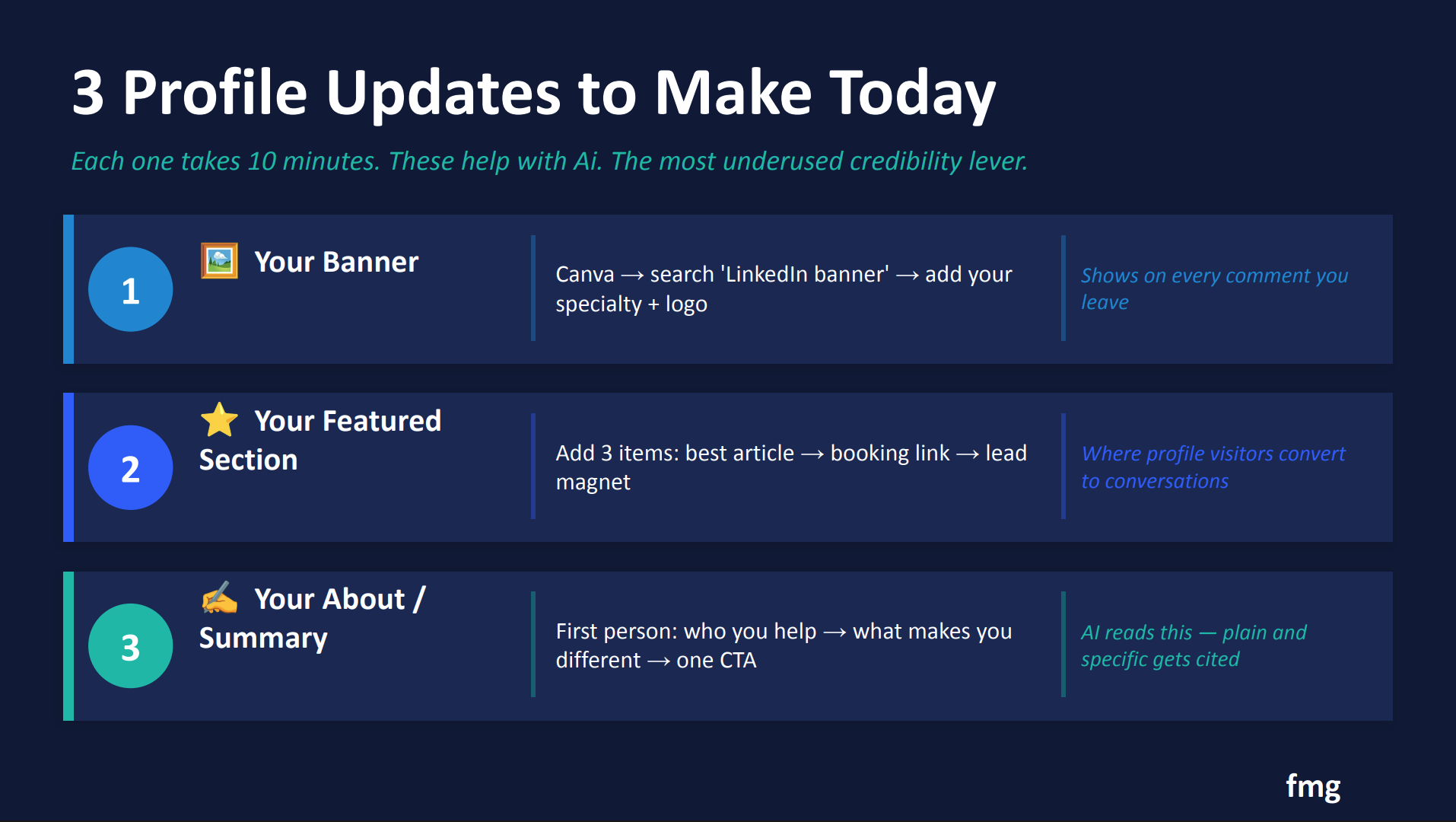
So you guys get the are the first to see some of our new enhancements, which is always really exciting. So let’s dive into the profile. And like I mentioned, feel free to turn jump into LinkedIn and and put into play what we’re gonna talk about. But there’s three major updates that we need to make sure we are updating on a regular basis.
Number one is your banner. Your banner is one of the things that sets you apart, it catches their eye, and it’s a great place for us to communicate more than what is just in our headline and our summary.
And your featured section is number two, and we’re gonna dive into each one of these. And so in our featured section, this is where we can really start to highlight our best articles, our bookings link, maybe downloading an ebook that you might have. This is where profile visitors go to convert to conversation. They’re looking for that tangible item they can take away.
And of course, you’re about your summary. This is this should be written in first person, who you help, what makes a difference, and AI reads this. So this is one of the things that AI is reading. It’s it’s reading all of this, of course.
And so let’s talk about what we need to fix and how we can do that. The first is your banner, and I’m going to show you some examples as well. And if you have an amazing banner that you want to share with the chat, feel free to drop it into the chat. We want to see your banner.
And so this is how we can align our specialty. This is where we can add our firm name, our firm logo. So now we’re at adding brand awareness, and brand reinforcement. We also can add visual cues, like, you know, is it a skyline? Is it a visual cue of maybe where you’re located, or your niche audience you work with?
And what’s great is if you need to create a banner, right, maybe this is something you need to add, you can also use Canva, which is a complimentary tool. And if you go into Canva and you search LinkedIn banner, they have plenty of templates that you can utilize. So again, this could take you ten minutes. You can slap your logo on there.
You we’re gonna talk about here in a second some ways that you can, add to that banner and some ideas of what to add to that banner. And again, I just have the size on here in case you have any questions. And again, recording and details will be sent afterwards. And all of these details are included in the guide, the LinkedIn optimization guide that we’ll send.
So that’s our banner. So the first thing we need to make sure we have is that banner, because it catches their eye. The second is that featured section. Are you utilizing this?
And again, in the chat, if you have a rockstar feature section that you would love for us to see, we would love to see it. So feel free to share that URL in the chat to give our audience and our community some great ideas. But in that first slot, it could be some content you’ve created. It could maybe be a media mention, right?
Maybe you were mentioned on a advisor media article, or maybe the local news picked up something, maybe something with you in the community, or a video you have. This is a great opportunity to showcase a media mention.
We also have our direct booking link or our lead magnet, right? How can they now get in touch with you? They’ve read your profile, they think you look awesome. What’s that next step we want them to take?
And also is slot three is the second article targeting a different niche or an upcoming event you might have. So utilizing this and yay. I’m so excited. We have some some examples, and I would like to give a special giveaway to Thomas Moreno.
He’s given us some ideas here. So Thomas Moreno, if you can message us on the side and send your contact information, we’d love to give you some swag.
And so we also we have this featured section that we can do, and then of course our about. Not enough people take advantage of our about summary, and yes, on the next slide we’re going to go and show some examples.
In our about section, this should be where people read, and they start to really figure out who they’re dealing with, who you are. This should be written in first person.
This should have of course, your professional accomplishments and your professional story. This should have your why, why did you get into this? And it should also have personal stuff. Where did you go to school?
What hobbies do you enjoy? What do you enjoy doing on the weekends? We want to make sure that when people read this, they start to see you as not just that amazing financial professional, but also the person line. That gives them things to talk about.
Those are the things that they remember.
And so with that, let’s look at some examples. I love this. This is an example of a great LinkedIn profile. This is Joe Marshall, and I really love how he wrote his headline and his why, who he works with, where he’s located, and of course, this banner. This banner calls out who he works with. It has his company name on here, and the solutions he provides. I help busy tech professionals grow wealth without adding more stress.
And so that is a really great place to start.
And this is another one. I love this one because it’s also sharing the as seen in. Right? So if you have media mentions, maybe you’re in Business Insider, Yahoo Finance, right, this is a great place to showcase that and to tell a little bit more of the story.
These items like, as seen in help build our credibility. So I love this top one hundred advisors, top twenty three advisor, financial advice and education for who is the niche audience? Who does he work with? This works with our with our next generation.
And so I love that in his headline, it also is financial planner helping who? Thirty to fifty year old business owners, and co founder and head of communitywealth dot com. Right? So there’s some more information here that starts to highlight who he is, credibility.
So your banner, let’s talk about what we can add to that banner. Most advisors leave it blank. This is a huge missed opportunity because it is it allows for us to show your specialty. What do you specialize in? We can add our logo, which we don’t normally have that opportunity to add our logo. So again, brand awareness and recognition.
That visual cue about who we serve.
And we want to keep it uncluttered, right? Too much information is too much, right? It needs to be visually pleasing. And again, we can utilize Canva to create something.
And of course, that size is fifteen hundred eighty four by three ninety six pixels. And anything smaller looks very pixelated. So just some ideas here for our LinkedIn banner, and then that headline. That headline is also a place that AI is scanning.
So we have two hundred and twenty characters here, and every word should earn its place, every word should be meaningful. And this is what AI looks at first. So what is your role? Who are you?
Are you a CFP? Are you a wealth manager, financial planner, retirement specialist? We want to avoid generic terms.
So think financial advisor that might be too generic. Principal, of course, we might need to work within the confines of compliance here. So I also know that is a big part of your your title. So taking that into consideration.
And then who is your niche audience? Who do you work with? Let’s call out exactly who our audiences physicians or health care. Is it tech executives and RSUs, federal employees, PRs, right?
Calling out who it is you work with, you know, individuals and families that might be too generic. Anyone who wants to build wealth, again, is very generic. We want to call out who who we are, who we work with, and where we are located. Because AI uses location as a really great AI prioritizes location when the when someone searches for financial planner in in Colorado Springs, Colorado that works with x y z.
So your role, your niche and your location is a great place to start. And so if anyone wants to copy and paste their headline into the chat as some examples, we would love to see them. And if you’re ever having trouble creating these, can also take these to your AI engine to help you find one. And I love this.
Oh, wonderful. These are some really great. So John Dunham, thank you. I help manufacturing construction professionals. I love that. So John, we would love to send you some swag. So email marketingfmgsuite dot com and we’ll send you some things.
But I love all of these. And we also shared the banner size too in there.
Next, so we’ve done our banner, we’ve done our headline. Next is our about section. And our about section here is we want to tell a story, not a resume. Resumes are boring.
And so we want to write this in first person. So again, that same formula of who we are, who we help, and the problems we solve for them, and how we are different. What makes you different? What is your why?
Most advisors focus on x. However, I do y because I’ve seen this and this is why I do that. Right? That is the the formula we can use as we are looking at that.
And of course, a call to action. What do we want them to do with this information?
Shoot me a DM, schedule a meeting, give me a call. What is that? And as we’re thinking about our call to action, we also want to consider who our target audience is, who is our niche audience, and what is their preferred form of communication?
Within LinkedIn, and of course, if compliance approves, we want to encourage that one to one quick dialogue. Hey, send me a DM, let’s connect. Or it’s hey, here’s my meeting, here’s my schedule a meeting link that you can schedule that link to.
So that about section, great opportunity. Of course, lot of you probably need to make sure that your disclosure is somewhere in there. Most people understand that, they get that, no problem.
But I love this example on the right. It is teeny tiny you guys and I’m so sorry. But let me let me summarize this for you. It is who he is, his why, why he works in there.
And here’s exactly how I can help you. And he has a free resource. He has the one hundred twenty three of getting started. And how can they get started? Send him a DM, right? So clearly defining who it is we are and how we can help and what next steps do we want them to take.
So your about section is a great place to update this. And if you have an all star about section, share it here in the chat, we would love to see your examples of these written in first person of you sharing, of course, your professional development and as well as that personalization. So if you are here, feel free to either copy and paste it, share the link to your LinkedIn. We want to share with our community all these great ideas And your featured section.
So now we’ve done our banner, we’ve done our headline, we’ve done our about section. Next, we’re going to tackle our featured section. So this sits right below your about section. So if someone is scrolling your page, whether it’s AI or it’s a person, this is the the next piece they come to after they read about who you are.
This is where the conversions happen. This is what gets them to click.
So what can we put in these slots here?
We have your best content or a media mention. So whether you were on Barron’s or Yahoo Finance, this is where we can share that exact article.
A LinkedIn article, which we’re going to talk about how to add these.
We have a media feature. So as seen in financial planning magazine, or maybe it was a podcast or YouTube video you’ve added or maybe you’re on the news, whatever it might be, or even just a video, right? Maybe you’ve created if you’ve attended one of my did you knows, maybe you attended our video did you know and, and so you have a really great about me video, this is a great place to add that.
And then that slot number two, and again, it doesn’t matter which these are just ideas for you to incorporate. And then that slot number two, so you have three slots right there, a direct booking link or that lead magnet. So direct booking link would be, hey, schedule a meeting, book a complimentary fifteen minute intro call, download our retirement readiness guide, download our guide for military professionals, right, download that guide for who your target audience is, and link to your website’s contact or scheduling page. So whether you’re using Calendly or Microsoft Bookings, whatever is approved form of booking for you, that’s where we can add that link. And then slot number three, this is that this can be that second piece of content or even event, right? Maybe you have a webinar coming up. Maybe you have a virtual event coming up, we can encourage people to attend.
We can highlight this event, maybe it’s a secondary article, a recording of a recent webinar you’ve done, right? So thinking about stuff you’ve done in the past, this doesn’t have to be all new content, we can also start to repurpose old content as well. So giving that old content some new life, let’s bring it back, let’s add it as a slot in an upcoming event with that registration link. Right? So and if anyone has some awesome featured sections, we’d love to see them here as well.
And so here’s an example. Right here is one of a featured section. And the first one has a free newsletter. Hey, download our newsletter.
This one has, hey, here’s our free guide. Here’s our financial planning white paper. And hey, here’s time to book your discovery call. So these all have his logo on there.
He’s probably created these in Canva, and there is recognition here.
And so here it is. And again, we want to make sure that we are calling out our target audience. So we are reaching the right message to the right audience because we don’t want messages coming in from all different types of people. We want to work with who we are going.
And here’s another example of a featured section. So here we were in Investopedia top one hundred financial advisors.
Here is your media piece employee benefits, and then another media piece of which is a free ebook, how you can download five ways to optimize your employee benefits, right? So just some examples of how we can incorporate our featured section.
Okay, also something that I didn’t even add, when was the last time that you updated your profile image? So we want to make sure that our headshot is up to date, done with a nice smile, wearing something that you would normally wear to the office, and you and it’s recent. So making sure just a friendly nudge, you haven’t updated your headshot, now’s a great time to do that. You can update it on your LinkedIn, you can update it on your business profile page for Facebook.
You can also update it on your website. So friendly nudge. And we’ve got a great question. What if you have multiple markets you target?
Spectacular. I love this question, because we want to identify for the one, the largest audience that you work with is what we should put in our keywords. But what if you work with multiple? That’s where we can add extra information into that about me section, or you can add those also to your website as well.
But if you work with multiple, I would say pick the largest audience to put in your headline and or your banner, you know, how you want to to communicate that. But also we can add also I work with, you know, growing families within XYZ community. And we can add those also in our about section. So that about sections where we can start to expand on services and or audiences.
Oh, I love this. Here, Eric Olson shared, I read years ago to take a photo in the afternoon, your face is relaxed in the afternoon. Love it. Okay, take your take your headshot. You can do it on a you don’t even need a fancy camera these days. Our phones are sufficient. Prop your phone up on a window, have a nice background, put a nice smile on, do it in the afternoon and you are ready to go.
Alright, so content, content, content, content is king. It’s not going away. What on earth do we post on our LinkedIn? So we’ve now optimized our profile for LinkedIn, we were getting a fancy new banner, we’re going to update our headshot, our headline or about featured section.
Now what on earth do we post? So I encourage you to shoot for three posts per week. And the mix matters just as much as the frequency. So what should we be posting on here? And here’s three ideas.
And one is the expertise post. So this and again, all these details are going to be shared in our LinkedIn guide that we’re sharing after this. So again, don’t worry, it will be shared afterwards. But we have our expertise post first.
So answer questions your clients ask you every single week. What are your clients continuously asking you? And lead with the punchline. Answer first, and then explain.
So the biggest retirement mistake I see has nothing to do with investments, and then that’s your hook, and then we can explain in the comments.
And so here, as an example, we could write this as an FMG blog post on your FMG website, and then share a link and expand on this as a LinkedIn post. So that is a way that which we can also incorporate the FMG platform into our LinkedIn. How can we maximize our content we’re creating and the content available in the FMG content library? And another one, this is one of my favorites.
It’s the conversation starter. Ask something easy to answer. Easy questions get comments, comments fuel the algorithm. So and again, these can be financially related, and they can also be non financially related.
So earlier, I shared the example of what is your favorite LinkedIn game. And that is an easy question.
It doesn’t take a lot and you’re like, I don’t I didn’t even know they had it and or it’s, you know, it’s it’s links, it’s it’s Sudoku, whatever it might be. But which concerns you more right now inflation or market volatility? This is an easy A or B answer. And then this encourages dialogue, right? This is going to encourage engagement comments, and a great way for you to get engagement early on.
And if you again, if you’re looking for ideas, we can go to the FMG content library, and peruse the library for ideas.
And then of course, the personal post. We know that personal posts perform the best out of all of them. So we want to share who we are, we want to share who you are on the outside the credential list, but those personal posts generate three times the comments.
Know, a hook example, your kids won’t remember the deals you closed, but they will remember the vacation you took, and a picture of you and your family, whatever it might be.
I share this a lot, you guys know this, but also, dogs perform much better than kids on LinkedIn. So make sure to share your chief rollover officer or anything like that. But those personal posts, so this is the mix we are looking to incorporate on a regular basis.
And if we’re looking at answering questions, right, so the expertise post, these are what your prospects are asking AI and these are the questions and the content we need to be creating for our two audiences, our AI audience and our people audience. So what questions does your target audience ask? And these should fuel your content. And if you’re curious, ask Google, what are the top financial concerns of millennials today?
What are the top social security questions for retirees today? How what are the top financial concerns of of business owners right now? Right? These are the questions and they’re going give you a long list of questions.
That is your playbook for content that you can write.
And so, for example, when should I take social security? Should I buy or rent a second home in retirement?
What is the difference between a traditional or Roth IRA? These are questions that we get on a regular basis. And these are this is the content we can create utilizing FMG tools like our Muse AI tool to expand on these really great topics. So again, we want to write a lot of our content in question answer format.
And so then you can use the content to generate your script, your prompt to be able to, you know, answer these questions.
So again, we’re now writing our LinkedIn content for our two audiences, that AI and that person.
And we wanna make sure that content is extractable. So like I mentioned, a structure is important here. So vague post gets ignored, clear post gets cited. So some thoughts on retirement timing, da da da da da da da.
That is something that’s vague, there’s no question in here, there’s no answer, It’s not easy for AI to scan. However, if we can change the structure of our post, when should I take social security? This is a question. This is the question that people are going to AI to ask.
They’re going to Google to ask.
This is the question, and then here is the answer. Here are three things that actually determine the answer, your breakeven, your spouse’s benefits. Right now, we’re giving a clear question with immediate answers, structured, excitable, easy to scan.
And so with content, that is a great way to be able to do that.
And here, this is just another example, post content, so again thinking about what types of content and how we can structure our content.
LinkedIn prioritizes people that keep you on LinkedIn. So LinkedIn wants you to stay there, they want whoever’s engaging with your post to stay there as well.
So creating what we would call zero click content means creating a post that keeps people on LinkedIn is important. So the algorithm rewards this. So again, if we utilize that question and answer, and we’re starting to expand, they are keeping people there, that is what is going to get seen, that increases your chances of getting seen.
So this is a great question. Do you recommend posting pictures with the content posts every week, or just keep it to text? Again, we suggest a mix, a happy mix of these so we can utilise pictures, right? If you’re posting from the FMG dashboard, you can pull an Unsplash picture, or you can create something in Canva. It’s easier when we’re personalizing posts to be able to to add a picture. But again, it doesn’t always have to be, we want to mix up our content, not just pictures, but if we have a video or a webinar recording, these are great ways to also mix in our different types of content that we are sharing.
And one of the great things about our do it for me program is they really help execute. They help execute LinkedIn and social posts for other approved platforms. They help write it in the zero con click content manner, and they help you personalize these. So if anyone’s interested in learning more about either our premium features like our AI tool, or do it for me, we’re going to launch a poll right here.
So if you want, if you’re like, I would love to do all I really just need someone to do it for me. And you want to learn more, go ahead and select that you’re interested. And if not, maybe you’re already someone. And if you are one of our do it for me customers, we would love to have you share something, a post that you’ve personalized, that you worked with our Do It For Me Concierge and they helped you personalize.
I know with a lot of these, we have a lot of our Do It For Me clients join it and so if you want to share one of the posts that you’ve personalized with our team, we would love to see that in the webinar chat.
Yay, we love our Do It For Me too. We all we all don’t have enough time to do everything we wanna do. Right? So in addition to our LinkedIn posts, LinkedIn also has a feature called articles.
Articles are a great way for you to also include your credibility and your blogs and all of that. So eighty percent of LinkedIn AI citations come from LinkedIn articles. One per month repurposing an existing blog is all it takes. So I’m going to show how to do this in our demo.
But our LinkedIn post, right, it appears in the feed. It’s great for engagement.
You have up to three thousand words. So like, what’s the difference between these two, right? The LinkedIn post versus a LinkedIn article, and AI extracts the q and a and pairs it with a structured post. And this is what we encourage you to do three to, you know, at least three times a week.
And our LinkedIn articles, which are preferred by AI. This is something that we could do once a month. We can with this, it creates a permanent URL that we can share in our featured section on our profile. You have a lot more characters. So this allows for you to expand on complex topics.
And it helps with AI. So this is going to then get found on Google and our AI engines.
And here we can, you know, you can add that question title and create that. So we’ll I’ll show you how to do that and where you can do that. And in the chat, we’re going to share if you’re curious on how to do a LinkedIn article, we’re going to share the LinkedIn help article, so how you can create an article.
And so if you’re looking to write and publish a LinkedIn article, we just shared that in the chat, so you can look for it there. But this is an example of what it looks like. So what I would do, if I were you, I would go into the FMG dashboard, I would find an article.
I would or a blog post you’ve already created, and I would also then bring it over here, and copy and paste it into the LinkedIn article section. This is a great place for you also to get cited and found by Google and AI engine. So curious, who here is currently using LinkedIn articles?
And or is this a new opportunity for us to add to our quiver?
Just curious. Oh, we got some thumbs up. Yay. Okay.
So now looking at some of you do both. We use LinkedIn. Awesome.
Haven’t used it yet. I love that. I love the haven’t done it yet. That means we have plans to do it, means we have good things. I see David Shanker just gave us an example. David, we would love to share a swag item with you, so we’ll get in touch with you in order to to get that to you.
Alright. So now we’ve talked about like optimizing our profile, utilizing LinkedIn articles.
How often? When should we do this? Just give me a playbook for the rhythm. Right?
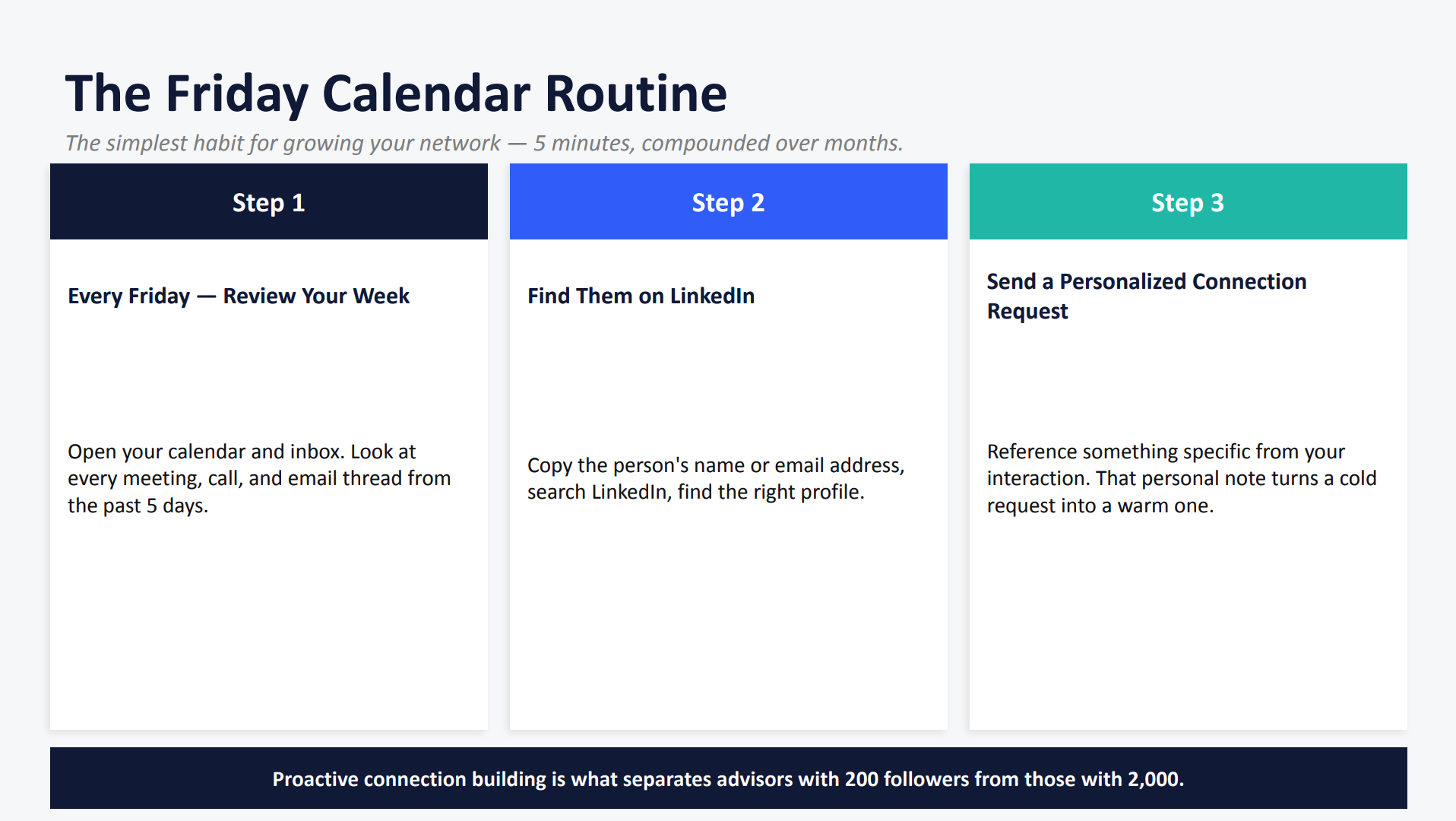
And so the Friday calendar routine, and it doesn’t matter. It could be Monday calendar routine for you, or it could be Friday. But the simplest habit for growing your network, and it takes just five minutes, right? Every Friday, go back into your calendar and see, okay, who did I meet with?
Who did I shake hands with? Whose business cards did I receive? And let’s connect with these individuals. Let’s add them to our LinkedIn network.
That’s step two. Let’s add them to our LinkedIn. And then of course, send them that personalization request. Hey, loved meeting you at the chamber event this week.
Looking forward to connecting. Hey, we got an introduction from client, client XYZ, looking forward to setting up our meeting. Right? So if you if you want to do that, this is a really great way for you to continue to slowly expand on your LinkedIn network.
Because and I think a lot of people are like, man, I just don’t want to send out a bunch of cold LinkedIn messages, or maybe you do, maybe you’re looking to expand your niche audience where you can go into LinkedIn and search specifically for doctors in your area, or search specifically for your niche audience in your target area.
So being proactive is really important in this process.
So again, it just takes five minutes, go in, find who you worked with that week, and send that personalized invite personalized invitation to connect.
Alright, LinkedIn events, again, I’m not going to spend a lot of time on this today, but because I want to get into our demo, but LinkedIn events is another great way for you to showcase and highlight the virtual and in person events that you are creating. You can do this in conjunction with your FMG event you created. This gives you another avenue to promote your events to reach your audience.
And so you can create the event in LinkedIn, you can invite them directly from your LinkedIn, you can promote it. This is a great way if you don’t have email addresses, and you’re trying to reach a new audience, this is a great place to start.
And again, that niche specificity is important here.
That’s a great place and show hands if you’re utilizing LinkedIn events, and if you’ve created one in the past and you want to share it, we would love to see it as well. So we love seeing those examples from the field and how this is being put into play.
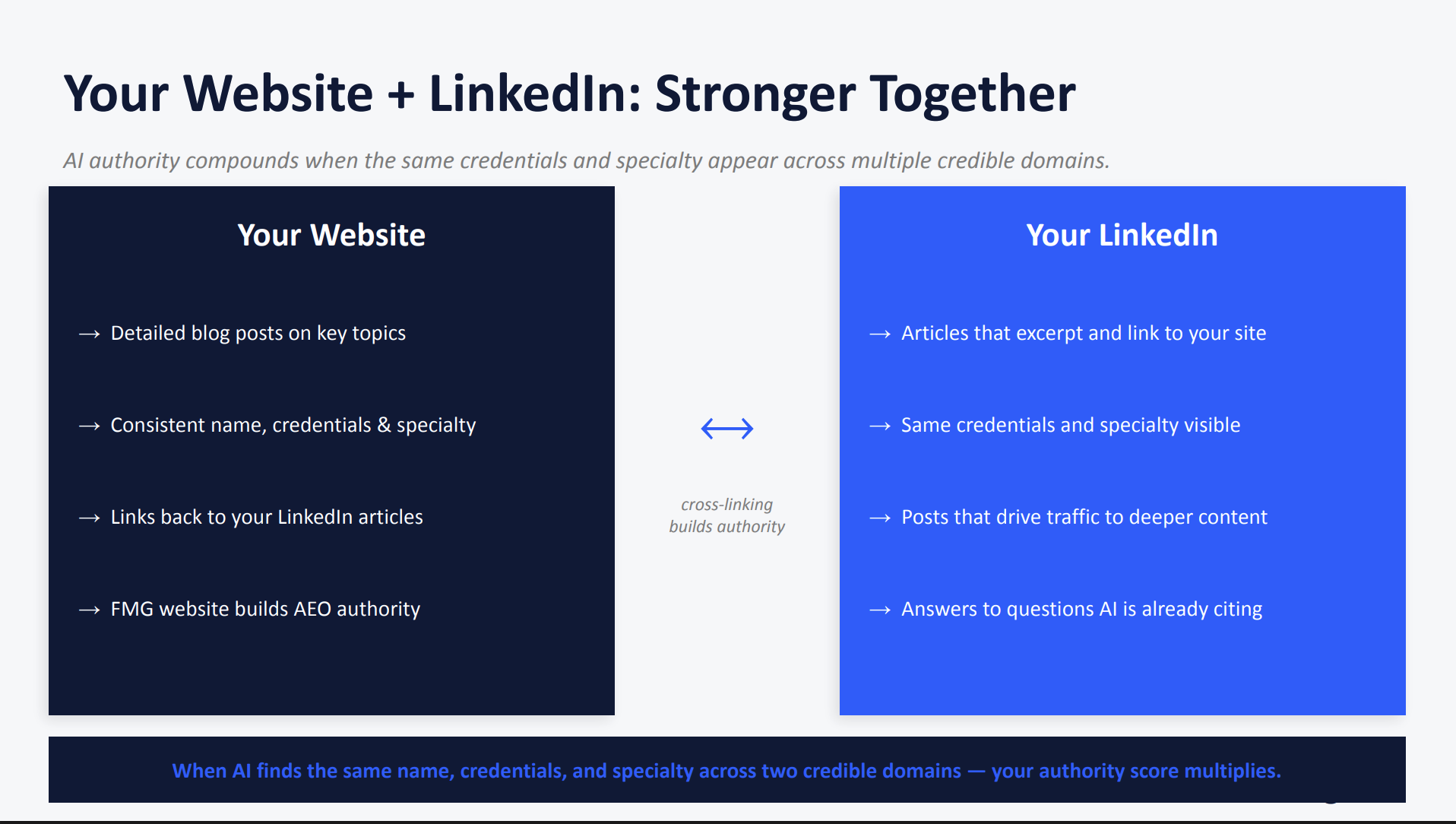
And of course, your website, your FMG website and your LinkedIn work in tandem. So your AI authority compounds when your credibility matches in two locations, three or four if you’re using an approved Google My Business and or an approved Facebook page or anything like that, but it can compound. And it is important that your information is is consistent across all of them. So your website, right, we can add our detailed blog posts and key topics.
We can also add those as LinkedIn articles. Right? So there’s some congruency there. We want to make sure basic information are consistent, our name, our credentials, our contact information.
Sometimes I see that, you know, maybe we moved offices and we forgot to update our locations or our new phone numbers that is that gets swapped out.
Making sure that we are backlinking and so our website and our LinkedIn working congruently is an important piece in getting found and being optimized for AI.
Here’s your action plan. Again, this will be shared with you afterwards. But today, today if you could fix your headline, if we can make our profile public, add a booking link or add something to your profile, these are great places for you to start. And then later this week, I know it’s Thursday already, but we can get that routine going.
Maybe tomorrow you set some time apart to start adding some connections, and engaging with some posts, publish your three different posts, or maybe schedule them out. And we’ll share with you our calendar to give you some content ideas to schedule out for the future. And then leave five meaningful comments daily. And again, lot of you are saying, and I hear this a lot, I don’t want to comment just to comment.
And I get that and so comment strategically, comment on your niche audience, comment on those posts that deserve being commented on.
And then we also have you know, what can we do this month? We can add a LinkedIn article, we can cross link it to your FMG website, and maybe you can create an event.
And of course, never forget the eightytwenty rule for every one thing you post, we want to make sure that we’re commenting on five others. Again, strategically posting on others. And why should we do this? Why should we engage before we post? And it’s because the LinkedIn algorithm prioritizes reciprocity. So comments beat reactions, quick engagement, creates awareness, and timing is important. So we want to engage with people within thirty minutes of them liking, commenting, sharing our post.
Okay, and like I mentioned, we’re sharing all of this afterwards. We have created that LinkedIn guide for you where we go through it. It has the banner size dimensions, we have also the details of setting up your profile, your headline, your featured section. So this will all be shared afterwards.
And here, I’m going to do a quick demo. So a couple of you asked like, hey, how can I go into FMG, create a blog post and share it? And again, we’re at time. So if you need to jump, no problem. I’m going to keep going. So those of you that can stay with me, please do. But if you if you have to jump, don’t worry, recording will be sent afterwards.
I just want to preface that. We have a lot to cover today. So thumbs up if you’re still with me, and you’re enjoying what we’re going over.
But let’s jump into the FMG content library.
So here okay, good, lots of thumbs up. Thank you.
So let’s say I want to create an FMG blog, and I now want to share that on LinkedIn. That’s what we’re going to cover today. So here, I’m going to come to blog and I’m going to create blog post. So this is if you have an FMG website and again, if you’re curious about adding an FMG website or you’re curious about adding a blog or utilizing AI, send us a message on the side and we can help connect you.
So here it is. Let’s say I want to create a blog. So my target audience is let’s say business owners. Okay. And I’m gonna write with AI here. Create a blog. Create a blog answering top social security questions for business owners entering retirement.
Optimize. So just to kind of I’m giving you some examples. Optimize.
Oh, optimize for location. I’m just gonna say for Texas.
Write commonly asked questions and add a link to schedule a meeting. So my call to action here is really important. And then what is my writing style? How do I wanna write this? I wanna be today the Sage guide.
I’m gonna hit save, and how long do I want this? I want this this is a blog post. I want this to be a little bit longer. So I’m gonna hit long.
I’m gonna hit generate. So now, AI is gonna work. It’s built in with compliance workflow here, and now it has created this amazingly long blog post for my target audience, the specific questions they have, the answers that we can provide, and of course, always take a look and make sure it’s exactly what you would like to share. And I asked it to also at the end sched add a call to action.
So here it’s writing, it’s going, going, going, and if you guys are using our Muse tool, let us know what you think about it, because it really does help create content and this is, a lot of people are like, hey, you know what, I don’t see a lot of content maybe for a specific niche audience, right? Maybe I need more content for special needs in the content library. This is that gap for you, so you can take the FMG content, and then you can personalize it. You can now start to add that niche audience, those keywords for your location, and answer all of those great questions. So here it is, and I’m gonna say use as draft, and it’s gonna pull over, and I don’t have time to review it right now, but of course, I would review this and making sure it it matches my tone of voice, and it matches, you know, what I would like to say. And at the bottom, you can see that I added a place for a call to action.
This is really long, but I added a schedule meeting. This is where I would add that URL to schedule a meeting.
And it automatically adds a title for me, so you wanna make sure that you can see that this title is addressing the topic and some keywords such as where, my location and my niche audience.
And so now I’m going to hit publish.
And here, where would you like this to go? So as soon as compliance approves it of course, I can say, you know what, I want this to go to my Facebook and or my LinkedIn, and so now we have disseminated that and we’ve created a niche specific blog post that then we can hit next, and it will share out. We can also share it as an email, and then we hit next. So now we’re sharing it on LinkedIn, but also, I want to encourage us to take some content from here and create that as a post. So I’m gonna hit next and okay, yeah, it’s being shared.
And also, so here it is, we’re gonna pretend that compliance approved it.
I can also take pieces of that blog, and I can put it into a social post here. I can repurpose it. So let’s go visit that blog post real quick. And what I can also do is we mentioned LinkedIn articles. So here, I can copy and paste this blog that we’ve just wrote, and I’m going to now take it over to LinkedIn articles.
If you go to linkedin dot com slash article, this is where you can find that. Now I’m going to paste what we just wrote here, and you can of course spice it up, you know, you’ll have to edit a little bit, but now I’ve just repurposed my FMG blog as a LinkedIn article. So now, we’re repurposing content, we can now extract this, make it multiple pieces of content.
And so and we just got a great question. Do people actually read the long blog? Yes and no. Yes.
It is important for AI to read. So again, we have these two audiences, and we can now extract pieces of that blog and make them as social posts, or make them as standalone content ideas, which then people do read. So the long answer is yes.
And so we want it and that’s exactly why we want to make this scannable. Clearly highlighting what these main topics are. Highlighting and adding bullet points makes easy for them to scan and read and to grab the meat and potatoes of what you’re trying to say.
So that is our demo for today. And so we’ll keep going. And again, if you have to jump, no problem. I’m going give you guys some inspiration for content for the month of June.
So here, let’s go through our slideshow.
And when you come to our Did You Know, you know that you get our ten minute marketing calendar here first, so we can add that.
So we will add that into the chat for you. So you get the ten minute marketing calendar for next month. So if you guys are looking for inspiration on what to schedule out and what to turn on, you can do that there. And some content ideas. Here’s some new content that we’ve published in the content library. We have Juneteenth, we have Pride Month, we have Father’s Day and Flag Day all coming up. So some great reasons to share some emails, some automations, some social posts and some cards.
And also some themes for the month of June. We have National Cancer Survivor Day, we have American Housing Month, Men’s Health Month, summer’s beginning, right? So all ideas for you to post different types of either expertise or personalized content here, and some product updates. So these are really neat you guys.
Now within the content library, we have AI powered search. So what does that mean? You can now type in something like into the FMG content library, something like explaining five twenty nine college plans for savings for parents, and it’s going to now take the terminology that we use in our everyday verbiage, and we can now search these terms. We have increased we’ve made the search feature better is what we’ve done.
So you can type things that we you would commonly ask for into this library, which is really great. And then if you haven’t seen them yet, we have brand new calculators. These are available to everyone. These are no matter what FMG package you have, these are available. So there’s new interactive financial calculators. So they’re, they’re much nicer. They’re beautiful.
So they look really nice, and they’re fully mobile. So whether you’re reading them on your desktop or your mobile phone, they are great user experience. So we’ve added forty new calculators here.
And if you don’t see them, always check with your compliance, of course, if for some reason you’re not seeing these.
And if you are an FMG testimonial, you’re self managed and currently have FMG testimonials, we now have an automation for you, which is really, really exciting. But again, please check with your compliance if testimonials are approved for use and or if you can utilize FMG testimonials, and you can now automate your asking for testimonials, which is really neat.
And of course, we are always as a company AI is a huge initiative for us. And so our Chief Evangelist Samantha Russell has created a AI newsletter. So if you wanna be on the brink of all things AI, we have created a newsletter, but specifically how AI is a is as it pertains to financial services. So this is really cool.
And so if you want to subscribe to our new AI newsletter, you can do so here by scanning this QR code. This is a really great place for you to stay. You know, what’s next? What’s coming down the pipeline? How can we incorporate AI in a compliant way, most importantly?
So we have this cool newsletter we have started.
And I’ll stick around today was long. Thank you for sticking around with me. As always, I love seeing you stick around for or join us next month as we tackle another Did You Know series. So these are monthly. And I look forward to seeing you on LinkedIn. I look forward to seeing all of your great new banners that you’re going to create.
And thank you so much. Have a beautiful day. And I’ll give one more swag.
Let’s see, we have Anne, Elliot, Nile, Nile, if I got that right, we would love to send you a swag item as well just for hanging on. And I’ll give one more away to Gina Hernandez.
So thank you all. Thank you for attending. Hopefully, this was valuable. We look forward to seeing you next month. We’ll see you. Bye.
Book some time to chat or call us at 858-251-2400.


