
Events work best when they are goal-specific (lead generation, education, client appreciation, referral growth).
Turn one event into a full campaign: landing page + segmented promotions + post-event follow-up + repurposed content (blog, social snippets, email).
Partnering with other experts (for example: CPAs, attorneys, cybersecurity pros) can expand reach and boost attendance.
New event tool updates are now available: RSVP Yes/No, add-to-calendar, reusable promotions, smarter promo filtering, and more.
Browse the slides we reviewed during this workshop below.
Welcome to this month’s Did You Know? We are covering events, and we have so many exciting new product features to show you today.
But first and foremost, let me know where you’re coming in from, and we will get started.
I am Elise Lambert, the director product enterprise marketing here at FMG, and that is my family. I have been a financial advisor, financial professional in the past and have used FMG in the capacity that which you all are using it. And so it is safe to say I know what it’s like when you all have so many different hats. And somewhere within this crazy, crazy world of running a business and taking care of your clients and trying to find prospects, you need to figure out how to market yourself.
Specifically, today, we’re gonna talk about events. Right? So how can we where can we find that marketing hat, specifically the event hat, and put it on and make it easy for you. And before we get started, I was just kind of quest I was curious.
One, and where are my polls? Okay. Here we go.
Do you currently conduct events? So I’m gonna launch a poll. I’m just curious.
This is so fun. I see everyone coming in from California, Denver, Long Island, all over the place. And as we’re doing this poll, I’m just curious, do you currently host events? Yes. And if not, not yet.
But even if you do currently run events, I think you’re gonna really like all the new products and updates we’ve added to the event dashboard. If if this is your springboard into events, we’re gonna give you guys lots of ideas. So I’m just curious, and it looks like about sixty percent currently host events and for and we have about forty percent that haven’t done so. And so we’re looking to see all the great events you guys post after this. And one more question before we get started, just because I’m curious.
It looks I’m curious if you prefer virtual events or in person events. So that is another thing, and feel free to put it in the chat too, and maybe why you like one or the other to give some inspiration to those that are looking to do this. But of course, as always, this recording will be sent to you afterwards, and look out for a follow-up with the recording, the presentation, our giveaways today, which I think are pretty darn spectacular, and also, I encourage you to log into the dashboard and follow along with us and put into practice what we’re going to go over, take a look at the new features.
And of course, my favorite piece of this built in community we’ve created is the Did You Know chat because you guys get to share ideas and inspiration. I get to hear real life what you’re doing in the field. But if it’s too much for you, feel free to minimize it. It can be a little much, so do what is best for you.
And if you’ve missed last month’s Did You Know, we covered top twenty twenty six top website resolutions to compete and grow. So we looked at how to test your website, some of our brand new AI tools that we’ve implemented into the platform, easy ways to level up your pages, add frequently asked questions, make sure you’re found in AI search. So we just shared a link to that recording in the chat, so feel free to take a look at at that. And that was a really great one.
And what we’re gonna cover today? We are going to cover how to turn a single event into an entire marketing campaign. Right? So we’re not just gonna do an event once. We want to squeeze as much life out of it as we can. We’re going to look at event promotions and ways to boost attendance, also how to create those follow ups and promotions.
And, of course, we’re gonna this is gonna be very demo heavy. We’re going to I have lot of great slides to cover, but we’re gonna dive into the platform so you can see the new features that we have. And so I was just curious. So I’m gonna share the results of this poll. So it looks like eight percent are doing virtual, in person events still seem to be the winner. We also we have both, which is awesome.
So it looks like in person and both are amazing, and it looks like only a handful are doing primarily virtual, but again, it depends on where your clients are. Some of you work with clients all clients and prospects all over the country. Some of you work with them just within your geographical area. So really cool to see.
And like to get started with a little stat, and ninety nine percent of advisors say, if I can just get in front of the right people, I know I can close the deal.
I know I can get them to become a lifelong raving fan, and I think that’s true for a lot of you as well. And so why client events are essential? Right? I think you guys know this.
It shows from the stats from these polls, you guys are already doing them or you’re looking to do them, but it’s creating that world class experience for our clients and prospects. This the name of the game hasn’t changed. Referrals are still the number one way that which we know we can grow our book and an easy way for us to facilitate this, create value for your clients and prospects is through events. So we wanna engage with them in a meaningful way.
We know that the number one reason why someone might leave their trusted financial professional is because they feel as though they are not communicated to on a regular basis. They want that white glove experience. And so events are a way to do that, to build that connection, to build that trust.
We talked a lot about building credibility through our website last month, but also how can we continue to cultivate those relationships and provide ancillary resources and services for them. And of course, lead generation, right? That’s huge, always getting one percent better every single day and nurturing those relationships, whether they’re old and or new.
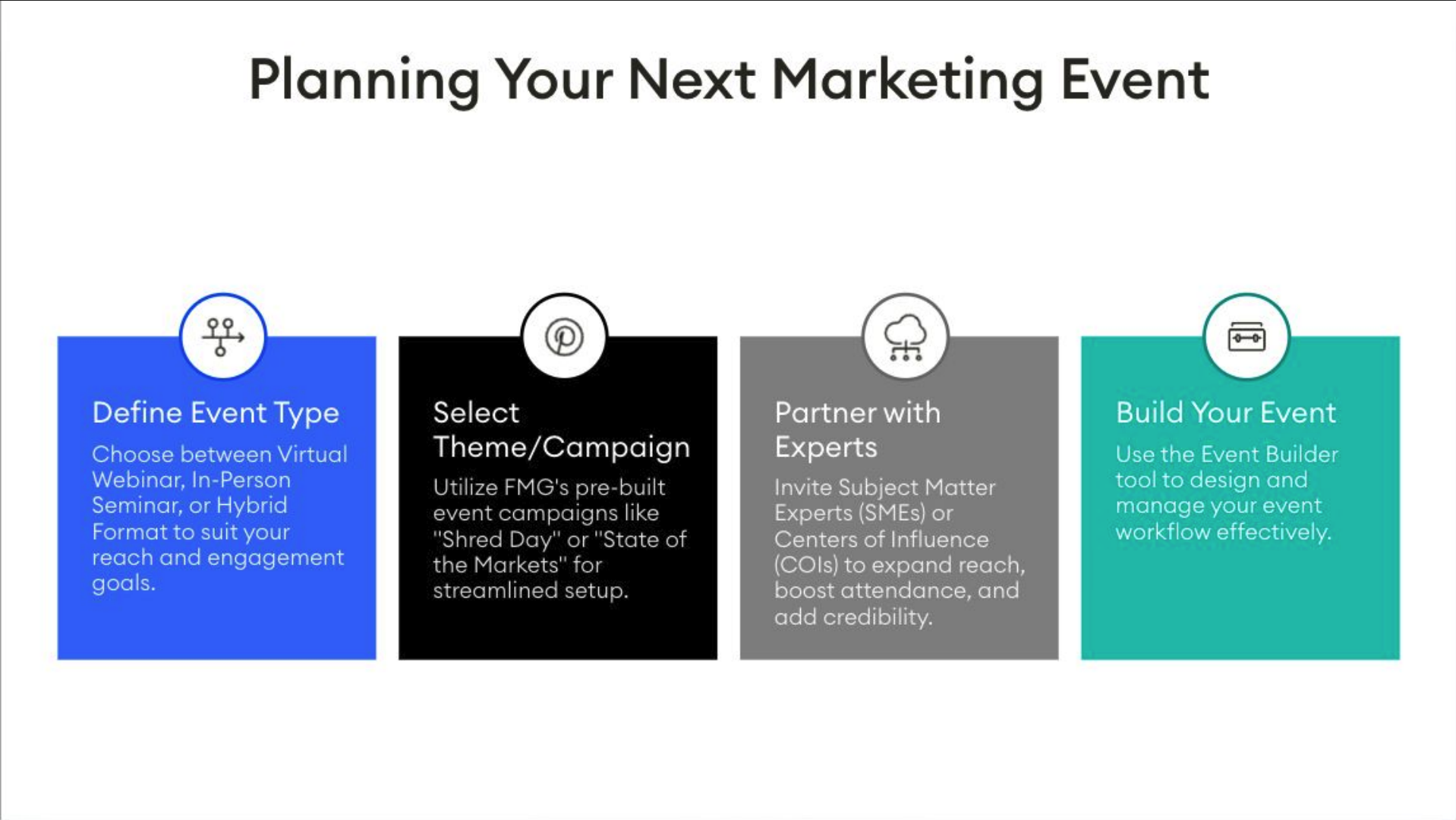
And so when it comes to planning an event, there’s a lot of pieces that go into it. Luckily, the FMG dashboard makes it really easy with our event tool. So we wanna think about our goal of our event. Right?
We wanna make sure that our events are goal specific. What are your goals? Is it general awareness? Is it lead generation?
Is it education? Right? So that is something that we want to think about when we’re defining what type. And of course, virtual or in person is really a great place to start.
And we also wanna think about budget. Right? The good thing about virtual events is they are complimentary. Right?
They are there’s not a lot of budget that goes into those. We know that those in person events sometimes have a price tag attached to them. So, again, thinking about those ideas as we then go to select a theme or a campaign, right, we have built into the FMG dashboard. We have different events like shred day, tax strategies, state of the markets, but also what what is your theme?
Is it community involvement? Is it thinking about that. So again, our theme, and I put this almost on darn near every slide, but one of the best ways for you to expand your network and expand your reach with events, whether they be virtual or in person, is by partnering with other experts. They don’t have to be in your fields, they can be CPAs, they can be health coaches.
They can be estate planning. They could be dietitians. Right? So whatever your theme is, let’s start to bring on other experts to expand your reach.
And then, of course, building out your event. Building out the event within the FMG landing page dash or the event tool, creating a landing page, creating email promotions, and creating then content on top of that to expand on your event that you created. And so let’s talk about event ideas first and foremost. So we know that within the platform, this is a premium feature, but we have event themes.
Some of the event themes here are tax strategy presentation. We have state of the markets twenty twenty six. There’s a generic event, client appreciation event, shred day, couple others in here to give you some ideas and some more ideas. And as we go through these ideas, I also want to hear from you all in the chat.
What are some of your favorite events or most successful events you have conducted? And so one of my favorite is getting the family together. So maybe hosting something like a family picture day where you maybe cover the cost of a photographer and you host holiday pictures for them. Another one, leading with education, whether that is targeted workshops on a specific topic, like taxes or salary negotiation, or providing professional headshots, that’s another really great one.
I love this in the chat, someone just had a Galentine’s Day luncheon, that’s really fun. And also there’s the idea to involve the community. So partnering with local organizations or sponsoring a pickleball tournament, including that is really fun. And okay.
I have a really annoying slide. This slide right here goes against anything they ever taught you about adding something to a presentation, but just an idea to get some ideas flowing. And so there’s investment seminars, webinars of course, but in here, financial fitness challenges.
One of the ones that I added in here was the investment club. So my this is near and dear to my heart because my grandmother is ninety five. She has been going to her investment club for twenty years and it’s hosted by her financial professional. And this is something she does not miss. It’s held quarterly and it just it makes me laugh because she loves her investment club.
But also legacy planning events, this is a great one to expand on a network because you can have them invite family members. What a great way to add additional attendees.
Oh, good. I’m getting of you love this list because I was a little worried about putting it up that we can’t see it, but of course it will be sent to you afterwards as well.
And so in the chat, I love this, a train ride to a little town where they spend the day in a train ride back. How wonderful. Of course, the ever so popular pie pickup during the Thanksgiving and fall holiday season. That’s a really great one. Love these ideas. Keep them coming through.
And okay.
So now we have we have some ideas as far as events go. Oh, I almost forgot, one event that FMG hosted not too long ago was we brought on a speaker. So again, thinking about what other COIs or experts you can bring on.
They can be authors, they can be speakers, they can be, you know, other professionals from anything, real estate, whatever it might be.
So in the chat, I would love to hear from you all as well. Who are some experts you’ve brought on to help encourage your events or help promote your events and or lead with education?
So let’s hear it from you all in the chat on who you’ve partnered with with some of your travel agent. Love that. That’s a great idea. Estate and planning.
FBI. That is very fun. Okay. See, you guys are giving some spectacular ideas on also ways to do this.
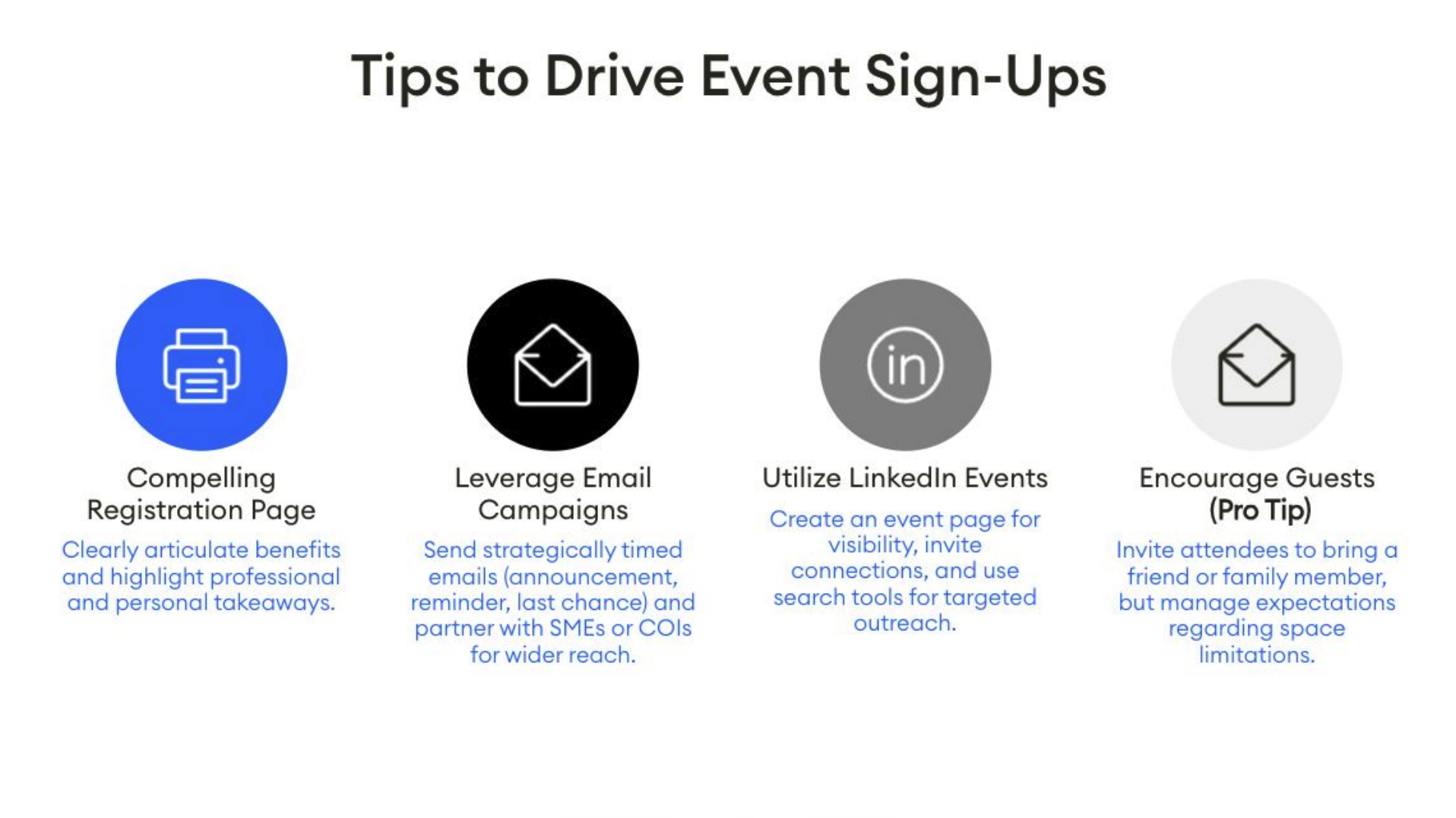
And so why we partner with other experts is one, of course, education, and it’s interesting, but also we want to boost attendance. If we’re going to put on an event, we want butts in seats. And so how can we look at boosting our attendance? We want to identify who our target is.
We want to make sure that we call out who our audience is within the branding of our event, which I’ll show you how I did that in our example today. But if I work with dentists, I wanna make sure that my events are specific and valuable for white coat professionals. If I work with military professionals, I wanna make sure that my audience or my my topics that I cover, the experts I bring on are interesting and relative to who I’m working with. So that is a really great way.
People wanna know what’s in it for them, and they wanna know it is for them. So clearly defining our target audience for these events is crucial, Or even if it’s just, hey. These are for my clients who I hold dear dear and dear to my heart. I wanna do this for you.
Right? That is important too. So, also, great way to boost our attendance is to, of course, leverage social media. We can create posts on our approved, of course, approved social media platforms, but we can also utilize items like LinkedIn events or Facebook events to continue to promote our event and to reach a larger audience.
And then this is always one of the most popular, of course, is email marketing. This is not going away. We know that people still turn to their emails as one of their favorite ways to communicate, and we know that is how we can get in touch with our audience. So leveraging email marketing, encouraging those experts that you are bringing on to your event to have them also utilize social media and email marketing strategies. And then also, of course, compliance willing and with compliance approval offering incentives. So, hey, here’s a free downloadable, right? The FMG dashboards jam packed with downloadable resources you can utilize, maybe not so much a discount in future services or maybe the chance to win a prize, but again, check with compliance, of course.
That is always good. And collaborate with partners, right? I added that here again because I want to really drive that in and how important that is. And of course, creating that sense of urgency.
So maybe using some terminology like, hey, limited spots available, or register by this date to encourage registrations and to encourage early registrations as well. We just had someone add the word exclusive in here, and there was a quick question on snail mail. And so yes, the FMG dashboard has some of these event templates, has a built in greeting card that can be sent via snail mail, and so it is something that I always say, fire bullets before cannons, and so give it a test. If you haven’t done snail mail for an event, test it out and see how it goes.
There are services out there that you can utilize as well, but FMG Greeting Cards does have event greeting cards available. So and ask let’s ask the chat. Has anyone done some snail mail for an event and how has that been for you all?
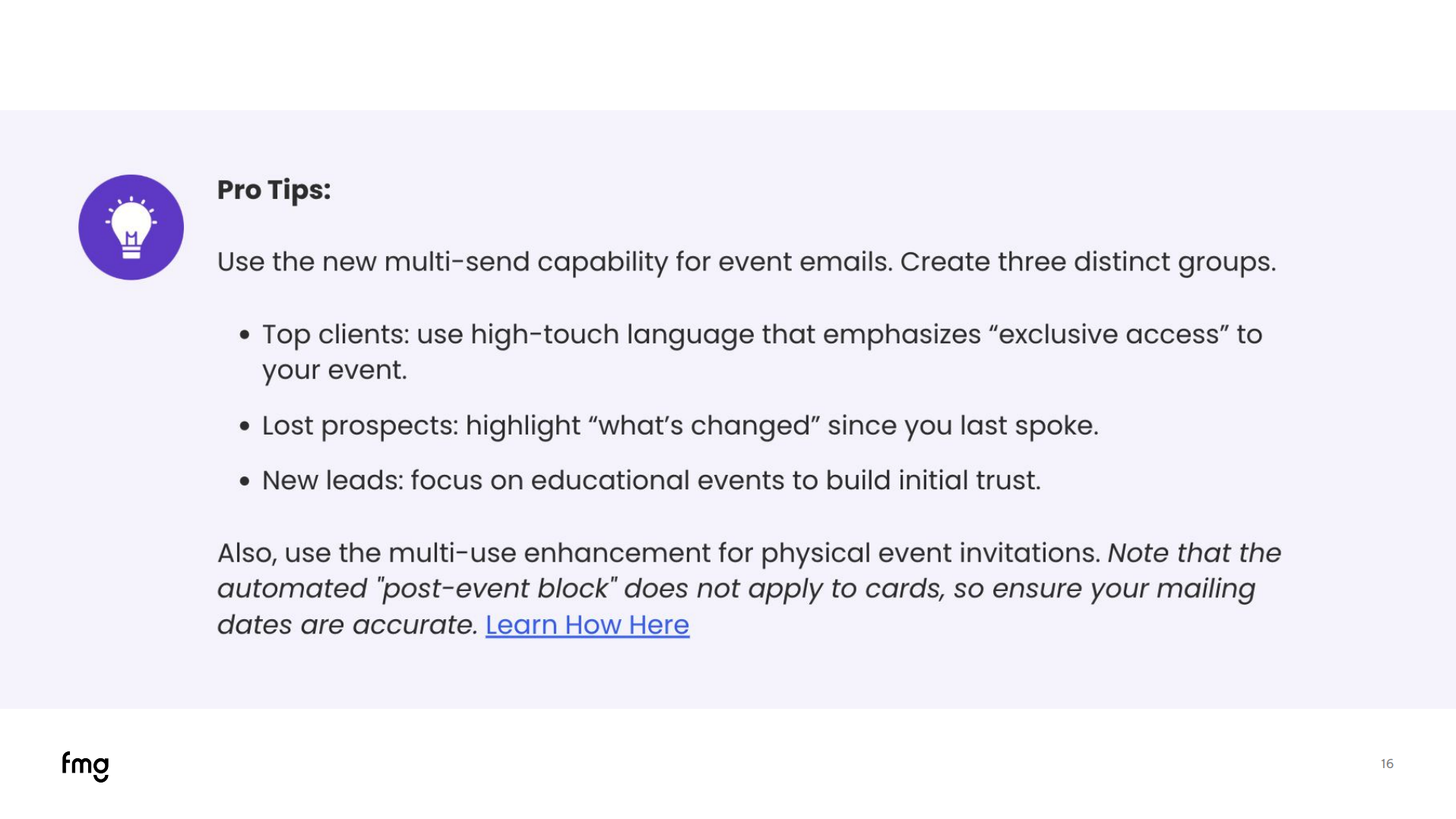
So as we’re thinking about how we can boost attendance as well, this is really neat because one of the newest product features within our event template is you can now reuse your promotions. So for a lot of you, that’s a big deal, at least it is, it was for me, that was something I feel like I’ve been asking for ever since I’ve been a financial professional, and so that is really exciting. But now we can think about this a little more strategically since we can reuse those event promotions. Let’s get, let’s send the right message to the right audience and maybe we switch up our terminology for our audience.
Maybe the first segment we send is to our top clients, you can use high touch language, exclusive access, and then we can have another bucket of people that we send the same promotion to. And maybe the terminology changes here because this is our lost prospects or our win back group. And it’s, hey, this is what’s changed since we last spoke, here’s some value from attending our event.
Also, maybe there’s one focused on new leads, right? Maybe you’ve had a wave of new clients come in through your website or prospects come in through social media, and so this is a really great way to start to build credibility and build trust. And so you can use these event promotions multiple times and think about who your audience is and maybe switching up some of that language within those emails to drive home to your exact audience, to drive, of course, attendance.
And I’m gonna, like, give away the secret. I I forgot what the terminology was I was gonna use, but we are giving away at the end of this an event checklist.
So have no fear. I am all about making it easy for you, like, at least that’s how I’m like, just tell me what I need to do. And so we have created an event checklist, and so these tips and ideas are all in there. So, again, you can print it out and then execute at a high level.
So that’s coming. I didn’t wanna wait till the end. I just got too excited. I’m terrible at keeping secrets.
Okay. So then we’ve figured out our event idea. We figured out how to boost attendance. Let’s continue to talk about promotion and how we can do that.
Right? So we wanna create that landing page. We want to clearly articulate why they should be attending, who it is for, and highlight some of those key takeaways. That is really great.
And in the chat, we just shared a link to promoting an event, so just a great blog post there. And of course, leveraging those built in promotional email campaigns.
And again, thinking about segmenting our target audience, utilizing that LinkedIn event or a Facebook event, and one of my favorite pro tips here, encourage them to invite guests. Right? Say the more the merrier. We welcome you. Please invite your colleague. Right? If it’s for business owners, please invite a fellow business owner.
But manage expectations. Right? Let them know if there is a limit to your event or if you can add guests.
But tell them that, add that to your event page because we gotta tell them what we told them and tell them what to do, and that is where we can set very clear expectations and give them idea. Right? Sometimes they don’t know that they can invite someone to your event, and so encourage that. And, of course, follow-up ideas. I think I I played d one sports, and my my coach back in the day, he would always say, knowledge without action is wasted.
And that is like ingrained in my head. If you’ve been to some of my Did You Knows, I say it all the time, but really, right, we’ve created this event, we’ve shared knowledge, and without follow-up action, it goes by the wayside. So now what do we do with this event we’ve hosted, with this content we’ve created? How do we continue to cultivate on these relationships? And so the post event follow-up is almost more important than the actual event itself because this is what is going to continue the relationship and maximize your impact. So the importance of the follow-up, whether it’s email, phone call, that personalized follow-up, that personalized thank you note that you can handwrite or have the FMG greeting cards do it for you, right, but that follow-up is great.
And then segmenting your emails again to your target audience, sending the right message to the right audience, tailoring your communications to those that attended or didn’t attend, or maybe even reaching out to those that really had high engagement and saying, wow, I appreciate your engagement. Thanks for coming. What did you think? But really adding that personalized touch, because like I said, everyone wants that white glove experience.
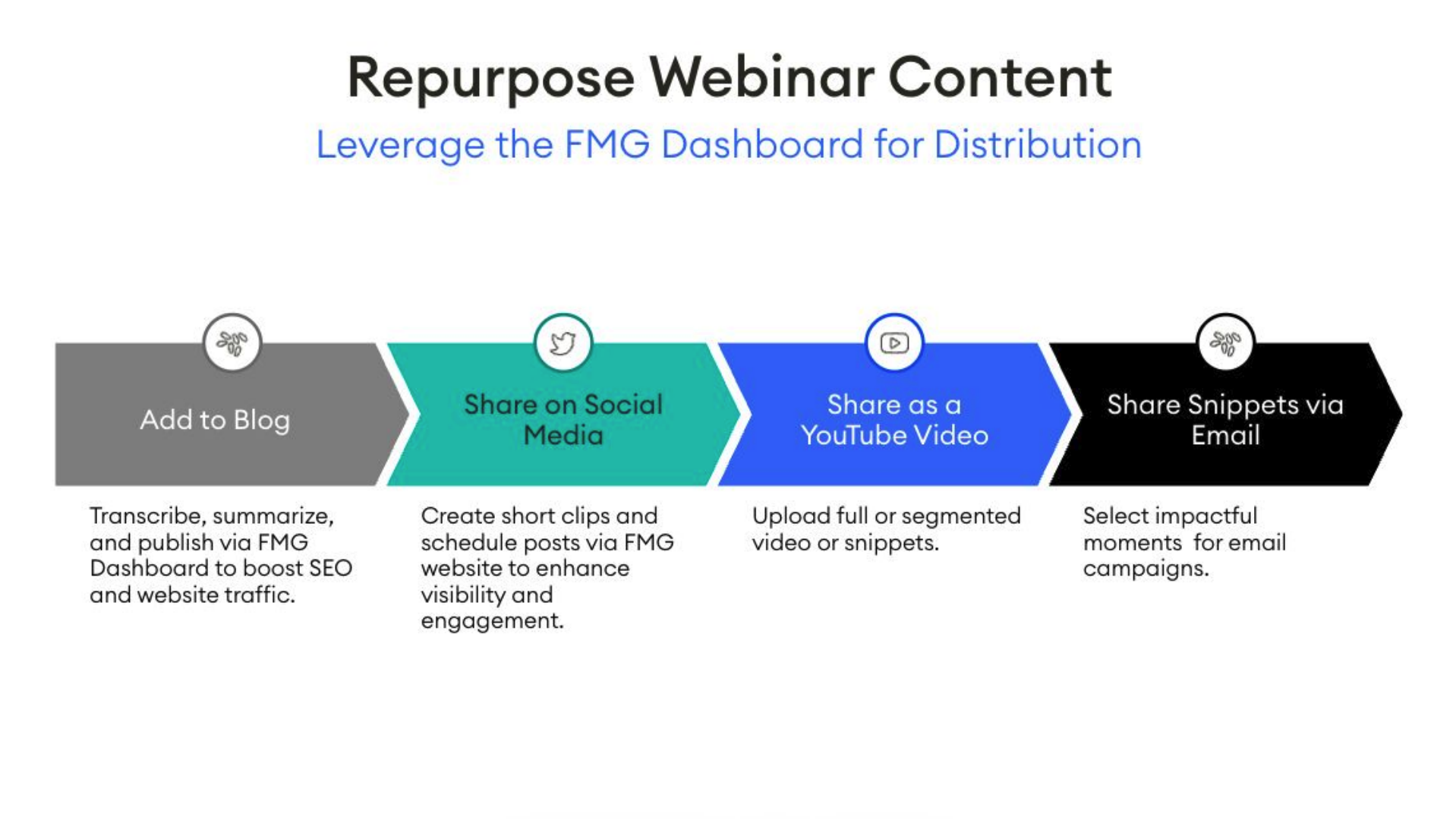
And then looking at repurposing that content, which we’ll expand on, but how can we now take this event and then break it into bite sized pieces that then we can share within our marketing ecosystem is really important. So now we’re squeezing all we can out of this event and we’re sharing it in multiple different ways, and of course, analyzing the data. So utilizing, okay, who attended?
Why didn’t they attend? What’s the best time for events? Maybe thinking about, okay, attendance was low, well, maybe it’s because I hosted it during hours that weren’t great for them.
So again, thinking about who your target audience is, when you should host these events, what time of day, what days work best. Right? For example, I know that dentists, a lot of them take Fridays off. So Fridays are a day that which they sometimes use for personal development, and so what a great time to do that during the day on Fridays, where if I’m working with millennials, I know that they’re probably working throughout the day.
So later on in the evening might be better for them. So again, thinking about your target audience, what’s best for them, and if you have questions on when, I always say, add this to your client onboarding process. When they’re coming on as a client, start to ask them, hey, if I was to host a webinar, what days work best for you? Or what times work best for you?
Add that to your onboarding survey if you’d like. Right? Always ask if you have questions.
But analyzing this data is really great because we can now look at we can look at open rates from our emails. We can look at attendance rates. We are now getting we have through platforms like Zoom, through the FMG dashboard, we now have numbers, and we can keep score of how we’re doing. So utilizing that and then using this data to then create even better events in the future.
And so how can we repurpose this content? Let’s look at how we can use this. So let’s say I hosted a virtual event. Now what we can do is we can take that virtual replay, we can add it to a blog, we can transcribe it, we can summarize it, we can jam pack it with AEO specific keywords and terminology, and this is gonna help boost our SEO, our AEO, and boost website traffic.
We can then share that blog post on social media. We can also share snippets of this on social media. And what’s really cool, you haven’t noticed recently, platforms like Zoom will automatically give you webinar summaries, they’ll break down your snippets for you, and they will make it really easy for you to then distribute. And of course, we wanna share on social, and then we can share on YouTube as well.
You can share the entire webinar on YouTube or Wistia, whatever it might be, whatever’s approved, of course. And then you can also share those snippets. We know that those short form videos are performing really, really well, and then, of course, share these snippets via email, via email campaigns, you can also add them to different places on your website. So again, making sure we’re maximizing this content that you’ve created, and of course, sure it’s all done compliantly.
So if you’re making those snippets, make sure everything’s compliant. And so, just some ways that which we can totally maximize this great content you’re creating.
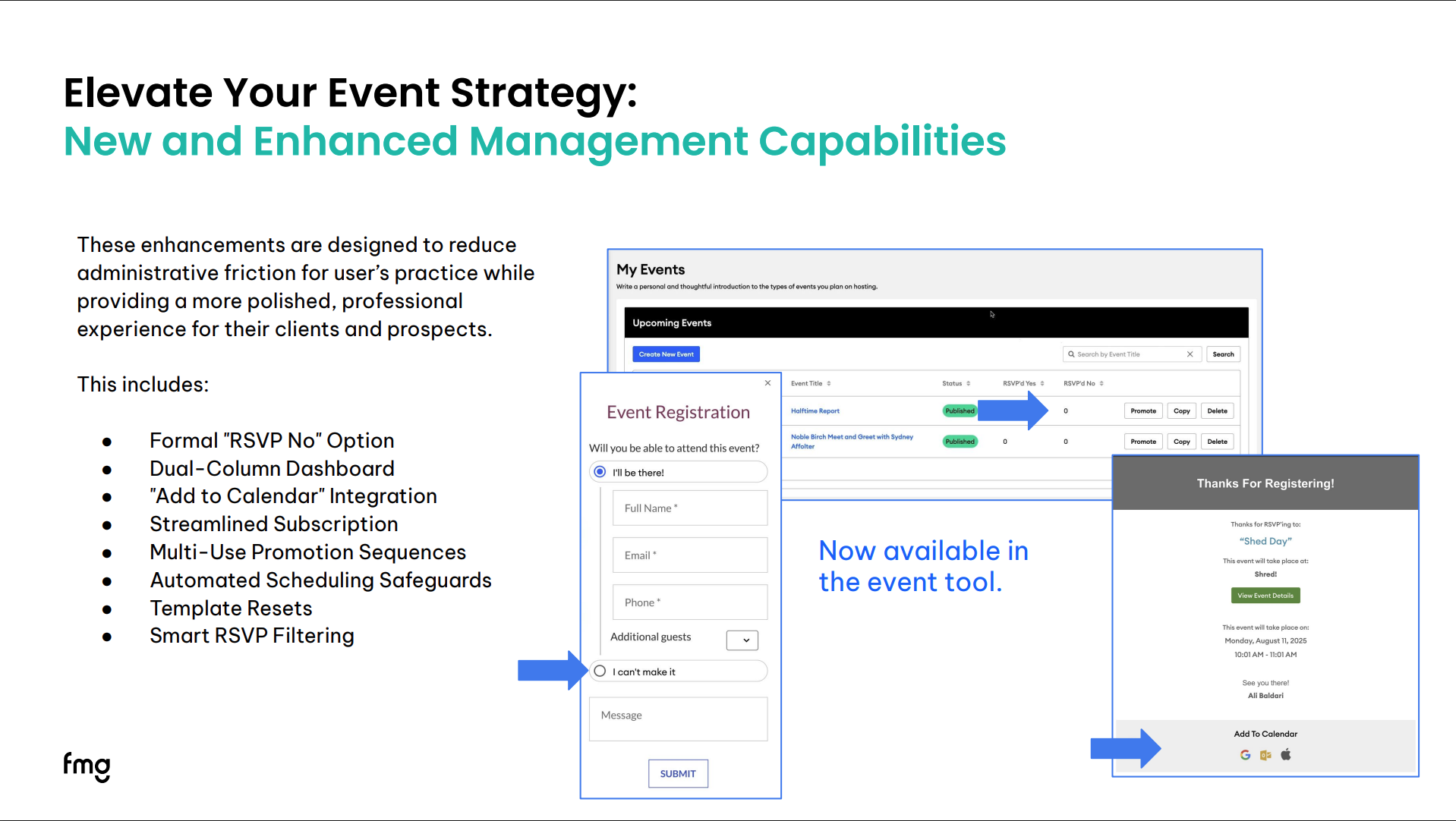
And now let’s look at some of our product updates. So these are really exciting. So we’ve added a handful of product updates that have been requested by you all, and so now they’re coming into play. So we want to allow event strategy and event creation to be easier than ever. And so we now have added things like a formal RSVP, no option. So traditionally, we have only had a yes, I’ll be there, there was never a no option, and so that has been added, so show of hands or if you’re excited about this, this is like one of our most requested features, you guys can react to it, I’m just so excited about this.
And then also, we now within see, I I loved it. We also have our dual column dashboard. So now when you come into your event dashboard, you can see that there’s nos and yeses. So let’s go through this. I made a slide for each one. So yes, now you can change and manage RSVPs. They can confirm yes or no.
And what’s really cool is if someone declines, they will no longer So there’s some intelligence built in, they will no longer receive your promotions because they cannot attend. So that is a fun addition to the RSVP. And also, like I mentioned, the event dashboard, now there are multiple columns so you can easily see how many people has have RSVP’d yes and how many people have RSVP’d no. So that is really nice to be able just to see in a quick glance, and again, help with promotions, maybe you wanna add another promotion.
And, okay, I didn’t have a picture for this one, but it is that smart filtering. So, again, I just I went over this, but if someone replies yes or no from those emails, they will not receive those subsequent promotions. So just letting you know that the AI is built or the smart filtering is built in, and so we used to have to do that manually, take those out, and that has been changed.
And, yes, that has been a big complaint from clients and prospects. They’re like, okay, I can’t make it, but you’re still sending me emails. We want to allow you to continue to build that trust and to maintain your reputation. So that is something we heard loud and clear from the mountaintops that we wanted to make sure we added.
And now there is an add to calendar feature, so when someone registers for the event, within that event registration confirmation email, there is now an add to calendar so that they can easily share that.
Yes. Shred day. Shred.
See, we are people here too. You can see that we make mistakes as well. But, yes, shred day. And this change makes it easier for your clients to add this to their calendar so they can’t miss it or forget about this.
And now there’s streamline subscription management. So we’ve removed there was a box that said keep me posted about future events, and now we just automatically subscribe new contacts, which is really nice so that they don’t get removed from future promotions or marketing, and it automatically groups them into a new group so that it’s easy for you to go in and see your new groups. It’s called the FMG Suite website form lead, and so now you can easily come in and see all those leads that come in from website or your events and manage those there. So again, small but big additions that really make a big difference, And like I mentioned, you can now reuse event promotions multiple times.
So again, you can segment these, you can add a new list. Right? Maybe you receive a new list from a COI, you wanna send those to them, and it’s a separate list, great, no problem, you can now reuse these promotions. So really exciting to add this.
And again, these are all requested from you all that we’ve added to the platform.
And also, there is in the past, this didn’t exist, but it automatically stops your emails from being sent after the event date. So again, we wanna protect your reputation and avoid sending invitations afterwards so the system will read when that event is and make sure and prompt you to update those dates before sending. So again, another small but mighty addition to the event tool.
And yes, a lot of people have opted not to promote or build their own promotions in the past because of the limited flexibility, but I think now this absolutely makes it so much easier. So if you are following along, log in right now, build out an event test, and let’s test it out. So now there’s one more.
We can now preview event confirmation emails. That was also something that you couldn’t do before, so that’s an a nice button we’ve added as you’re building out your event. You can review what that confirmation email looks like.
Alright.
And oh, one more. I’m sorry. They just keep coming. There’s so many to talk about.
But you can now reverify bounced email addresses directly from the contact details within the FMG platform to verify re enable sending button. This makes it easy to restore legitimate contact emails and keep important communications ongoing. So again, sometimes things happen with emails, and so this is a way for you to reverify that process. Yay.
I’m getting lots of hand claps so you’re all as excited as we are about this. So you can now see that.
And like I mentioned, you all are going to be getting our event planning checklist, and we are providing you with exclusive do it for me content sample. And it is from tax prep to tax strategy, how to make taxes work for you, and it is a webinar outline that we are providing.
So that is exclusive Did You Know content that we’re providing to you, so just a little snippet of and a little commercial of some of the content available for our Do It For Me program.
And now let’s get to the demo. So I built out an event that we’re gonna take a look at so we can take a look at some of our brand new event features.
And so here, I we’re gonna come down to events and my events.
So if I wanna create event, if you are brand new, if you have never used events before, you can come in and use our event tool, and here you can create a new event. I can create one from scratch, or you can use one of our premade event themes or templates. So like I mentioned, there’s tax strategy presentation, state of the markets, there’s a blank event, generic event, client appreciation, check-in webinar, open house, halftime report, day or shed day.
And so those are the event templates you can pick from. You can see that if I select one of these, it will automatically help populate some of the the content in here. We always encourage you to come in and add your own wording, add your own flare, add your branding, add your voice, and so that is one great way to build out an event. So now let’s take a look at an event I created.
So I wanted to build out a tax strategy webinar. So I started with our tax strategy event template. And what I did was I came in here and I made it my own. So we talked about hosting events for the right audience.
So what I did was I had added let’s see if I can make this bigger for you all. Okay. So I updated the event name. I said webinar twenty twenty six tax strategies, and I said four business owners.
Right? So who is this for? I’m calling them out in the event name.
And then I came down here and I updated the description. Here, you can utilize a tool like AI to help expand on the tools here, maybe to help call out that target audience to pull in some good keywords, and so you can add that. You can generate a great summary. Again, we wanna add as much details in here as possible. We wanna add who it’s for, why should they attend, what will they receive for attending, right, maybe they’ll get a downloadable or a takeaway.
And then I came in here and I utilized Canva, which is an easy, great tool to update my my landing page header image. So if you have a complimentary or paid version of Canva, you can come in and do that, but I went in and created that. I updated the image, And then, of course, I added the exact event date, the end date, and the time zone, always important to add the time zone, and event location. So if you have a virtual event, you the system prompts you to add a location, so you have to say, hey. Virtual event. But if it is at a physical location, you can add the exact day and time.
And and we can come down and then additional information. So, hey, valet will be provided or parking is complimentary at, hey, our office is, you know, on the third floor, take the elevator, We’re on the left.
Or, hey, we encourage you to bring other attendees. The more the merrier. Bring a friend. Right? Add additional information here that they might wanna see.
And now we’re gonna come down to adding our registration options. So we wanna toggle on allow guests to register for this event.
We want to if we wanna close registration, we can, of course. Right? This is something we’re used to seeing here, And now we have more specific options.
Use the default registration link. That is the landing page that will be created through the FMG event tool. We can allow guests to register additional attendees. Maybe seating’s limited, we can always turn that off. We can say, hey, seating’s limited, I’m hosting a wine tasting and I have room for fifteen people. We can also limit the number of signups.
And here, we also we can add details for people who register. So thank you for registering.
We look forward to having you join us. We believe the more the merrier, so feel free to invite anyone you think would benefit from this. We’d love to have them join.
So adding those details for people who register are really great option again.
And if we are utilizing a virtual software like Zoom or GoToMeeting, whatever is approved for you, of course, and I always we got a question come in, what if Zoom or, you know, it’s not approved. Always check with compliance what you can and cannot use.
But if you’re using a Zoom registration link, you can add that Zoom registration link here so that there is an integration between that approved webinar platform and the FMG dashboard. So that’s a nice touch there.
And now we also we have that SEO toolkit. So if you want to be found online, you can come in here and create that title tag and description tag.
Nothing new here. This is on all of our website pages, but you can add that.
And now I can preview this. So this is the event page that I have created. You can see that I added that custom imagery here, the description, and that RSVP. So updated RSVP, you can see this new form. It has the option for I will be there or I cannot make it, and they can add their email and a message and then hit submit. So coming back to the dashboard, here is we have looked at the preview of that, and now we can also promote this.
So I went in and I created premade promotions, of course, and so you can see that this event has already been promoted. So we can preview this. So event promotions are already built in, so you can come in and use these as is, or you can come in and edit these. Again, we talked about sending specific promotions to specific audiences, which is a really great use case here.
And you can now also dictate the amount of days in between each email or each social post that goes out. So opportunity there. If you want to create an event or if you wanna share your event registration page, this is where you can find that URL to share with maybe the expert you’re sharing you’re, you know, you’re cohosting with. They can use that link and track registrations as well.
So there’s different ways to promote the events. And let’s go back. Someone just asked, what are those four steps? So this is a sequence.
This is a four email promotion sequence. And if I wanna use this sequence, we can look at it here. So this is the first email that will go out. I can use this email as is, or, of course, I can edit this sequence.
And again, just taking into consideration compliance turnaround times, I want you to think about that as you’re editing your content here.
But I can edit this by clicking this edit button, or I can wait and and then also, I can dictate the amount of days in between each one. So you know what? I want this my events coming up. I want this to be send out, wait every three days for these to go out, and then hit preview and schedule sequence. Who do I want the sequence to go to? This takes us through our normal email process. Who do I want this to go to?
Who next? When do I want this to go out? As soon as possible. And here is my review and summary of what is going out and when. And like I mentioned, it now has smart technology built in. So if your emails are scheduled to send after your event date, they won’t send, and it will give you a red message saying, hey. Your event your dates don’t work, and go back and recheck those.
Alright. So that is how we can promote the event. So let’s now take a look at the dashboard. So here is my event I’ve created.
You can see that now I have five RSVPs. I have one RSVP. If I click into this, I can now see the people that have RSVP’d. I can download a CSV. Right? We know for events, compliance always needs that list. These are you can also use these lists for follow-up, post events.
But also what’s really neat is if I have someone that is maybe a new contact that has not lived within my contact list before, I can click on their name, it will open up into the edit contact form, and I can come in and easily edit this. So I can easily add them, you know, this is a new contact for me, so it’s automatically added to this new group that’s created automatically for us so we can track our leads.
And you know what? This person is a Sage and they’re top tier one client, and I can save this. So easy contact management as well. And again, if you have your CRM, your Redtail, your Wealthbox, your Smart Office integrated with this, It is a two way sync. So if you update items here, it will also read in your CRM.
And so that is contact management that has done so oh so well. And of course, when you receive a new sign up, you can see this. So I came up here to my navigation under inbox, and you can see my event RSVPs. You will also receive an RSVP notification via email to make it really easy.
And I pulled up an email that you will receive. So me, the financial professional, I’m hosting an event. I will get an email saying, hey, this person has registered. So that I’m now prompted to come into the dashboard and see who’s registering and check out the great analytics of everyone attending my events. And we mentioned that also, we have added that register now button.
Right? So here’s just an example of one of those emails that will be going out. They look really beautiful. Brandon has your contact information in there and everything.
Alright.
So we have gone over events, the new dashboard, some of our brand new features.
That’s a lot. All exciting things. So let’s get back to what we recommend in content ideas for the month of March, and we’re going over time because there is so much to share today. So if you have to jump, no worries. We will share the replay, of course.
However, let’s go over if you have time to hang out, please do. Let’s go over some content ideas for March. This month is flying by. So let’s start thinking about the month ahead.
Of course, one of the pros of attending our Did You Know Webinar Series is you get the ten minute marketing calendar before everyone else, so we will share the ten minute marketing calendar with you in the chat so you can use that and start getting a head start on your content. And, of course, if you wanna learn more about events, if you’re interested in the events package, you don’t have it today, say yes, and our team will reach out to you so that we can talk about the new features, see what’s best for you, all of that good stuff. So we just added a poll. So as we get going, I also wanna go over just some content ideas.
Right? Saint Patrick’s Day is coming up, women’s history month, daylight savings, tax prep. So thinking about maybe hosting a tax prep event along with all the supplemental content in the content library would be a great idea and friendly nudge.
So and also, if you’re like, man, this sounds like a lot. I just want someone to do it for me. We also have our do it for me program. We that we have. So if you’re interested in learning more about our do it for me program, you can put it in the q and a if you wanna learn more about that specific program, or of course, you can scan this QR code and we can reach out to you.
And what’s really fun, we can’t talk a lot about it quite yet, but we do have a new testimonial platform. This is not approved for everyone, so this is a small communication, but this is here to let you know that we now have a testimonial feature that we will be sharing on in the near future.
And of course, save the date. I want to hang out with you again, March twenty fifth, eleven am Pacific Standard Time. Come back. We have another really fun topic shared for you. And of course, we want to welcome any ideas that you have for Did You Know? So if there’s any topics that you would like us to tackle, feel free to add it to the chat or send us a Q and A.
Send us in the q and a because we would love to hear and wanna make this valuable for you. So save the date, come hang out. I’ll stay on for a couple more seconds, so if anyone wants to to ask any questions, but most importantly, we appreciate you. We love all the marketing you’re creating, and keep up the good work. And next event, next did you know? I wanna hear about all the great events you guys are hosting. So thank you so much.
And so there’s a good question, do these new features show up for everyone? So if you have events turned on, if you have access to the premium marketing tool, these features are automatically turned on for you, so you can log in right now and be able to find those.
And so let’s see, so yes, for those that have it, if you’re not sure which package you have as well, if you’re like, Hey, I don’t know what I have, feel free to message us and we can have our team reach out to you, walk you through that.
We can figure out where you are and what you’re doing and what you need.
And most importantly, thank you so all. I don’t see any more questions coming in. But if you would like us to reach out to you regarding events or do it for me, put that in the Q and A. And we will see you next month. Thank you, everyone. Have an amazing day.
Thanks.
Book some time to chat or call us at 858-251-2400.


