

You may already have warm leads sitting inside your FMG dashboard. Email opens, clicks, website form fills, event registrations, contact notes, and client milestones can all point to people who may be ready for a more personal follow-up.
Review a recently sent email and identify five people who opened or clicked. Use the topic they engaged with as a reason to follow up personally. Check contact notes, CRM details, birthdays, anniversaries, graduations, new homes, retirements, new babies, and other milestones.Review recent website form submissions and ensure each lead receives prompt follow-up. Add or review lead generation forms, pop-ups, and website CTAs.
Use top-performing topics like market volatility, retirement income, Social Security, estate planning, insurance, and calculators to spark more relevant conversations. Use Muse AI when available to personalize content for a specific audience or niche. Revisit past event registrants, form fills, and warm prospects who may still be worth nurturing.
Topics FMG is seeing that are performing well right now:
For email specifically, strong topics included Social Security, retirement quality of life, risk tolerance, tax-deferred growth, wills, and legacy planning.
Browse the slides we reviewed during this workshop below.


Hi, everyone. Welcome to this month’s Did You Know, and we’re gonna talk about some quick summer moves, how we can look and utilize the FMG dashboard to find that low hanging fruit, warm leads, thinking about intentional follow-up, and of course content. So I am Elise Lambert, Director of Enterprise and product marketing over here at FMG. This is my family that you can see. I would love to connect with you on LinkedIn.
I am coming to you, generally from Fort Worth, Texas, but today we’re in Colorado, which is exciting.
And I would love to hear from you all where you guys are coming in from. And I see on the attendance list, we have some familiar faces. So good to see you again for those of you that come and join our Did You Know series.
And so as we get started, of course, housekeeping, I always want to mention that the recording will be sent to you afterwards. Have an amazing giveaway as well. Presentation will be sent. So all of these awesome resources you will receive. That’s one of them, our most asked questions, and so look out for that follow-up email with all of those.
And, of course, I want this to be a truly valuable use of your time, so log into the FMG dashboard, follow along with us and put into practice what we’re going to go over today.
Of course, if you have any support questions or anything like that, feel free to send us a message in the Q and A. We always want to make sure that we are answering all of your great questions and providing that world class experience for you.
Last month, we did a workshop on LinkedIn and AI. And so if you missed last month’s, did you know, we talked about top LinkedIn adjustments for AI, the LinkedIn formula that’s changed, content angles and the daily LinkedIn algorithm and rhythm that we want to think about. And so if you don’t follow our Did You Know playlist on YouTube, go ahead and check those out. So each month we are covering a different aspect of the FMG platform, and of course thought leadership, best practices, and all of that.
So if you missed last month’s, go ahead and take a look. And today, what we’re gonna be talking about are five summer moves that turn interest into conversations. Right? So where in the FMG dashboard can we spot those warm leads, whether they’re current clients or prospects, and how can we also look at form fills and event follow-up. And we’re also gonna look at top trending content. So we, our team spent a lot of time digging into the analytics and what content is performing well, what is getting open rates. So we’re gonna go through that.
And I’m also talking about just like really easy ways that we can reach out to our audience create milestones and lead generation. How can we look at this? And of course, today, we have some really fun giveaways. So I always love your participation in the chat. That’s one of my favorite features is I think we’ve really grown a great community with our Did You Know series and everyone shares some really great ideas. So as you all are sharing ideas, we are going to give away some swag items to some lucky winners. Please chime in and at random, we’ll be giving away some of these awesome swag pieces.
So who doesn’t love some good swag? And if you’re a winner, share it on social media. We would love to see you utilizing your swag in the wild. And so you can win some awesome swag.
And so let’s dive in. We only have forty five minutes to track cover a lot of tracks. And so one, what do we look for? How and where in the FMG dashboard can we spot some of our warmest leads?
And so what do we look for? And one of the first places I always say we should go to is our email sentence schedule. So one, this requires you to be sending sending out emails on a regular basis, but also now the more emails we send, the more analytics, the more information you have to work with, which is really great. So if you are not familiar with the email, send and scheduled dashboard, we’re going to dive into this in the demo.
But also in the chat, we’re providing some of our knowledge base articles too. So as we go through, we’ll share some of those and they will also be shared afterwards. So show of hands in the chat, who utilizes their sent and scheduled dashboard?
And so what we want to do is we want to start to look at this a little more critically. It’s not just we sent an email, but how are emails performing? Yay, a lot of people saying I do.
I love that. And so we want to look at what types of content are getting the best open rates, who is opening our emails. And then we want to also cross reference it with our CRM, of course, and we want to really start ensuring that we’re sending the right message to the right audience. And so one of the quick wins that I want to talk about today is really going into some of your past performing emails and picking you know, you can look at your last email campaign you sent and pick five people that opened it and reach out to them.
And you can what does that reach out look like? It can be a number of different ways. But that is some low hanging fruit, right? They just opened your email, they are you are top of mind.
And you know, they opened it because that was a subject that resonated with them as well. And so if you could go in, pick five people, and then send a personalized follow-up with them, whether it be a phone call, right, you know, your clients or your prospects, with your prospects, it might be a little bit different as you’re building relationships.
But we can go in and then send that personalized communication. Hey, I saw you opened up that piece on estate planning, maybe that’s a great way to then send one of our calculators that we’ve incorporated, or this is a great place just to say, hey, I saw know, here’s another article on you know, I saw you opened up the email on social security. Here is another great piece on social security that lives in the content dashboard. And so a great question is where on earth do I go to find out who opens my emails?
And so within the FMG dashboard, you can go to along your left hand side, you have your tools and I will demo this after the end of the presentation. So you guys will see this but you can go to your sentence scheduled. And here you have your detailed analytics, you have your overall delivered emails, you have your open rate, your click through rate, your unsubscribe rate and your bounce rate. So let’s talk about what those numbers mean. An open rate, that means someone opened your email, they clicked on it, they were able to read it. The industry average for open rates on an email is twenty six percent. So, if you’ve been to some of my did you knows, you probably know that already.
I talk about that a lot. So that’s a really great gauge for you. But also then the next piece we want to look at is yes, one, did they open it? But two, did they click on it?
Meaning did they click either on an article? Or did they click to on a button or a CTA, a call to action you had in your email? So that is then taking it to the next level to see who is engaging with your emails the most. And of course, unsubscribes and bounces.
So unsubscribe meaning that email didn’t resonate with them, they unsubscribed. So if you have a high unsubscribe rate on a certain email, this would be something for you to take into consideration.
And the bounce rate is that email didn’t go through. So that is another great place to look at our bounce rates and say, okay, I saw this email bounced, time to pick up the phone, call that person and say, hey, I saw that your email bounced, did you get a new job? Did you get a new email? Do I have your contact information correct?
How are you? Right? That’s a great place to to check-in on that. So this has great information.
We’re gonna demo how we can go into each one of these emails and look at who’s opening your emails and giving us some ideas on how we can then send some of our top performing content to them, how we can follow-up with them. But again, as we’re on this call right now, go into your sentence schedule, look at some of your past emails and pick five people and do a personalized follow-up. And again, that follow-up could be a phone call, that could be a compliant text message, it could be another email, it could be connecting with them on LinkedIn, right? Just continuing that conversation is really important.
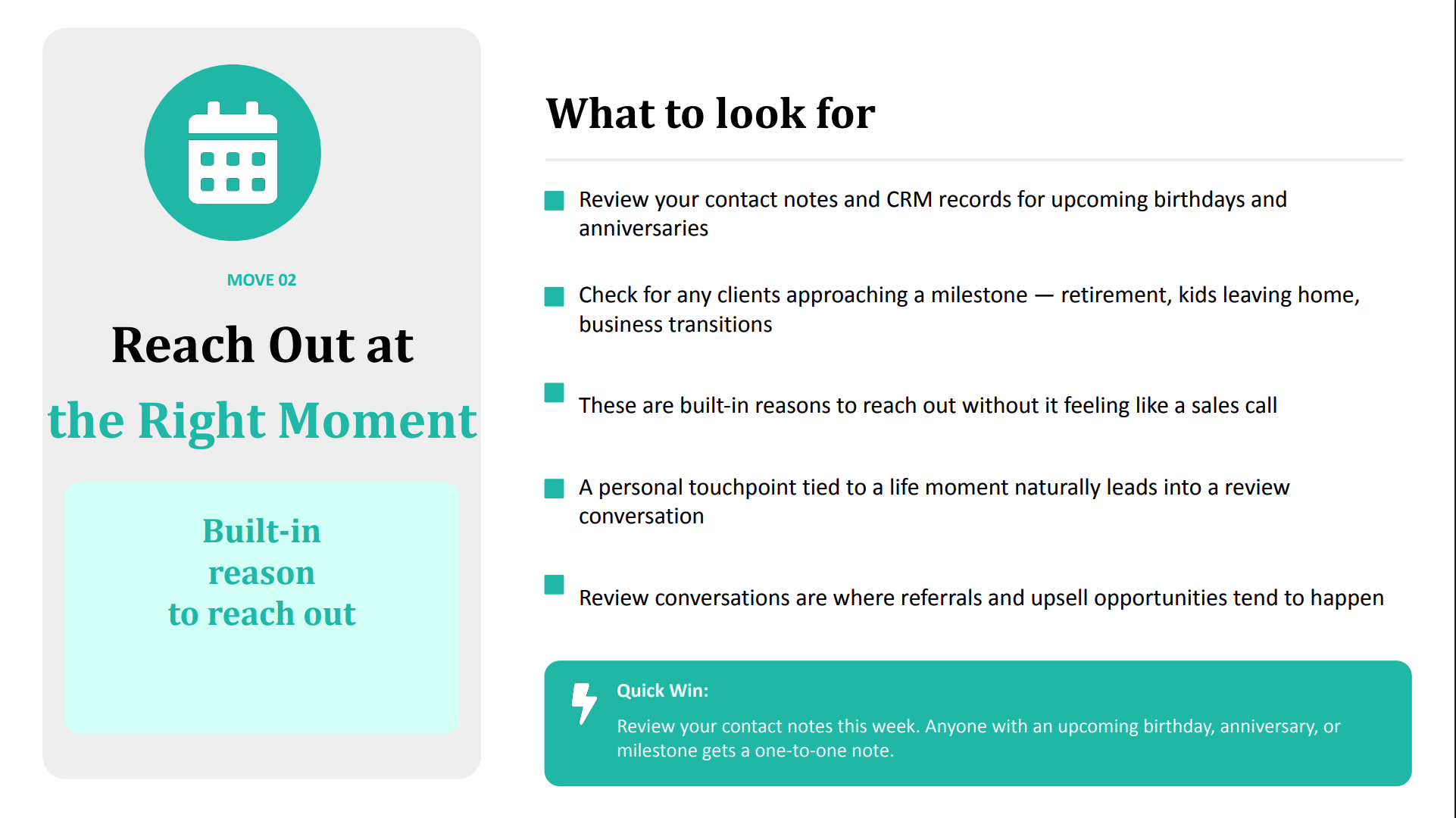
And so that next piece is once we’ve kind of looked at our emails and how they’re performing, we’re looking at who’s engaging with our content, we want to make sure that we are reaching out at the right moment. So reviewing your contacts, and so whether they’re clients or prospects, and you can do this in the FMG contact space, or you can do it within your CRM, whichever CRM you have linked.
And we want to review this. Right? What are life moments? What are those triggering events that are great reason for that personalized touch?
So thinking about those mile milestones is a great way to go into that. And so it’s retirement, it’s kids leaving for college, it’s a new baby, it’s a new house, it’s a business transition, any kind of liquidity event or estate planning event. Right? So looking at our contacts when you know, you can use your emails as a great starting point, and those that are opening our emails, and now what are we looking for?
Now we’re thinking about our clients and prospects in a way that’s like, okay, now what would resonate with them? These are built in reasons for you to reach out to them and to be able to, to make that that initial touch without it being salesy without you know, that takes that out of it. That’s you coming alongside them as their bellwether you coming alongside of them as their trusted confidant.
And it’s creating that personalized touch point for those big life moments. Right? So again, as we think about our our niche audience, what are those milestones? What are those trigger points that that cue them to think of their financial professional?
And that way when we’re having these conversations, they’re much more organic, they’re more personalized, and they’re not just a transaction or a sales. And so another quick tip for this week. So the first one is, let’s go in and let’s pick five people from our emails to follow-up with. The second one is let’s review our contact notes and anyone with an upcoming birthday, an anniversary, it could be a client anniversary, maybe they just got a new house, maybe they’re about to have a baby, maybe their kid’s graduation is right here.
So let’s pick a handful of contacts that are experiencing some of these milestones and let’s just share and congratulate them and reach out. Again, these touch points can be via email, can be on a phone call, whatever it might be. So I’m curious in the chat, what are some of your milestones that are either normal practice for you to reach out on?
A really simple one, of course, is automating a birthday message. But how are you guys personalizing that? And what are you doing for some of those? So we just had here birth of a baby.
Absolutely, retirement, sending champagne. I love that. These are all pieces that are setting you apart. Graduation of a child, wonderful.
Birth of a child, that’s such a great one. And it could even be birth, thinking about who your target audience is, it could be birth of a grandchild as well so taking that next generation or a grandchild who is graduating as well and I love this And I’m going to throw some swag because there was someone that just mentioned a handwritten card. So Joelle Hogan, we’re going to send you some swag because a handwritten card is one of my favorite pieces and I think is totally underutilized in this.
And and one of my favorite ways, and I think this needs to I need to set the standard as long as this is approved for you. So if you have an approved text messaging platform like MyRepChat, this is one of the best ways for you to get in front of your clients. And so something you can do within MyRepChat is create a template for a birthday text message.
So being able to send those.
So show of hands if anyone in here is currently using MyRepChat for compliant text messaging. But and if you’re curious and if you want to utilize it, you want more information, we’re gonna go ahead and just put up a poll and we can have our team reach out to you if you want more information on MyRepChat, is compliant text messaging.
But this is a really great tool for that personalized communication. This allows for us to take our communication to that next level. And so being able to create those templates really allows for us to personalize our messaging and capitalize on the right message at the right time. And this would be a great way to follow-up with our emails that we’re sending as well. So we’ll keep that up for just a second and we’ll keep going. But yeah, I love this. Everyone’s saying they love my rep chat.
And Michelle Carson, we’re gonna send you some swag as to, I see that you love MRC, we love MRC, it’s such a great tool to utilize in your tool belt of marketing things and communication and just providing a world class experience for our clients.
And I love that. Amy just mentioned our clients love it too. They love being able to text you compliantly and schedule meetings and hear from you. You can send FMG content through there, so there’s a lot of great use cases.
Okay. So we talked about our emails, how we can look at those. We talked about right message at the right time, thinking about some of those some of those milestones and how we can follow-up with personalized messaging. We also want to look at within the FMG dashboard, the leads coming in.
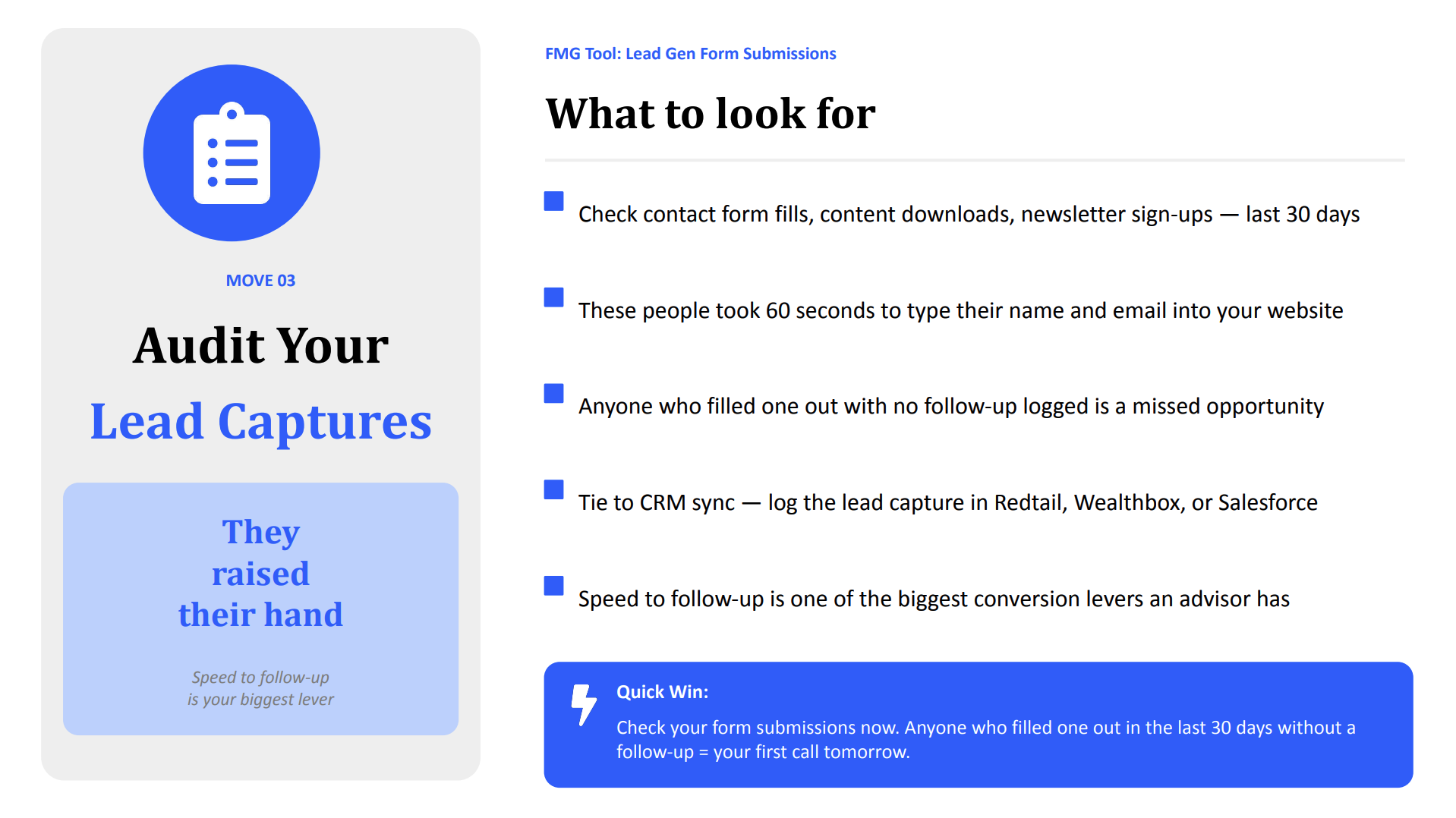
And so this means someone has filled out a form on your website. They have raised their hand. They maybe they’ve booked an appointment with you through an approved calendar Calendly, your Microsoft bookings, but we wanna check our contact form fills. So within your FMG dashboard, going into your inbox and seeing your your lead generation form fills.
And so looking at those and seeing, okay, who has taken time to go to my website and figure out that they want to sign up for an email, or they want to sign up for your ebook, or maybe they’re just looking for more information.
And anyone who filled out and you haven’t followed up with them, we are missing out on a huge opportunity. So we know that we see greatest conversion rates and greatest opportunities when there is instant communication when someone fills out that form. When they fill out that form, that means they’re looking for more information, you’re hot on their mind and they want to know more. And so within your lead generation and your form fills, your pop ups, do you have a follow-up email you’ve created? And, and we also you know, you can tie this into your CRM as well, so that’s a really important piece. But, again, having that form triggered email sent right after they fill that out or you’re following up with a phone call, that’s really great as well. We need to make sure that as these leads come in, that we are following up with them instantaneously.
And so if you haven’t gone in and checked out your form submissions, now is a really great time to do that. And thinking about even people that have filled out a form maybe in the last year, are you staying in touch with them on a regular basis?
Have you added them to your automated marketing? Have you added them to an email sequence? Where can you find this? And so great question, where on earth can we find this?
And I will go through where we can find our lead generation opportunities in the dashboard. So let’s check these out. And of course, if you don’t have any lead generation on your website, this is a great opportunity to add that. So adding a contact us form, adding a, hey, up for our email or hey, download our ebook.
And we’ll talk about how to do that.
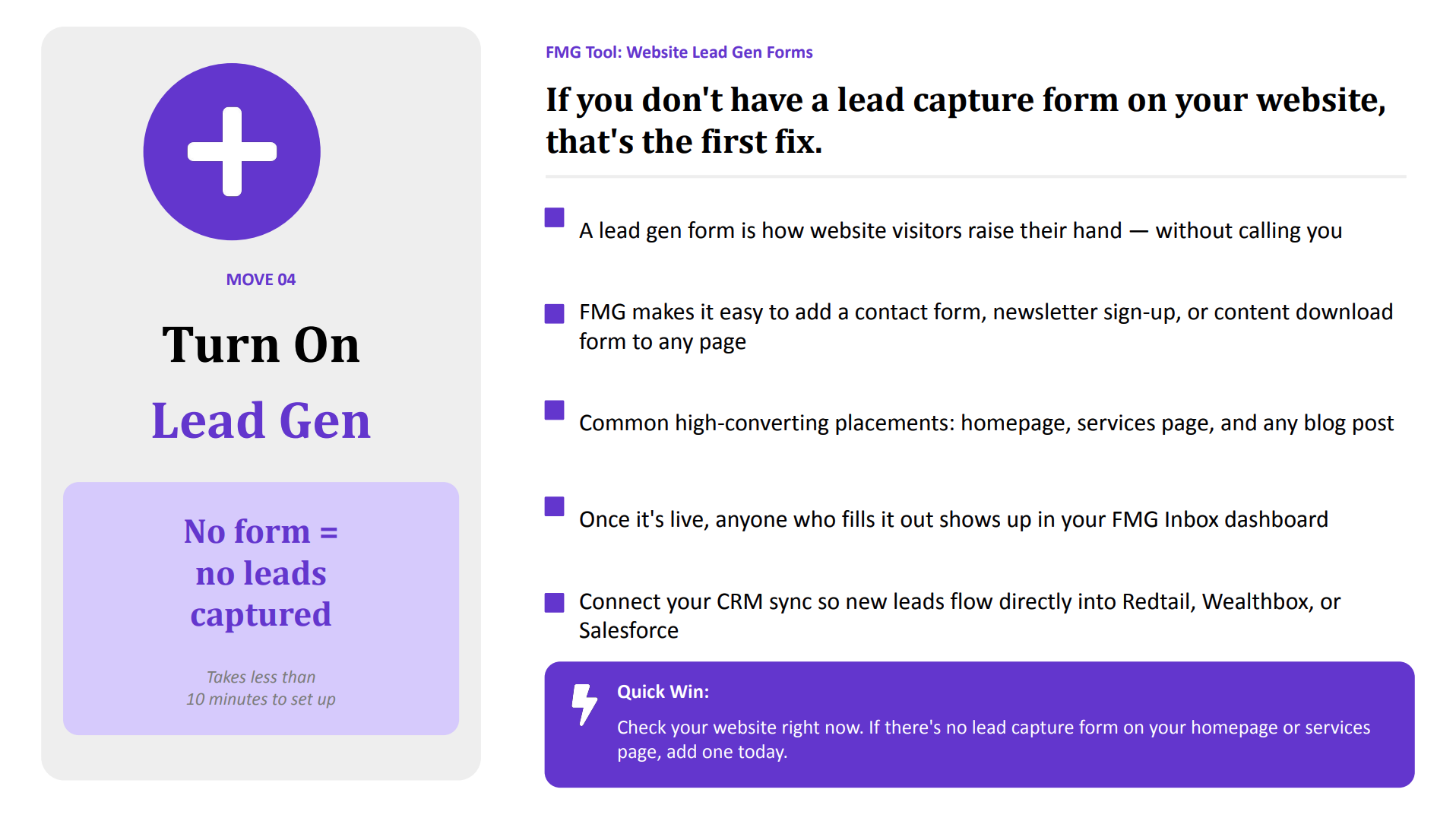
What is a lead gen form? If you don’t have these on our website, we need to add this.
We want to make sure that we have multiple different types on our website. You can also use these and disseminate them via email, you can disseminate them via social media, and so a lead gen form is how we get website visitors to raise their hand. And we know that a lot, especially the next generation, they don’t want to pick up the phone anymore, and so they wanna be able to do it all with the touch of a button. And so this is how we can make sure we’re converting our website traffic and our social traffic to getting that contact information. So we want to add these. And so if you haven’t checked your website recently, this is another quick win for us. Let’s add some pop ups, some form fills, and some opportunities to capture these leads that are coming in.
And so within where does this live in the FMG dashboard? Great question that we keep getting. And that is under websites and pop up. So this will be a premium feature. So if this is something that you don’t have, always you know, we’ll we’ll talk about how we can you can add these. But if this is something you wanna add as well, you can always message us in the q and a section, and and we can help get you set up. But there are a number of different lead generation pop ups that we can have on our website.
I’m going to go back a slide because I breezed over this and I did not mean to, but where should we place these? Think is a really great question. And some of the best places for high converting placement is our homepage, our service page, and our blog posts. So making sure that we have these pieces on at least those three pages is a great place to do that.
You can add those, so if you don’t have those added, have some homework to do to make sure that you have added a pop up or a contact form fill on those pages. K. And so what types of lead generation pop ups are there? Of course, one of the easiest ones is join our mailing list. Right? That’s a great, warm call to action for them to stay in touch with you.
And also there’s ebooks, right? Retire Happy ebook. There’s common filing errors. There is a way if you do have if you’ve created your own ebook, right, you can incorporate those as well into a pop up. So that’s something you can absolutely do. And, you know, there’s quizzes.
So these are things that one, keep people on our website. We’re capturing those leads, but we’re also capturing their attention with something like an investment quiz. Right? This is a great thing to send on social media.
This is a great thing to send via an email. And people want results. They want to know where they stand and so it keeps them engaged and it provides really great pieces. So where does this live?
If you have a website with FMG, that is where you will see these pop ups.
Todd Day, you asked some great questions and so I want to give you some swag as well so as we’re going through we’ll make sure to send that to you.
There’s a lot of great great questions. So we’ll go into pop ups, in our demo today. And this is one of my favorite emails to get. And if you have a FMG, website, when someone fills out a form, you also will receive this email in inbox, and it’s my favorite thing to receive.
It says you’ve received a lead from your FMG website. So I always do that. When I was an advisor, I used FMG. I would do a happy dance every time I got this in my inbox.
And it looks like a lot of people are sending hearts. You guys feel the same way. It’s just such a great way. It’s just like little bursts of dopamine that you get saying, Yay, we got a new lead, now we can follow-up with them.
And how can we follow-up with them?
And we talked about that. Your follow-up can be a phone call, which a lot of you are doing. We can follow-up with an email. So you can create a follow-up template. Right? And this can also be based on what form they filled out. So you can have a template for for each pop up you have, and we can customize this.
And, this is just an example of a follow-up email you could create. And, again, this could also be a text message. This could be part of your phone call script. But making sure that we have a book a meeting link, maybe asking a thought provoking question.
Encourage them to respond. So something like, hey, what’s the financial goal you’re looking to accomplish this year? Or what are some of the financial topics that are important to you? Or ask them a question that allows for them to engage with your email or your text message.
And again, another place for you if you’ve created about us video, about me video, or about your services or your firm, this is a great place to add that as well. So again, we’re building that connection and being able to, share that. So creating that template and being able to use it in a number of different ways. And one of my favorite pieces, that I think this is a very underutilized tool is in form triggered email.
So when someone fills out a form, you can automate and customize that email that goes to them. And so we will share in the chat here how to do that. So we’ll we’ll share the knowledge base article on how we can share that that great piece. And so being able to customize that, capturing their attention, and being able to capture those leads.
And so now we’ve talked about, okay, where can we find some of these warm leads? We can find them in our email. We can find them in our form triggers, in our our lead generation opportunities. And then it’s what can I send them?
What is some of the top trending content that is performing really well? Because, again, right message, right time, thinking about milestones. We want our messaging to resonate with our target audience, and so we can utilize a lot of the content in here that, one is performing very well and allow for it to resonate with our audience. So what are the top trending topics right now?
We combed our whole content library for you so you don’t have to. And of course, we have some really great collections that highlight this, but we looked at the analytics in the background. What is performing really well? Market volatility.
In this crazy world we’re living in, people want to hear from you, especially about market volatility.
Retirement income, that’s really important.
Social security and estate planning. These are the topics that are getting opened. These are the emails that are getting opened. These are what people are engaging with.
And we know that we can take one piece of content and share it in a number of different ways. So making sure we’re reusing this content. And, of course, Muse AI, the AI feature is amazing, and it allows for you to utilize AI within the dashboard. This is a premium feature.
So if you don’t see it in your dashboard, that might be why.
And it allows for you to personalize these messages. So you can personalize a market volatility message to your niche audience who might be business owners or to your millennial clients.
And I love that. Musa saved you a lot of time. That’s wonderful. And now we can think about how we can follow-up with trending content with these leads we’re finding within who’s opening up our emails, who should we send text messages to, what should we add in our follow-up email from our lead generation forms.
And, you know, think about sending, you know, some of these trending topics about two times a month. And what we can do today. Right? What’s a quick win today is let’s pick one trending topic, and let’s have Muse personalize it for your target audience and schedule it.
Schedule it out to either a couple people that have opened your emails or people that, are opening those topics, because that’s a really great way to expand. And, again, we wanna take the effort out so you can be a financial professional. We can help you execute on the marketing, help you rate the content. And so these are some of the top trending topics, And we dove in specifically what’s working for each channel as well.
So content works best when clients when when the content helps clients answer questions that they are already asking.
Right? So what questions is your niche audience asking, and what do they have? And so some of the top email content that’s performing really well right now, social security, retirement quality of life, risk tolerance, tax deferred growth, and wills and legacy planning. So those are for email. That is what we’re seeing perform really well across all of our adviser advisers that we have, which are thousands.
So just some tips for you guys to implement. And then also what’s performing well on social.
Our new calculators, if you haven’t seen the new calculators, these are an awesome place to to capture attention on social.
And so that home affordability calculator is doing really well, the long term care calculator, buy versus leasing a car. Right? We want to share content that helps people run the numbers, then invite them to talk through those numbers in the follow-up.
So these are some top content pieces that are performing really well. And I’m curious in the chat, what topics are performing really well for you?
And also maybe you share who your target audience is as well. So who’s your target audience and what pieces, what types of content are performing really well? Five twenty nine’s, absolutely.
Retirement and event. So for example, we have 529s that means that audience would want more information so maybe we can share a calculator with them, maybe we can share some more articles on college planning.
So again, looking at those top performing pieces and what can we do to personalize that next outreach because we know that that’s going really well.
So retirement fundraising event we have coming up, Awesome. Estate planning.
Awesome content. And again, I think it it goes to show a lot of the content that you guys are seeing trending matches what what we’re seeing. And so, you know, one of the examples is retirement content. Lead with a specific decision.
Right? So the problem is advisers send generic retirement messaging. You know, we all wanna retire and, you know, take take a trip by the boat, go to the beach, and that clients tend to tune it out. It doesn’t feel personal.
Planning for retirement is very broad and so thinking about the solution specific beats broad every single time. Giving clients the real decision to talk about. Tie it to something that they’ve already been worrying about and that converts a read into a reply. So thinking about what can we share?
Of course social security timing, the timing of social retirement quality of life, that is a real concern. Yeah I want to retire but what does my quality of life look like? What’s the risk tolerance? So here we don’t want to just send a retirement overview but asking specific questions for this so have you thought about when you claim social security?
That’s inviting the conversation, that’s now taking that to the next step so thinking about maybe an email you sent going into your sent and scheduled, maybe you sent some retirement content pieces, now we can follow-up with, have you thought about when you’ll claim social security? Now it’s inviting the conversation, it’s inviting the review, it’s inviting them to take that next step.
Estate content, This is another, I pulled four of the top ones, and so number two is estate content. So frame around family, not documents. When people think about estate planning, think about, oh, that’s a lot of paperwork. That’s a lot of things I need to do.
I need to meet with my advisor. Need to meet with the attorney. There’s a lot of moving pieces and it feels like a legal task, not a conversation. And so putting them at ease is important here.
So a lot of times we some avoid doing it, some lead with it. And if you lead with this or maybe you’ve had an email go out regarding estate content, this is how we can capitalize on that and create that next step.
And so we want to put their anxiety at ease. We want it to feel personal, practical, and urgent, and making sure it’s not tied to stock prices or economic cycles, but gives you a reason to talk about family and legacy because that’s what’s important. So asking those thought provoking questions again is important. How we can frame this is when do you need a will? That would be something to think about for those that are doing college planning. They also need to think about their estate planning.
We also want to think about leaving your lasting legacy or a checklist when a spouse passes.
So these triggered thoughts and questions that they have when they reach certain milestones.
So again framing it around family readiness, not the paperwork, not the anxiety. Your estate plan is more than just documents, it’s a way to make things easier for people you love. So this is where we can send this after marriage, after a new child, a business sale, a loss of a parent, maybe a liquidity activity.
And then another one is insurance content And this one is interesting because we all want to have the conversation, but we fear we do not want to be too salesy, we don’t want it to feel like a sales pitch here. And so a lot of times we avoid the subject, and it is one that is a very important conversation to have, and it’s a most it’s one of our top trending topics. And so clients don’t raise it on their own.
And so and also, if it’s not addressed, it creates gaps in their plan. And, you know, it it doesn’t address the what if in the room and so the solution. This is the number one total social usage in our FMG reports, which is wild to me.
So thinking about how we can follow-up on our personalized messages with top performing content.
And, again, we don’t wanna feel like a sales pitch. We want to make sure that it gives the client permission to think about the risk at hand. And so what what can we share? Right?
We’ve seen them open up some content. Maybe they were because this is the number one topic on social that’s performing really well, maybe we can see that our we can follow-up with some of this breaking breaking it down. Does your credit score affect your insurance? Lifetime of earnings?
The ABCs of auto insurance. Right? There’s a lot of pieces in here. So using insurance content as risk awareness to prompt those life stage events.
So again, when we have a new home, when kids come into the picture, retirement, caring for aging parents, these are all practical times that we can follow-up with some of this content.
And number four is lifestyle. Right? People want to hear about lifestyle and the calculator associated with it. Right? So advisers default to market commentary. They’re thinking about portfolios every day. I’m not saying everyone, but this is what we see.
And generic financial content doesn’t always get them there. It doesn’t always meet the need of of this. And so making sure that the solution is that we are sharing these calculators, that they’re getting these numbers and giving them peace of mind and that opportunity for them to pick up the phone and give you a call. And so, again, it’s not a sales message. It’s a it’s an educational tool that you’re sharing and creates that natural next step.
And so, again, what can we share when we’re thinking about this? And it’s, you know, how much home can I afford? Should I buy or lease my car? Right? The the lifestyle the lifestyle question is is important and it’s one that’s on everyone’s mind, especially with market volatility and what’s going on.
So that long term care calculator, inflation and compound interest. And I’m curious in the chat, has anyone used some of our brand new calculators? And if so, which ones are you using? Are any of them have you seen great results with or you’ve used via social?
I’m just curious.
And so as people are thinking about their finances and their lifestyle, we can share content that helps people run the numbers. They like to have that physical number in mind.
Know, the old traditional financial way of financial planning is, hey, what’s your number? Right? We’ve all seen that commercial before and so we want to invite them through those results. Try this calculator. Let’s talk. I’m sure if you have any questions.
Okay. So what can we do this week? Here’s your to do list. Here’s your tasks. If you’re like me, I’m like, just tell me what I need to do. And so here, we want to look at our email clicks from the last, you know, sixty days or the last couple emails you’ve sent and send a personalized follow-up to five people. We want to review our contacts who has an upcoming milestone, whether it’s birthday, anniversary, new kid, graduation, retirement.
We want to look at our form submissions. When was the last time you followed up with all of your form submissions?
We want to check our website. If you don’t have a lead form added, making sure you’re doing this, and of course picking those trending topics and following up with that personalized communication is really important. You already have all of these warm leads and these are just some really quick moves and quick things you can do to find that low hanging fruit, create an awesome experience, and now you know where to look and we can look at our dashboard critically and be able to use that information to allow for us to educate.
And so I want to jump into a demo real quick. So first thing that we’re going to look at is where we can add pop ups.
Can come over here. So if you have an FMG website, we come over here to website and I’m going to navigate down to the pop up section right here. And this is where I can peruse all of those lead generation pop ups. So here, joining our mailing list, this is a really easy one.
Happy retirement, let’s take a look. If you have gated content, maybe you’ve created your own ebook and you want to gate it, you want to capture information, be able to access that, you can utilize that. There’s a Dope Panic ebook, Unlocking the Treasures of Financial Wellness. So if you haven’t come in, take a look at some of these popups.
And if you don’t have one and you would like to add one, you can you can message us in the q and a section, and you can look at upgrading your account.
And what’s really great is let’s also take a look. We can configure each pop up as well. So configuring it. What does this mean?
It means this is where we wanna set it up. What pages do I want this to pop up on? Do I want it to pop up on our home page? Do I want it to pop up on our service page?
So here I can come in and I can check mark where we will be adding these, and say, you know, I want this to go on my homepage and then the source. So when will this pop up show up? This pop up will show up with if anyone comes to my website, right? I can also have it pop up only if this lead has come from social media.
So thinking about where the source is, or maybe if someone came from a search engine. So think about your Google’s and your Bing’s, or it can have both. I recommend for now, all traffic is a great place to start. And then when do you want this to display?
So here display options, when do you want it to display immediately?
And again, depends on preference.
Wouldn’t recommend immediately. I’d give them a couple seconds because, think about your own personal preferences when you go into, a website and the pop ups happen right away. So thinking about what you would like, is important, or you can do a timing, Hey, if someone’s been on my homepage for thirty seconds, it can pop up.
Or you know what, someone scrolls percentage, they’ve made it down fifty percent of the page, they’ve scrolled down fifty percent of the page, that will trigger it to pop up. Or they’re about to leave. They’re about to leave your website. Well, let’s trigger that form.
So really easy to implement this. And again, bones, least join our mailing list is a great place to start.
So that is lead generation pop ups, where we can find them, how we can configure those. And then as we go down, I also mentioned that we were going to look at our email sent and scheduled section.
And here we can come in and this is where I’m going to look at how my emails are performing.
I’m gonna look at my open rates and my click through rates. So first and foremost, I’m going to come down and I’m gonna look at some of my emails. This is a demo account, guys, so you’re gonna have a lot prettier numbers than I do.
But let’s look at my weekly market insight. I can come in and I can see that it was sent to four people here. I had one hundred percent open rate, go me, watch out, but I didn’t have anyone click through it or unsubscribe or bounce. But we can click into this and I can see now who opened it, when, and if they clicked through the email and whether or not they unsubscribed. So now this is that list I’m using to follow-up with. And here I can take an action. What’s really cool is now I’m going to we talked about the first thing you could do is pick five people from an email you sent and follow-up with them.
Here, what’s great is if I’m curious what content is resonating with this contact, I can come over here to view history. And in view history, now I can see what emails have been sent to that exact contact and whether or not they opened it. So I might see some trends. I see that this person is opening emails on social security, on a specific topic. That is where I’m now performing content and follow-up with them, whether it’s a text message, whether it’s another email or a calculator, right? This is how we’re now taking that, that to the next, the next level.
So great place to do that. And so Greg Fairchild, we’re gonna send you some swag too. Yay. I’m glad you think this is cool because I think it’s pretty cool too.
But yes, so now utilizing this, this is your call list for the week. This is your follow-up, this is that warm lead that we can now send the right message to the right audience. And again, I’m going to then go into their contact and I’m going to look at their milestones, maybe they recently had a birthday, maybe it’s time we need to start thinking about five twenty nine because they just had a kid. So now I’m thinking about these at a granular level.
So that is how we can come into our sentence schedules and able to execute. So there’s that.
And then the next piece, before we get into everything else, is our inbox. So I mentioned where if someone fills out a form, if they fill out a pop up, they fill out the contact me form on your website. Where do those leads go? Up in the top right hand corner, there’s the inbox here.
And now I’m looking at the leads that come in. So here, you could see that I got that contact request. This is the contact’s name and the subject. So they filled out a have a question on my website, and it it was a lead. And now I can view this. I’m gonna come in here. I can see.
I can view the contact here. I’m going to make sure that I have added this person to all my necessary groups. This is some contact management stuff, but also I’m going to fill in anything that might be missing.
If I have their birthday, their client anniversary, all of that good stuff. So I’m coming in and I’m updating the contact information, and I’m making sure that I’m now following up with them, that they’ve received a follow-up email. Maybe I’ve sent them a follow-up email template where I followed up with a text message, if I have their contact information.
Right? So coming in and looking at our lead generation, our inbox, and seeing who’s who’s trying to contact us. So again, my question to you is, how often are you checking this? What does your follow-up look like? And this is a great place to create those those those warm leads and to continue to prosper with them. So also something else to think about is we want to make sure that our event registrations, so making sure that if you’ve had people come to an event and maybe they were prospect and they have not quite become a client, when was the last time you reached out to them? So making sure that even if times passed, we’re still dripping on event leads as well, because that is a really great place that we can come in here and look for some of that lower hanging fruit, our past event attendees.
So just again, thinking about your event, your event responses, thinking about your lead generation, leads that have come in, thinking about anyone that’s come to your website asking for more information.
And I love this page, you mentioned that you come in daily. Yes, this should be part of your daily practice to come in here and check out some of this stuff. So I just those were some quick items I wanted to demo so you could see it live in the dashboard, and we’ll come back to this. And so if you are curious, you want to get more information, maybe you don’t have pop ups, you wanna add these, we’re gonna go ahead.
And if you want more information you want our sales team to reach out to you, we’ll fill out a form. But if you’re already good, maybe you’re a different client and you’re already taken care of, no problem. But if you want some more information just regarding upgraded features, feel free to hit yes there. And of course, all registrants are going to receive our summer marketing guide.
This is really cool. So it has, you know, our five summer moves that we went over today. Some really quick tips, how to fast track you getting up and running, and and so we’re going to share this with you and also, we went into the demo. So, yay, we did that.
Content. So as you’re thinking about maybe scheduling out your content so you can enjoy the fourth of July or whatever it might be, what content can we share? And of course, when you come to our did you know, you get the ten minute marketing calendar before it’s released to everyone else. So we’ll go ahead and put that ten minute marketing calendar into the chat so you can use that. And so you can spend some time, schedule out the month of July so you can enjoy at least the first couple of weeks.
And so that would be great to be able to do. So here’s the ten minute marketing calendar that you can add and what types of content. Independence Day, then it’s National Grilling Month, that’s a great kind of fun thing to add. You could add a question on social, what’s your favorite thing to grill?
Do you have a really great burger recipe? You can have some fun with that. Summer activities, email and social, camping travel tips, retirement trends. So, again, some really great things that we can think about, in your follow-up and be able to do that.
And and Rachel Craig, I love this. You preplan your post so you can do follow ups. It makes the task super quick. I love that. Rachel Craig, we’re gonna send you some swag as well. What what a great way to do that. And, of course, just a quick product update if you guys haven’t heard.
There is AI powered search in your content library. So now if you are looking for you know we I saw in the chat that five twenty nine is a really hot topic right now you can type in explaining five twenty nine college saving plans to parents and it’s going to pull in because it has AI powered search now we’ve really we’ve really made our our search in the content library much more easier, so you can you can add that, but you can now search for kind of what you would search for, and it would give you all of the five twenty nine topics in the collections in the content library. Just a really fun feature there.
And I’ll stick around. We’ve gone over, for any questions, but come join us in July. We’re gonna have another did you know? As always, I love seeing you guys.
I see a lot of really great faces, well names, I can’t see your face, but hopefully this was a ten out of ten in your book, you found it valuable and I’m excited to see how you guys implement some of these five easy summer tasks. And most of all, happy marketing. Thank you as always, and we will see you guys the next month. K.
We’ll see you.
Book some time to chat or call us at 858-251-2400.


