

The advisors seeing the strongest results are not doing everything themselves—they are building simple systems that keep marketing moving consistently. Growth does not need to rely on memory, motivation, or having to find extra time each week.
Suggested Marketing Rhythm
Weekly
Monthly
Quarterly
Browse the slides we reviewed during this workshop below.
Hi, everyone. Welcome to this month’s Did You Know?
Where we are gonna be talking about delegation and outsourcing your marketing, what that looks like.
And really, we put together an easy framework for you. So whether you have a team, whether you are the team, or maybe you have a summer intern coming, or you have an amazing support staff, whatever it might be, we can use this framework to be able to, think about what we can either delegate or automate or give and ultimately give ourselves some more time. So I am Elise Lambert, the director of enterprise marketing here at FMG. And many of you know know my story.
I live in Fort Worth. I’ve been with FMG now for five years. I came from being a financial professional myself. And so I know what it’s like, as you all wear so many different hats.
I’ve worn all those hats myself. And so as I put together the content for this Did You Know webinar series, I put myself in your shoes. How can we continue to get better, grow, personalize our marketing at scale, all while being a financial professional? That is a lot of work, and you guys truly do it all.
So I’m excited today to share with you this framework and, of course, housekeeping items. The recording will be sent afterwards as well as the slide deck. Our slide deck has so many so much detail in it today because it’s like framework. And so that will be sent afterwards, as well as some guides and checklists for you all and the resources as well.
And so look for that follow-up email with the replay, the slides and our giveaways, as well as we we summarize the chat as well. The chat for us is an amazing opportunity for our community, our Did You Know community to share thoughts and so I’m just receiving some feedback that there’s a little bit of an echo, some people are saying no, so maybe if you’ve logged in on your phone and your computer sometimes that will cause an echo. But I encourage you all as we’re going through today to log into the FMG dashboard, log in, follow along, put into practice what we are talking about. And of course, the chat feature.
This is my favorite because I get to talk to all of you in the in our Did You Know community. But if it’s too much for you to follow along, no worries. Please feel free to minimize that. Whatever is best for you.
Our support team is standing by as well, so if you have support issues about your situation, please feel free to put those in the Q and A.
We want to make this super valuable for you, for you to be able to get what you need and so, please feel free to utilize those resources. And as always, I love seeing that I get to chat with you from everyone from all over the country. So if you wanna put in where you’re coming from, that is one of my favorite pieces just to see, makes me feel a little bit better working from home that I get to, you know, meet and see all of you from all over the country. So Central New Jersey, Ohio, Miami, Massachusetts, I love this. Welcome, everyone.
And if you missed our last Did You Know?
In March, we went over client retention, how to keep those happy customers, clients, engage those prospects. And so we went over a client communication calendar. We talked about really personalizing our communications, grouping our CRM data, and how can we really roll out the red carpet for our current clients. So if you missed that, we will go ahead and put the replay in the chat.
And if you haven’t followed our YouTube page, we have a whole series of did you know. So if there’s ever, a certain topic or a product feature within the dashboard that that you are missing, go ahead and check that did you know playlist because there are a ton of these in there. So feel free. We’ll share that replay in the chat.
And what we’re gonna talk about today. So where’s your time going? Your time, we all know, is the most valuable asset. So, we’ll talk about that and how we can start to delegate and automate, or if it’s if you are the team as well, how you can start to prioritize and and schedule out all of those marketing tasks.
And I broke it down.
What can we do today? What can we do weekly, quarterly, monthly, quarterly and on an annual basis? To give you that simple checklist to say, okay, what do I need to do?
How are we keeping score? What is important?
And of course, how can we divide these responsibilities and staying staying visible and in control? And of course, we have some sneak peeks of some new tools and new features, so stick around to the end so we can cover some of those. We are rolling out, I feel, as though so many new products and features.
And I’m curious. So before we get going into this, we’re gonna launch a quick poll. And the first one is if you could wave your magic wand, you know, what do you need help with most when it comes to your marketing? Is it sending emails?
Is it sharing on social media, promoting, managing events? I’m just kinda curious. Right? I’ll we, with these Did You Know webinars, want to hear from you, because this helps us as we, gauge new products and features and also just just curious.
So, if you wouldn’t mind, just curious what, what is the most difficult for you or and it might be a time thing or it might be a resourcing, no matter what the reason is.
So we’ll put that up there.
Today, like I mentioned, we’re just going to provide that simple framework. What should you own and what should you hand off? What is the cost?
And what do we do with that schedule? Okay. So I’m gonna end this poll real quick. And oh, we still have some people filling it out. Okay. So it looks like thirty two percent, say creating and sending emails, fifty percent say social media.
I had a feeling that might be it promoting and managing events, of course, writing and publishing blogs. Awesome. And we’ll share those results just so that you guys can see that, because it’s probably interesting.
And on the flip side in the chat, I would love to hear what is your favorite piece of marketing? What do you enjoy most? Because as we talk about the cost of marketing, everything has a price tag. So what do you love most about the process? And so as we go into this conversation, what is the cost of you doing your own marketing?
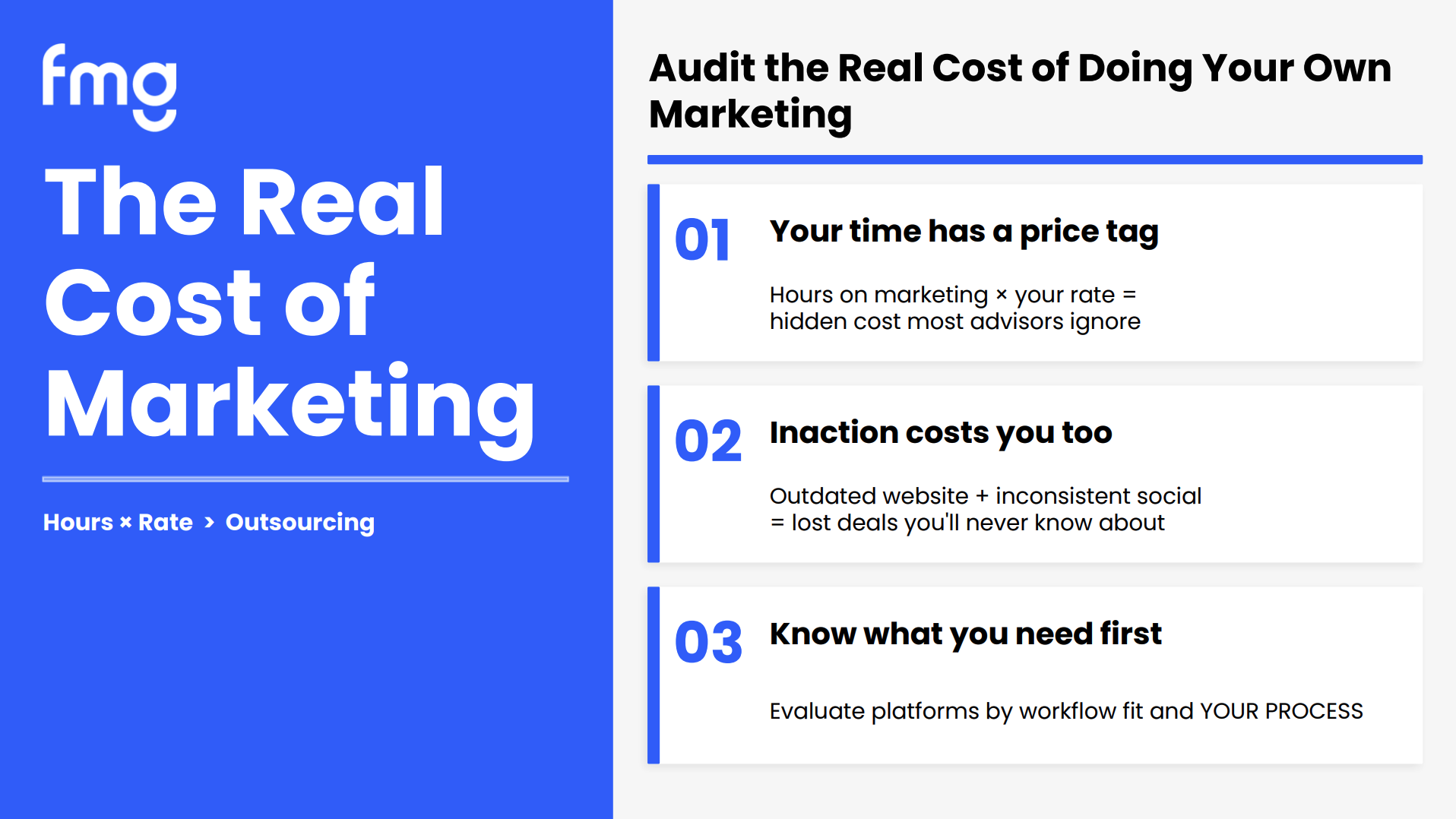
And of course, everything has a price tag. So if you take the hours you spend on marketing, and your rate, right, whatever your hourly rate is, that and you multiply those, that is kinda what you get around the hidden costs of marketing. Right? What is the cost of you doing that?
And so also on the flip side, it’s the inaction of marketing that we also need to consider. So, you know, your outdated website plus inconsistent social is lost opportunity as well. So thinking about that and know what you need to do first. So evaluating, so as you’re thinking about delegation, as you’re thinking about adding platforms or new products and services to your book, maybe it’s the newest fintech that’s out there, making sure that in your evaluation process that it truly fits into your values and your process and you can really blend it into what you are doing.
And so, as we’re thinking about that,
let’s dive right into the marketing checklist for so for support staff. But again, this could be summer intern.
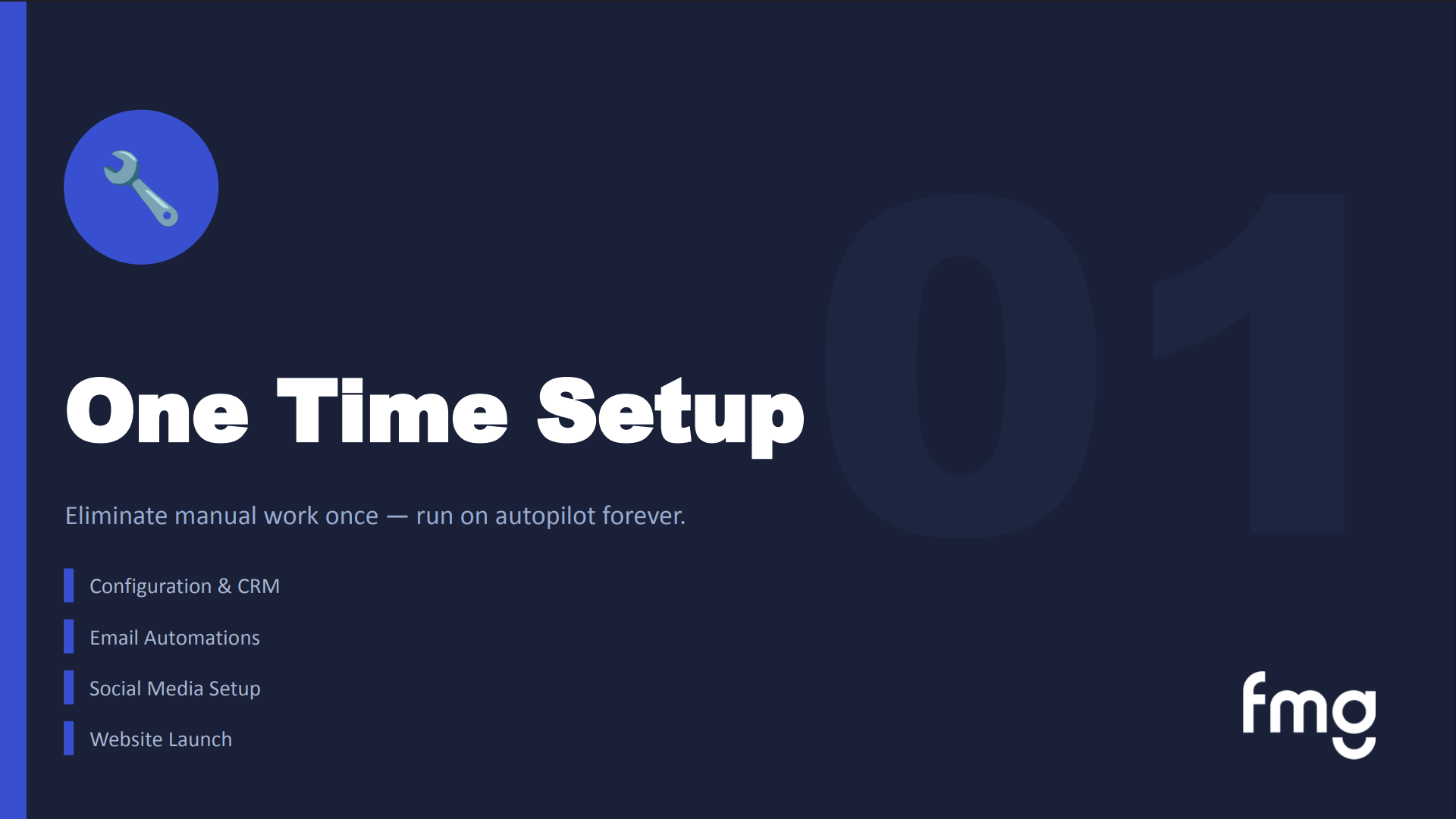
This could be you yourself, this could be your marketing team, this could be a support staff member. So take this into context with however you and your organization are run. And we’re going to talk about what can we do that one time setup, right? We can set it up once and have it go on forever.
What are those weekly, monthly, and quarterly objectives that we want to make sure we’re keeping track of and we’re doing?
And so what is that one time setup? Right? What are the things that we need to make sure foundationally are put into place before we can get going? And so, really, your configuration.
Right? We want to link our CRM or at least make sure all of our contacts are uploaded, whether it’s a CSV upload, you’ve manually manually uploaded those. You’ve uploaded your email branding, and you’ve you’ve verified your email domain as well, and we’ve set up a delegate user. So if you don’t know how to do that, we’re gonna go through that in the demo today.
So how to add a user? So if you have someone on your team that you need to give them access to the FMG dashboard, we could do that. And also setting up those automations. Right?
That’s one of the easiest things we can do. You set it up once and let it run for you. So those email automations, connecting our social media accounts. So today, again, this is your basic checklist.
Go through the FMG dashboard and make sure that CRM’s set up, branding set up, email verification set up.
We have our automations turned on if you have access to those. Social media accounts are connected, and maybe they have been disconnected recently. We rolled out a new feature that will send you an automated email if your social accounts have become disconnected, So it makes it easier for you to see those and go in and connect those and your print.
I mention it all the time. I’m old fashioned. I love the good old fashioned greeting card. And so I think like setting up that automated greeting card is one of the best ways to support to to surprise and delight your contacts and prospects. And of course, your website, right? When was the last time you updated your core pages, your calls to actions, your forms, all of those pages that are the core pieces of that.
And so that one time configuration setup, right? We want to organize our contacts into groups.
We talked a lot about this in our last Did You Know, and the importance of sending the right message to the right audience and the importance of an organized client list or client, we’ll call it a contact list, and setting up your branding like I mentioned. So again, these are your snapshots. We are also going to give you guys these slides and this afterwards, so feel free to take a text, a snapshot of this. We’re also sending it afterwards.
But I like this.
About like a new client email flow is what I put over here on the right hand side. So you get a new contact. You put them into your CRM. You add them to a group, and you automatically turn on a welcome series email, which drips on them.
You turn on their birthday email. You set up market insights, and then you can also turn on a targeted automation and follow-up. Right? So this is like a new client automation configuration, if you wanna call it that.
And so just a snapshot of a use case of making sure we’re staying in front of all of our new contacts.
And if there are any specific questions, right, maybe how to configure your email, we will share that help link here in the chat, and we’ll also share that in the follow-up.
And also setting up social media and our print and our website. So again, making sure all of our social approved social media accounts are connected. We know that the LinkedIn, just because of our integration with LinkedIn, becomes disconnected more often, so you might want to check on that.
And making sure that your social media, your branding, your profile matches your voice and your tone and your entire digital footprint, and that we’ve turned on our social media foundations. Again our social media foundations automation, so that’s automating your social media posts, are a really great way for you to stay consistent with your social media. I always say these social posts aren’t gonna allow aren’t gonna have you go viral overnight, but they are so important for answer engine optimization because all of those those engines, your chat GBTs, your Geminis, your series, they are consistently scrolling and seeing that you’re consistent and they like that. And so having that consistent foundation is really important and social sequences.
And then, of course, our website. So having those clear calls to actions. When was the last time you updated your forms, putting into process these these, processes, and making sure it’s mobile it’s optimized for mobile and all of that good stuff. So what can we do on a weekly basis?
And, yes, someone just put into the chat, Google my business profile. Yes. Make sure that you are updating that on a regular basis if that is an approved platform for you. Again, always check with compliance.
And so what can we do on a weekly basis?
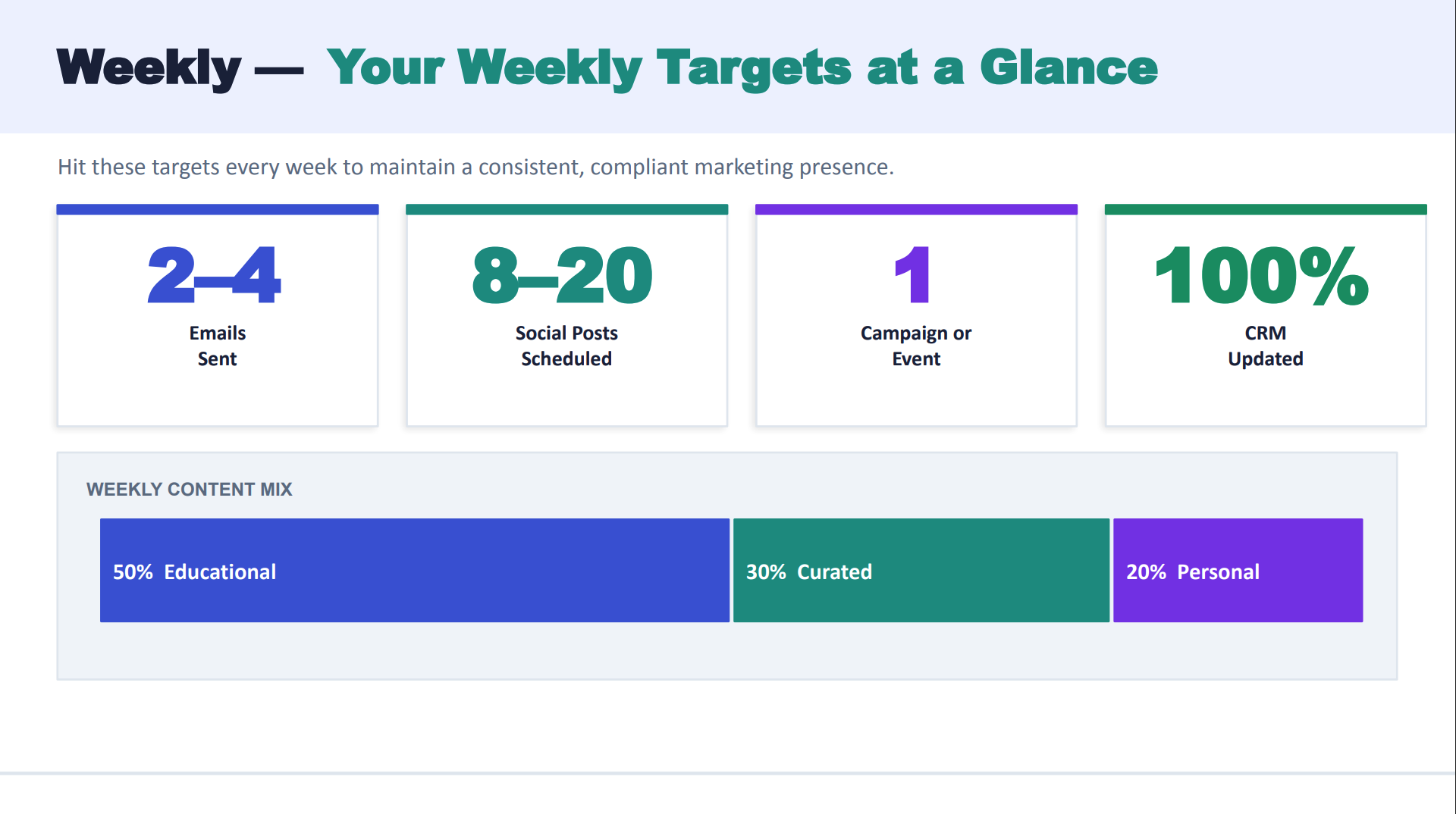
And so I’ve put this up here as a goal. But at a weekly basis, we would love to be sharing at least two to four emails, eight to twenty scheduled social posts. Now that looks like a lot. My next slide breaks that out for you. So it’s really not as much as it looks like. Because when I was putting this together and I was doing a lot of research, was like, man, twenty posts, that sounds like way too much.
But we’ll talk about that. And what campaign, what email campaign do we want to run this week? Right now, it’s financial literacy month. Right?
So turning on a financial literacy email series would be great. I mean, it’s not too late. Right? You could turn it on for the last week or so.
And again, just making sure your one your CRM is always updated because that is your source of truth. And what types of content should we mix in here? Right? That’s a big question we get a lot. Educational, the curated content, and then the personalised content as well.
So as you’re thinking about, well, what on earth am I gonna share on all of these? Come to the FMG library. You can find timely content. You can find educational content as well as then adding your personalization to that.
Okay. So I told you I’d break down that social media. Eight to twenty seems like a lot. And so what I meant was total. Right? We might use the same post on multiple social platforms, and again, your approved platforms.
So three to five times on LinkedIn, and think the type of content for LinkedIn would be thought leadership, market commentary, Facebook, that’s really community building, lifestyle content, and Instagram, right, that’s gonna be your reels, your short form videos, tips, carousel individual picture carousels. And if you’re utilizing, X or Twitter, right, that’s a couple times a week, and those are quick takes, hot insights. And something that a lot of people ask is, you know, how can do it for me help with social media? And this is where they really coach us on which posts are great to personalise.
And so you work with them and you can provide, you know, if, you know, it was National Pet Day recently, and so they help, you know, like, hey, send me some pictures of your your pets and let’s personalize this post. So it’s not just a generic National Pet Day, but we’re personalizing these posts. And I added again that content mix. So forty percent educational for social, thirty percent market insights, twenty percent personal, and some promotional.
Hey, these are the services I provide, this is the value I create for my community, these are the types of people or niche markets I work with.
And so as we’re thinking about our weekly planning, or delegation tasks or what you want to accomplish, we want to, hey, what campaigns are coming up? It’s financial literacy month. We know that March, April, May, what’s coming up for May, which I’ll give you a bunch of content ideas after towards the end, and confirm, what’s coming up next week? What do I have going on?
What appointments? Who am I meeting with? So sending out customized emails, adjusting our voice for our audience, and our types of content. We know that millennials like videos.
We know that our retirees like long formatted content. So again, just taking those pieces into consideration, sending that test email and scheduling it out, and reviewing performance. Again, I love our email sent and scheduled section because that allows for us to be able to to be able to do that. And that weekly flow, right?
Select what we’re we wanna send out and what is your clear call to action? I think a lot of us forget when we’re posting on social media, we’re sending out a custom email series, a clear call to action. How do you want them to act? What do you want them to do your with your email?
Right? Is it schedule a meeting? Is it sign some paperwork? Is it just a general awareness and education?
Right? What is that clear call to action with your social media posts? Do you want them to view your video, schedule a meeting? Making sure everything has a clear call to action is really great because that helps us measure what we’re doing.
And then, of course, test improve, and we wanna look at our results of everything that we’re doing and schedule it, send it out, and review our performance afterwards. So again, another really great tool if you’re not utilizing it as a compliant texting tool. We have MyRepChat, and it just got a brand new facelift, which we’re really excited about. But if texting is an approved form of communication for you, I put together just basic.
And again, can build out these processes, you can delegate these tasks, whatever it might be.
But sending out those texts, so sending out an appointment confirmation twenty four hours, sending a day of reminder, sending them a nudge to sign some paperwork. We see a huge we see a huge uptick in getting paperwork turned around quicker with text message reminders. And again, just something simple as a happy birthday text is great too.
So, again, adding these to your checklist is a great way to take care of our clients to and these are great tasks that you can delegate to your team.
And so in addition to approved text messaging, weekly, we can also think about, again, those social posts, scheduling those out, optimizing your images, monitoring your engagement, and the do it for me content calendar really helps with this, and they help execute a lot of the social media, the blogs, for you and help personalize those posts. And of course, yes, this will be sent. The recording will be sent, the slides will be sent. So there’s so much text on each one of these. I am not following presenter rules, as I know, when it comes to creating a slide deck, I have way too much information on here.
But I have so much I want to share with you all.
And also from a weekly standpoint, what should we be doing with our website?
Our website uploading or publishing a blog. If you have approved our, we call it our Muse tool, our AI built into your blog, it really creates an easy opportunity for you to create blogs on a regular basis.
We also wanna make sure we’re updating our website content if needed. We’re ensuring that all of our links are working on our website, all of our CTAs are clear. And now let’s look at monthly.
Lots of information today. And so what are we reviewing and optimizing and scaling on a monthly basis?
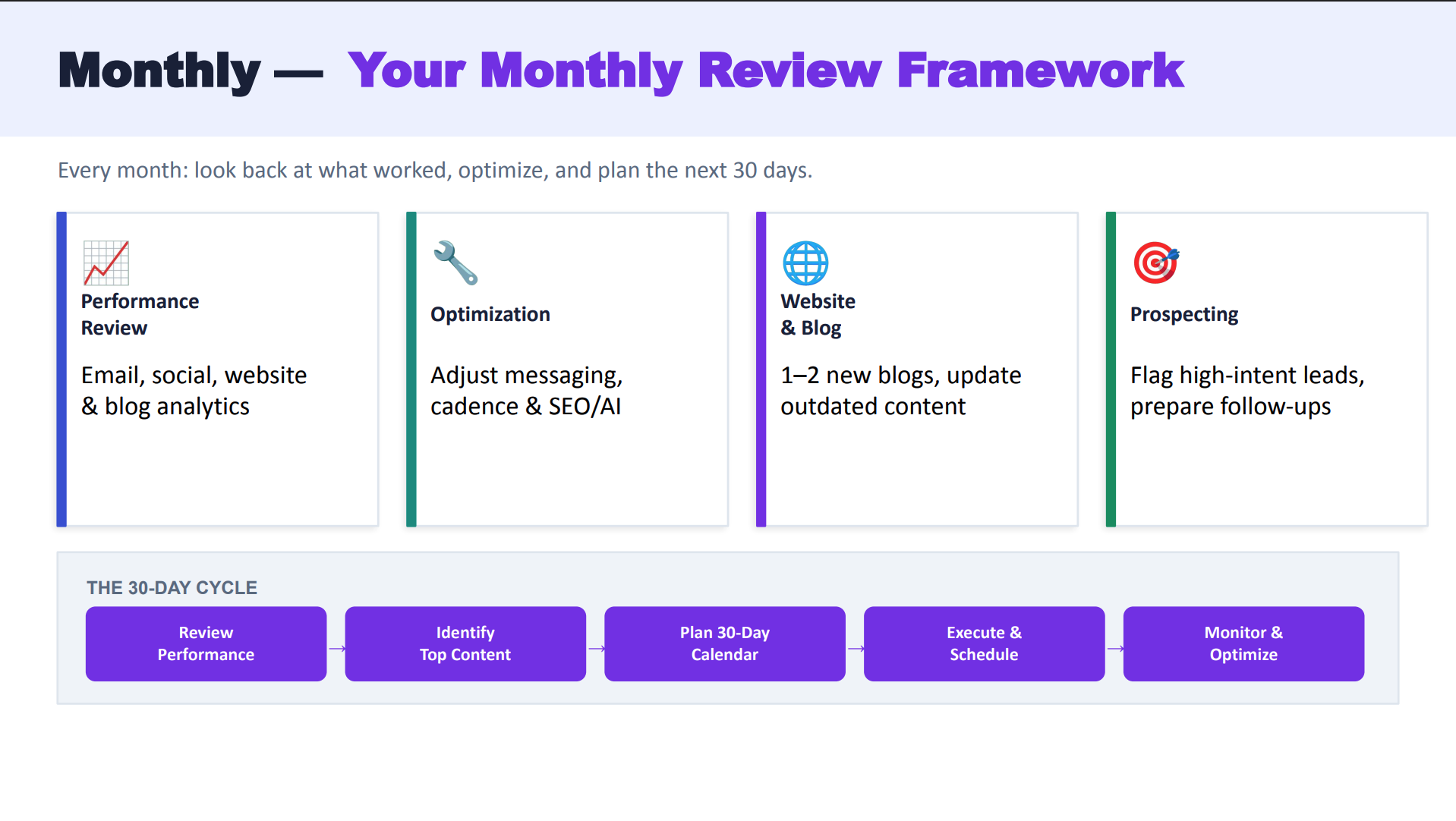
And your monthly review framework. So each month, I really want to look at my emails, my social, my website and my blog analytics, right? I want to look at my emails sent and scheduled, what’s going out, I want to look at my impressions on my social media pages, I want to look at my website analytics, my optimization. So based on that, then I’m gonna think about the optimization of my messaging.
Right? Maybe my email open rates went down. I need to think about what emails I’m sending. Maybe it’s not the right time, or right messaging to my audience, so I’m going to look at that.
I also want to look at the cadence. If you’re ever questioning your cadence, how often should I be reaching out to my audience?
Ask them. That’s the best way. Put into play a new client welcome survey and ask them how often do you want to hear from me? How often would you like to what types of content would you like to hear from me?
Is it educational? Is it estate planning? Is it tax planning? Is it life insurance? Whatever it might be, simply ask your clients if you’re ever questioning what types of content, how often, how would they like to receive their content.
And then from a monthly standpoint, also thinking about our blogs, how they’re performing and updating any outdated content. So sometimes going back through either old blogs or old web pages you’ve created and making sure are up to date, stats are up to date and also prospecting. Let’s start thinking about our lead generation opportunities, right? What forms are performing well? What pages on your website are you getting a lot of traffic to? And maybe we should add a pop up to those.
We can even think about outsourcing something to a platform like Catchlight, if you’ve ever heard of Catchlight. Right? So then also thinking about growing our book of business. A lot of this is about maintenance and what we can do on a daily, monthly, weekly, quarterly cadence, but also the prospecting aspect of it.
Alright. That’s part of marketing. One, general awareness, education, and communication, but also growing your growing your book ultimately. So again, thinking about how leads are coming in, what what channels are coming in from?
Are they coming in from your blog, your social pages? Did you get some email referrals? And thinking about what’s working, right? So these are all things that we’re looking at from a a monthly standpoint when we’re thinking about our month in review.
And again, that monthly. So if I’m looking at email, I know that a high level analytic I’m looking for is my open rate. On average, our industry is about, twenty five percent. So you can use that, come in and look at your sent and schedules and see, okay, that is what I’m looking for. My click through rate should be about three percent here.
So as I’m looking at my monthly email performance, that these are some of the numbers I’m looking at. And our social engagement. Right? How many comments? How many shares? How many impressions are we getting on our content?
And we know that personalized content always performs much better. So thinking about maybe adding to the mix of with your personalized content, I think you will absolutely see a uptick in impressions, comments, and shares with personalized content. And of course, website traffic. So making sure your website has been connected to Google Analytics within the platform so that you’re you’re able to see what pages are the most popular, how long are people spending on your website, and of course, lead conversions.
What where are they filling out forms on my website? What are my clear calls to actions? Are you utilizing the schedule a meeting button in your email signature? That’s a really great feature that we’ll share here in the chat, as well as making sure that your website has your client logins.
They know how to get ahold of you, they know how to schedule a meeting, all really important pieces as we’re thinking about performance and optimization.
Where can are we doing on a day to day basis and then reviewing at a monthly and even quarterly level.
And so website and prospecting. So things I’m looking at from a monthly perspective or I’m delegating for someone to do in a monthly perspective. Right? We’re publishing our blogs. We’re reviewing for outdated content, updating that seasonal messaging, and just looking at those analytics and looking for opportunities. And then blogs. Blogs are such a awesome place for us because they help with answer engine optimization.
They help showcase your credibility, they help showcase your thought leadership, and we see some great results. So fifty five percent of people that publish blogs say that they receive more website visitors, three times more inbound leads. So blogs are a great place for us to start, and if you’re doing if you’re part of our do it for me, they help dive into that. And they meet with you to review where you are once a month. So really helping with that review and optimization.
And I, again, coming back to the email sent and scheduled, this is so important for us to review where we are. So reviewing our sent emails on a monthly basis, what do we have coming up?
Identifying hidden advocates, Coming in through those lists to see who’s opened our emails, and that will start to see, you’ll start to see some patterns, right? Those clients that open your emails all the time, they know they love hearing from you, Maybe there might be some unsubscribes, a great reason to pick up the phone and say, hey, I saw you unsubscribed.
What’s going on? And optimize based on your data. So knowing that twenty to twenty four percent, I use the twenty six percent, I’ve seen both our average for the industry.
And it’s actually higher than other industries. And that’s because people want to hear from you. You’re their trusted bellwether. You’re the person that they turn to with all their financial needs.
So yes, they open your emails. So I think that’s a really fun stat is our industry actually has higher open rates than others out there. And so we looked at monthly, now quarterly, right? What can I do from a quarterly basis?
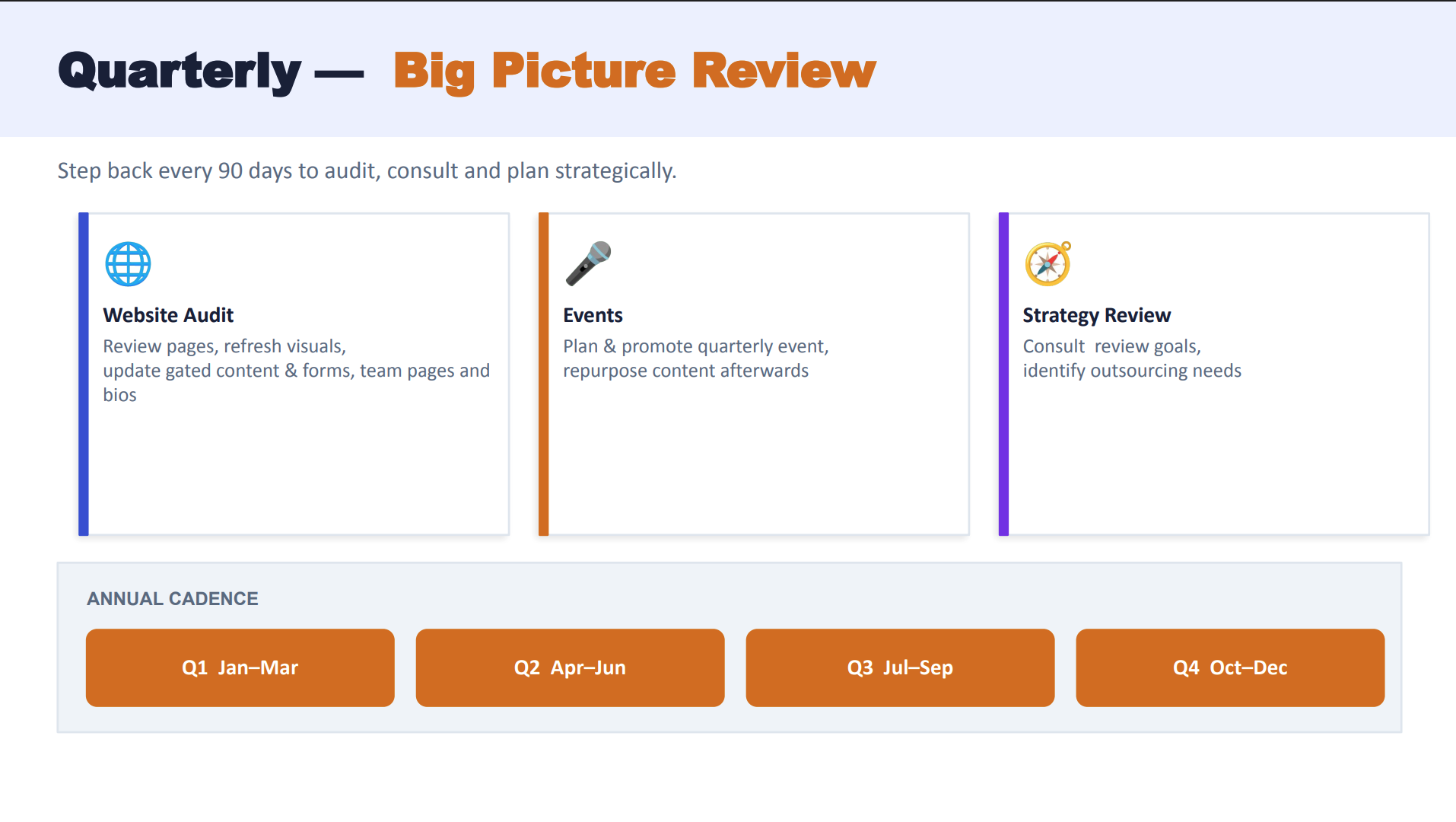
And again, it’s auditing our website, reviewing pages, refreshing your visuals, updating your bio, maybe you added a new team member. We wanna make sure all of these pieces are up to date on a quarterly basis.
Events, right? We can’t forget about events. We know that our clients really do love events, and so that is something for you to think about. Again, we don’t have to do them all time, but incorporating them whether they’re an in person event or a virtual event.
We’ve done some did you knows on events specifically in the past, and then of course reviewing your strategy. What is your goal? Is your goal overall awareness? We just want to share education.
Is your goal lead generation? Are we following those goals? Are we making those steps? Do we have more form fills this past month than we did the month before or the quarter before?
Is your goal making sure that your website and your social is meant for your current customers? So making sure they know that they can use your website to book a meeting, that they can come in and use your brand new calculators, which I’m going to show off here in a second.
But thinking about the big picture, we can’t let that get lost in the day to day stuff.
And of course, we want to review those top performing pages, we want to look at updating our messaging.
We know that best, best practice for websites, websites need to be refreshed redesigned every two to three years, so making sure that our websites are optimized for SEO and AEO, and they meet client expectations. Clients expect for you to have a mobile friendly, quick, educational based website. And if you don’t have that, if it hasn’t been redesigned in the last two to three years, it’s probably time to think about doing that, and having updated visuals, having maybe a really great video on your homepage, gating your content, adding PDFs, adding value add, items like infographics, lead gen pages, and of course forms. Forms are a great place to be able to, one, attract new leads, get information from current clients and review all of these, of course.
And again, just thinking about events, I mentioned events again, but your event life cycle. So thinking about planning your event six to eight weeks in advance, we want to start our announcement four weeks out, reminder the week before, the day before. So again, a quick snapshot on if we wanna run an event, or delegate an event, this is how we can do that.
And of course, strategy and review. Consulting with your team on what are our goals. Right? Is it to increase our social media presence over the next quarter?
Is it to add our automations and consistently communicate via email with our clients? Is it, hey, know, we want more website views, right? What are some of these goals that you would like to accomplish and making sure that whether you have a team you’re delegating to, you’re reaching those, whether you’re working with your DIFM, your do it for me concierge to help get you to that goal. But we just added a quick checklist, right?
So strategy consultation, what are our goals?
What is our plan to get there? We’ve added this framework for delegation to get you there and outsourcing your needs. What do we need to outsource?
And what can we do in house? What do you have capability for? What do you actually enjoy doing? I want that to be like one of the messages as we we talk about delegation is do what you love, because then that way marketing doesn’t seem like a task. It’s actually something that you get excited about and then thinking about what’s next. And also so we went over the basics, right? What should I do on a regular cadence for email, social, website, blogs?
But then there’s those always ad hoc things, right? Crisis communication. It’s a crazy world we’re living in, there’s wars going on, and so at the first sign of a market dip, making sure that you have, hey, this is this is what we’re gonna do. We’re gonna send out an email, this is who it’s going to, and we’re gonna send out a social post, right? So making sure to monitor the content calendar for timely content that’s out there that you might want to incorporate.
And, you know, office communications, templates, CRM best practices. Another one we see a lot of people that they want to delegate or look out or use an outside source for is videos. We know that everyone wants to use videos, and so a really great place to get help with videos is our friends over at Idea Decanter.
They recently put out a state of the advisors video report and I asked them if I could use this slide because I loved it so much.
As we’re thinking about delegating, doing what we love, and what can we have others do for us or another service do for us. And video is one of the ones that we see a lot.
And so I just thought this was great. Fifty two percent of advisors are currently creating video.
Eighty eight percent of advisers think they should be creating video, and seventy three percent of advisers agree that video is worth the investment. And so we’ll go ahead. And if you’re if you’ve thought about adding video and you need someone to help execute, our friends at Idea Decanter can help you with that.
And of course, I told you we are going to be sharing all this. I saw in the chat that this was a lot of information at once, And in our checklist, we broke it down for you to make it really easy. I had a really hard time putting all of this information into one. So thanks for sticking with me. But we are sharing with you running the system delegation playbook. Right? So how can we do this, and a really simple checklist, one that you can use on a daily, monthly, weekly, quarterly basis.
So we are sharing that, and now let’s go into the demo. So like I mentioned, we are going to demo a couple different things in the content library. So if you want to dive into the content library, come with me. The first one that we are going to talk about is adding a user.
So maybe you have a summer intern coming, maybe you’ve hired someone, or maybe you’re looking to add a new team member, well, you can come over here to adding a sub user to your account. So I’m gonna go to my profile picture in the upper right hand corner. We’re gonna come down to users, and here, this is where you can add users. You can add as many as you’d like, and so you simply come in to add user, click in this green button right here, and you can add their name, their email, and their username, and then you can select what they have access to.
So again, on compliance, based on rules, and all of that, you can think about what you would like them to have access to.
Best practice here, I always like to just have their username be their email, and no, you are not charged per user. You can have as many users as you would like. So there it is.
That is how you can add a new user. So again, you can add as many as you’d like. You can give them access to certain parts. And then there’s a notification section here.
So if you want them to also receive notifications, those notifications would be, hey, this email campaign is going out. Someone signed up for an event. Someone signed up for a lead generation form. All of that, you can also make sure that person receives those notifications.
So that is how we can add a sub user to the account, and again, not extra charge to add sub users. And we’ll go back to our home page, so we added that. And let’s just review that sentence scheduled.
And come over here to that sentence scheduled, and this is where we can look at our emails and review. Again, this, open rate should be twenty six percent. This is my demo account, so it looks like everyone on my demo account loves my emails at ninety four percent, but yours should be gauging twenty six percent. But our last FMG Did You Know webinar, we polled everyone and everyone even had higher click through rates than the average twenty six percent, which was really great. So I just wanted to highlight that. A lot of people ask, where can I go for those analytics? That is where you go.
And coming into the content library, we have some brand new content that has been recently updated that I wanted to highlight. And so down at the bottom, we have partner content. I don’t know if you have seen this, but we have nitrogen content down here that customers use if you’re utilizing nitrogen. And if anyone is also utilizing Bento, we recently updated some of these. So if you’re a Bento engine user or maybe you’re looking to add Bento engine, you can learn more. We just added that link to the chat.
And this is really great messaging for the right audience. And so, you know, milestone messages, age eighteen, milestone messages, age fifty, catch up contributions. Some of this content has been recently updated, so just wanted you to know that.
And another brand new feature, there are calculators. Have you guys seen these yet? So if you type in calculator into the content library, you will see that our calculators recently got revamped, and they are awesome. So we have added these, and we will be adding a significant more significant amount of more of these in the near future. But how long will my savings last if I become disabled?
And so let’s just take a look at this. You can see that they are much more user friendly. They have a lot more context, a little more intuitive, and so, come in and check out these new calculators that are available. If you have automations turned on or if you have website with us, you will be able to see these calculators.
So I just wanted to highlight some of these brand new calculators that are out there. Great lead gen opportunity. So again, we talked about updating our website and updating our blogs. This would be a great tool to add to that.
And yes, you can share them on your website, share them on your blog, share them via social, but these are pieces that you can add to your website that keep people there, they keep them coming back.
And also a brand new feature is it allows prospects and clients to be able to download their results as well. So yes, we encourage you to share these on your websites, share them on your blog, but come in and check out these, and again these will be added, and if you don’t see them, it might be because your broker dealer might not have approved them yet, so always check with compliance. That’s my compliance spiel there. Let’s get back to our presentation.
And so go in and check out those brand new calculators, see which ones fit your goals and your messaging and the services you provide.
And if you are looking for more information regarding our do it for me. You’re like, man, this all sounds great. I really need someone to help do it for me, or I’m just looking to add premium features. So whatever it is, whether you want to talk to us about an upgrade, whatever it might be, We’re just gonna set up this poll.
And while we do that, let’s take a look at our content. So as you know, by coming to our Did You Know webinar series, you are able to get our ten minute marketing calendar first. And so we will share this in the chat so you can start planning out your May content. So that is coming up.
And so you can see everything that’s coming up.
And content planning, so again, thinking about the month coming up, Mother’s Day, great opportunity to send a physical greeting card, Memorial Day, Cinco de Mayo, FAFSA deadline, so that is all included in the content calendar.
And more themes coming up, AAPI Heritage Month, Jewish Jewish American Heritage Month, Mental Health Awareness Month, Small Business Owners. So if any of these resonate with you and your your audience, you and your niche marketing, make sure to come in and schedule these out, delegate, if you need to.
And, again, product updates. So here, if you haven’t seen it yet, MyRepChat, our approved compliant texting platform got a brand new mobile app. So it is much like the text message feature we’re used to using in an everyday, and so that is completely redesigned. If you have MyRepChat, you just go in and update your app and you will see the new mobile app and the desktop will be getting a new new revamp in the summer, so you can look forward to that.
And of course, these calculators, so you can come in, check out these calculators. If you have calculators already built in, there are zero disruptions and no actions needed on your on your part. So just want you to come in, check out those brand new calculators.
And we mentioned that there’s new features coming soon in the email, and one of them is FMG testimonials. So if this is something that is approved for you, check with compliance first.
But we are building in some amazing testimonial automations.
And so that is all coming very, very soon, you can look forward to seeing that.
And at this point, we went over so much information.
Thank you all for sticking with me. I hope you love our checklists that we created as much as we do. We thought they would be very timely, especially with summer coming up and all of that.
The checklist will all be sent to you afterwards in this replay so you don’t need to sign up anywhere as long as you are signed up for this webinar then you will receive those.
And I would love to hear from you all in the chat what was something that you took away from today and I will go through and answer any questions.
One was when will we be able to post on Twitter or X?
Right now, always check with your compliance, number one. And two, our platform today does not have an integration with X. We used to actually, but X on their side changed their API or their integration, and so it’s no longer supported at this time.
Let’s see. There’s a lot more to offer that I may or may not be able to take advantage of. That is absolutely correct. We have that poll that we set up, but if you want us to reach out to you regarding maybe just what packages you have, and if you want us to reach out to you, you can go ahead and put that in the q and a section as well. So if you’re like, hey, I need to check, that would be awesome.
And any other questions? Thank you all so much. We look forward to seeing you for our next Did You Know? We hold these on a monthly basis and and come back and see us.
We’ll talk to everyone soon. Thank you so much. We love seeing you and I love seeing all the names I get to see on a regular basis. So thanks everyone.
We’ll see you soon.
Okay, bye.
Book some time to chat or call us at 858-251-2400.


