

In this session, the FMG team covered strategies for modernizing financial advisor websites to maximize engagement, visibility, and conversion in 2026. Key topics included the shift toward Answer Engine Optimization (AEO) and AI search discoverability, the importance of placing short FAQ sections on high-traffic pages, and strategies for using primary and secondary calls to action. The team also discussed website framework updates, the addition of the new FAQ widget, ADA compliance through Accessibility Lock, and using form-triggered emails to turn website visitors into leads.
Browse the slides we reviewed during this workshop below.


Hi everyone, welcome to our January Did You Know, whether this is your first Did You Know webinar series or you’ve come back month after month. Great to see you all.
And as we get going, today, we’re going to talk about websites. What are your website resolutions for this up and coming year? And how can we maximize our website so we can compete and we can grow and we can continue to be able to reach our niche audience and all of that. So looking forward, if you wouldn’t mind in the chat, me where you’re chiming in from, and we’ll get going.
So I am Elise Lambert, the director of enterprise marketing here at FMG. This is my family. We recently welcomed a new one. And so I say all that I’m out of Fort Worth, Texas, and my favorite thing is I get to see all of you on a monthly basis. This is my favorite part of my job as we dive in each month to certain tools and features within the FMG platform and teaching you all and how we can maximize these tools, how we can use these tools.
My, you know, one of my favorite parts about this webinar series in particular is our our chat feature. And so please feel free to chime in. I’m going to ask for ideas and inspiration. We would love to see what you guys are doing in marketing, especially as it pertains to what we’re going to talk about today with websites.
And so the recording will be sent afterwards as well as a replay page with a dialogue of the chat, in case you missed something in the chat, it is there. It also has a ton of really great resources, so that will be sent afterwards. And if the chat is too much for you, if you just wanna dive in and look at the screen and watch, that is no problem as well. So feel free to minimize that chat if it’s a little too much for you.
And I encourage you as we move through this process, knowledge without action is wasted. And so put into practice, log into the FMG dashboard, put into play what we are going to cover today, so we can make the most of your time. You all as financial professionals are so incredibly busy and so how can we maximize our efforts? We can do that.
Last month, so I always like to cover this, we will share the replay of last month’s Did You Know in the slide or in the chat, but we went over the twenty twenty six marketing guide. So our marketing team put together an extensive guide that is such a great resource. So we are going to share that resource with you.
Last month’s Did You Know we talked about how AI search is changing and how you can become discoverable, content marketing to save you some time, and we went through some demos as well.
We just shared that replay so if you missed last month’s Did You Know? No problem. We also have a YouTube page so if you’re ever looking for a specific topic you’re looking for a little more information on check out that YouTube page on all of our Did You Know webinars. So that’s a great reference for you to go in and check it out.
And what we are going to cover today. So how to make sure that your website lives up to expectations in this new crazy world we’re living in. So test your website for twenty twenty six, how to level up your website pages and build trust. We know that our website is our digital footprint, and so we need to always put our best foot forward.
And so we’re gonna talk about ways that you can build trust and add credibility to your site. And as we go through each one of these sections, I would love for you to grab a pen and paper and start to write down a little bit of a to do list for you. Right? There’s gonna be some things that we’re gonna cover so we can start to put into play a plan for execution.
And if you don’t have a pen and paper in front of you, you’re not taking notes, don’t worry because we are sending a checklist for you to make it easy.
So this is your website checklist that we will be sharing. It’s a twenty twenty six website checklist. We just shared it in the chat. You can also scan here to download it.
But again, you’re busy. If you’re like me, just tell me what I need to do.
We figured we would share it beforehand today instead of after so that you guys can follow along. You can put it into play. So go ahead. You can check that link.
You can download it, print it out, whatever is easiest for you. And then we’re going get into some demos today as well. So diving into the platform, we’re going to look at how to add a frequently asked question page. We are going to look at adding a form triggered email, as well as looking to create a blog using some of our timely content and a premium feature, which is our artificial intelligence.
So we got a lot to cover, let’s dive in!
And if for whatever reason that link isn’t working for you all, can scan this right here with your phone and it will open up, or we will also share it in the follow-up.
Okay. So first, does your website pass the five second test? And before I jump into what on earth is the five second test, I want to just preface that within the marketing world, we encourage everyone to update or redesign their website every two years. So if it’s been two years, it might be time for you to think about a website redesign, updating some of your content in your copy.
So one, that’s kind of our first check is, Okay, when was the last time we gave our website a little bit of TLC? And then the second is, does it pass the five second test? So within five seconds of someone going to your website, you should be able to answer someone should be able to answer these five five things, or I guess right here at four, but what was the page about?
What do you remember seeing?
Who would benefit? And what actions can they take next? So who is this for? What problems do they solve? Do you solve for your clients and prospects?
And what can they do to get more information? So within five seconds, and so send your website to maybe someone in your office, send it to your uncle that you know will give you some really great feedback and honest feedback, but send your website to someone and say, okay, within five seconds, do you know who I am, what I do, how I can help you, and where can you go to get more information? Whether it’s booking a meeting or downloading an ebook, creating that call to action.
So what does this look like on a website? We need to make sure that our copy is written with problem solution format. So what is the problem that your niche has, your clients or your prospects have, and what solutions do provide for them? So I love this example right here, helping business owners who want to exit on their terms.
So who is your target audience and what do you do from them should be right there when they first come to your website.
And so we also within five seconds, they need to know where to act. We need to compel them to do something with that information. So ninety seven percent of website visitors do not convert on the first visit, but give them a reason to tell you who they are. And so we need to think about our lead generation essentials.
So within your checklist, this is in here, but we need to make sure that the FAQ page is relevant, it is easily accessible, and it is on multiple pages. We’re going to go over this today in our demo and that there is a clear CTA, a call to action. So that can be book a call, download an ebook. And in the chat we just shared how to add that FAQ section.
We also shared some call to action examples and then also some other lead generation tools that are premium features to our websites, you can add a hub page is what we call this. And so these are niche landing pages created for you regarding planning for social security, life insurance, estate planning. These are very niche specific topics that you can easily add to your website.
And so what are some examples of a clear call to action? We always say we want a primary call to action and the secondary. What do I mean by primary? Primary is call me. Book an appointment. And then that secondary is hey download this resource.
Join my webinar coming up. You know, read the blog, right? So, what is, do you have clear calls to actions? And my question to you, everyone in the chat, what call to actions do you guys currently have on your website that garner the most traffic? So is it booking a meeting? Is it the call button? Curious which one’s on your website.
Oh, we have okay. So this is great. Some are saying the contact us page. Of course, no matter where you are on your website, it is important that your call to actions are always in sight so that they know whether how to get a hold of you, where you’re located, of that would be great. And so, no matter where you are, whether they come to your first page or they’re scrolling, there should always be a call to action.
So five second test? We’ll call this the ten second test. Go to your website and make sure no matter where you are, there is always a visible call to action.
I love these ideas. Discover more. Start a conversation. And as we’re thinking about our calls to action, also want to think about who our target audience is and what forms of communication do they enjoy.
If I’m working with Millennials, I know they don’t want to pick up the phone. They want to book a meeting by clicking a Calendly link. I know that my retirees, they want to talk to someone on the phone. So making sure that our call to actions also resonate with our audience is an important feature.
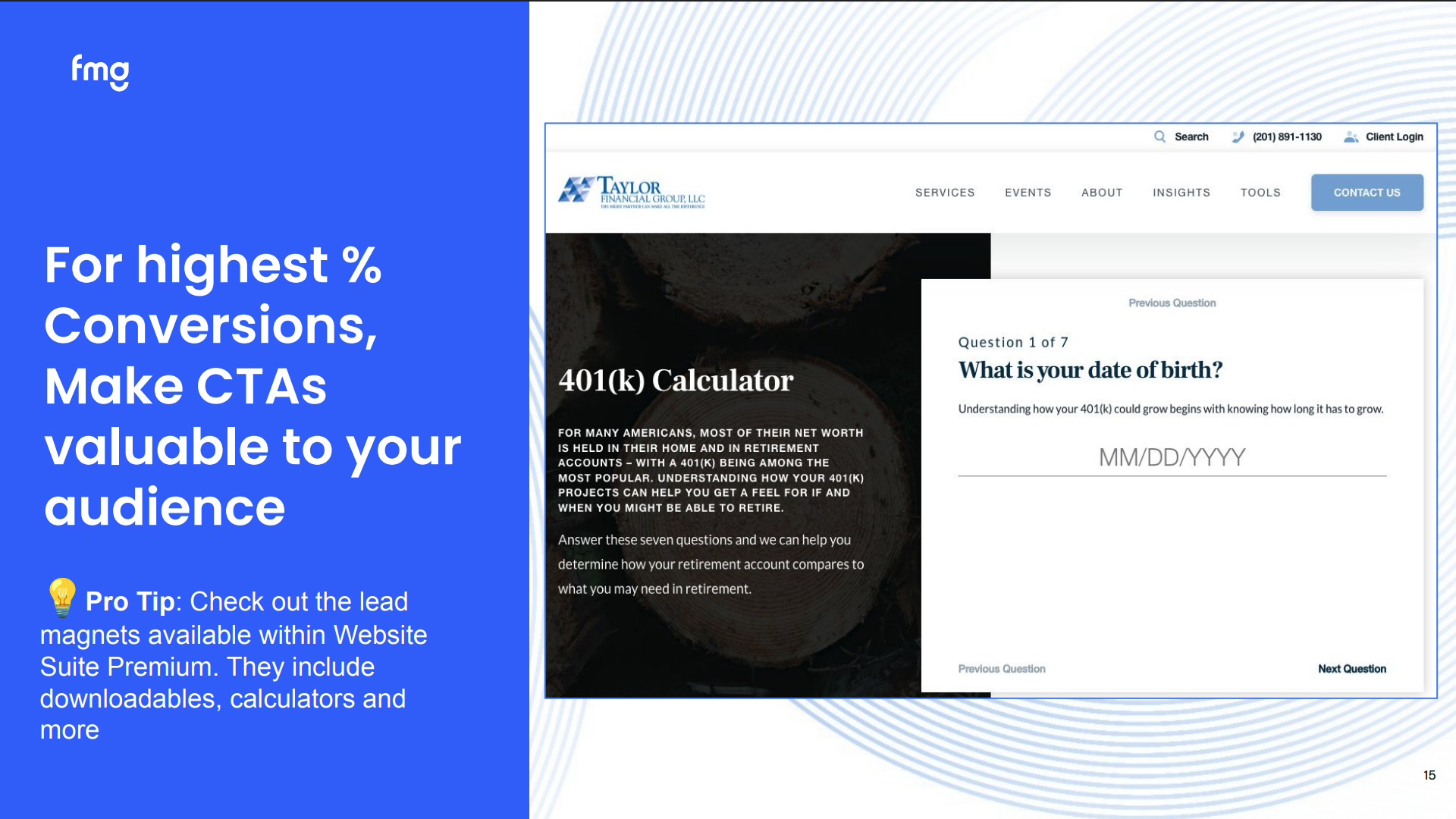
And for highest percent of conversions, how can we convert these calls to actions? We want to make them valuable to our audience. Again, resonating with our audience. So we can add a lead magnet, such as a calculator or a quiz to our website. So again, are important because they’re going to generate a call to action, they are keeping people on your website longer, and they know that these now, so once they’ve been there, they know these resources exist. So it is encouraging them to come back time and time again because they know your website is full of helpful educational informational resources.
And another big piece is the FAQ schema markup. So this is a widget we have added. So again, you haven’t updated your website in two years, this is one of those things that you can add. This is important for a number of different reasons. One, it answers the question of our audience, which is so important, right? What questions do they have? They want to come to your website and they want to find solutions.
Also, it helps us with answer engine optimization. What on earth is answer engine optimization? It is Hey Siri, can you find the best financial advisor in Fort Worth, TX that works with business owners? Hey ChatGPT, can you find me the top financial female financial professionals that have a CFP designation?
So when we create the formatting of FAQs, this is what answer engines, your series, your Geminis, your ChatGPT’s are using to crawl your website and grab these answers. So if you haven’t added this widget, this is one we highly suggest And so adding that, if you are questioning what FAQs I should have on my website, ask Hey ChatGPT, what are the top five financial questions millennials have for financial professionals. Start there and then you can get very granular. We encourage you to add these to multiple pages on your website, specifically for the different services you provide, the different products you might provide, and adding them to your blogs as well.
So we got a great comment in the chat. Biggest question is how do I make these modifications to my website? One, we’re going to go through a demo, but if you’re not seeing some of these, it might be because it’s time for a upgrade or you’re looking for more tools. And if you want to reach out to us, we’re going to also add support team here. If you want us to reach out to you and talk about what features you might have and what package you even have and what you’re looking for, please let us know. If you want to put that in the Q and A, if you want us to reach out to you, talk about what packages you have, where you are, we would absolutely love to help you out there.
And one of my favorite calls to action, everyone needs to add this to their website, is that calendar link. So whether you also check with compliance which calendar widget or which calendar tool is approved for you, but whether you’re using Calendly or Microsoft Bookings or Zoom appointments, this is great.
We would love to we would love to see this on more websites because this is the easiest way for people to take action. And if anyone is using an approved text messaging tool like MyRepChat, this is one of the easiest ways for you to book meetings is to send a compliant text message with your calendar link here in it. So we’ll also add in the chat how to add that and how that’s a really great feature.
And I talked a little bit about hub pages. So these are engaging landing pages that are premium features. If you have a premium website, you can automatically turn these on, but these are pages design specific topics like life insurance, capital gains, inflation, college savings, net worth, cash flow, social security estate. So you can easily turn these on, and these pages have detailed information, they have a lead generation and they have a call to action regarding each one of these. These are a great way to showcase your credibility, to gain trust and to help with answer engine optimization.
And so once we’ve added those, we’ve added our call to actions, we have two calls to actions, we have our FAQ widget enabled, we have added our schedule meeting button or our calendar link. Now next let’s talk about the basics of search engine optimization or answer engine optimization. If it is approved for you, so again always check with your compliance, but we would highly encourage you to claim and optimize your Google My Google Business profile. So we will add some steps here in a helpful blog post regarding this, but this is really important for people to be able to one, find you and it helps with answer engine optimization.
And we are going to dive into this in the very near future. I keep kind of dangling the carrot, are waiting for approval, but to talk more about testimonials and Google reviews and of course make sure it’s compliant, not everyone can do this, but if you can add these to your website, this is a great way to showcase trust and credibility and so adding those reviews to your website is a great way to do that.
And then of course accessibility lock. We need to make sure that our websites are accessible for everyone with a disability and so we can easily add that onto a website if you don’t already have that.
And what keeps people coming back and driving traffic is that client portal access. So do your clients, your current clients know that they can come to your website to access their client portal? So whether it’s their eMoney account or their living balance sheet, whatever it might be, client logins they have, make sure that they are on your website because this is encouraging traffic. It’s encouraging repeat traffic and they know that your website is the hub for for coming back into coming and booking appointments.
They know that they can come and log in to all of their important accounts. And so adding that and if anyone has any great examples of a client portal button on their website, we would love for you to share that in the chat so that we can see some good examples of how you’re doing it, what you have, how they can log in, and all of that good stuff. And thinking about your website is we want to plan our website with what do you want them to do, right? Of course, we want them to come to our website, but do we want them to visit our blog?
Do we want them to book an appointment? Do we want them to take our risk survey that maybe you’ve created or execute on that four zero one ks calculator? So calling to action maybe three or four things that you really want them to do. Make sure that is front and center.
And I love this. Someone just shared we make sure to train our clients to go to their website. Yes, make that a part of your first meeting process so that they know they can come to your website to get ahold of you, to log in, to find, you know, their documents, whatever it might be. So I love that.
That is a great practice management tip is to train your clients. Tell them what to do. Tell them how to utilize these great resources.
And accessibility locks. So again, making sure our websites are accessible for those that are blind and old, color blindness, epilepsy, All of these we want to make sure our website calls for these and so FMG offers what we call accessibility lock and this is an added charge to your website but we upgrade, we ensure guaranteed certification that meets all the requirements, as well as provide that documentation and it is updated every twenty four hours, so the maintenance is there. We are maintaining these standards as well as making sure they adhere to ADA compliance and all of that good stuff. So if you are looking to add accessibility lock, we can add that. If you want to add that to the Q and A, if you are like, hey, sign me up, I am curious in adding this, we can please reach out to us in the question and answer.
And as we do this, this is a great way for us to build trust. I mentioned earlier our website is our digital footprint. That’s where people go. That is the first glimpse.
That is the digital handshake. And so we need to build trust. How do we do this? One is making sure our content is up to date on a regular basis. So how often are you updating your content?
And I saw someone in here mention it feels like the website is always a work in progress. And yes, that is accurate, especially depending on what the goals of your website are.
And so a great way to do this is to add blogs frequently and to utilize AI to help you write these blogs, which we’ll go over in our demo today, but how often are you updating the content on your website?
So a great way to do this, let’s add some FAQ pages, let’s add some lead magnets and making sure that at least bare minimum we’re updating our blog on a regular basis.
And so how can we do that? We can utilize Muse, which is a premium feature where we can utilize compliant friendly artificial intelligence that we can and then we can prompt it to write, which we’ll go over in our demo today, to write some of these blogs. So we’ll cover that, but I just want to share a quick screenshot of that. And if anyone has used our Muse premium feature to write blogs, feel free to share that in the chat. We would love to see some of the blogs you’ve created to to share and inspire with our group here.
And within the same idea as creating that credibility, creating that trust, it’s important that the personality of you and your practice and you and your team show and shine through. And so show some personality. An easy way to do this is to update your headshots. I love this because this example, because it’s flipping images of the professional version of this team as well as the personal version of this team. So have some fun with this. Allow for your headshot to be a reflection of you and your personality and your brand.
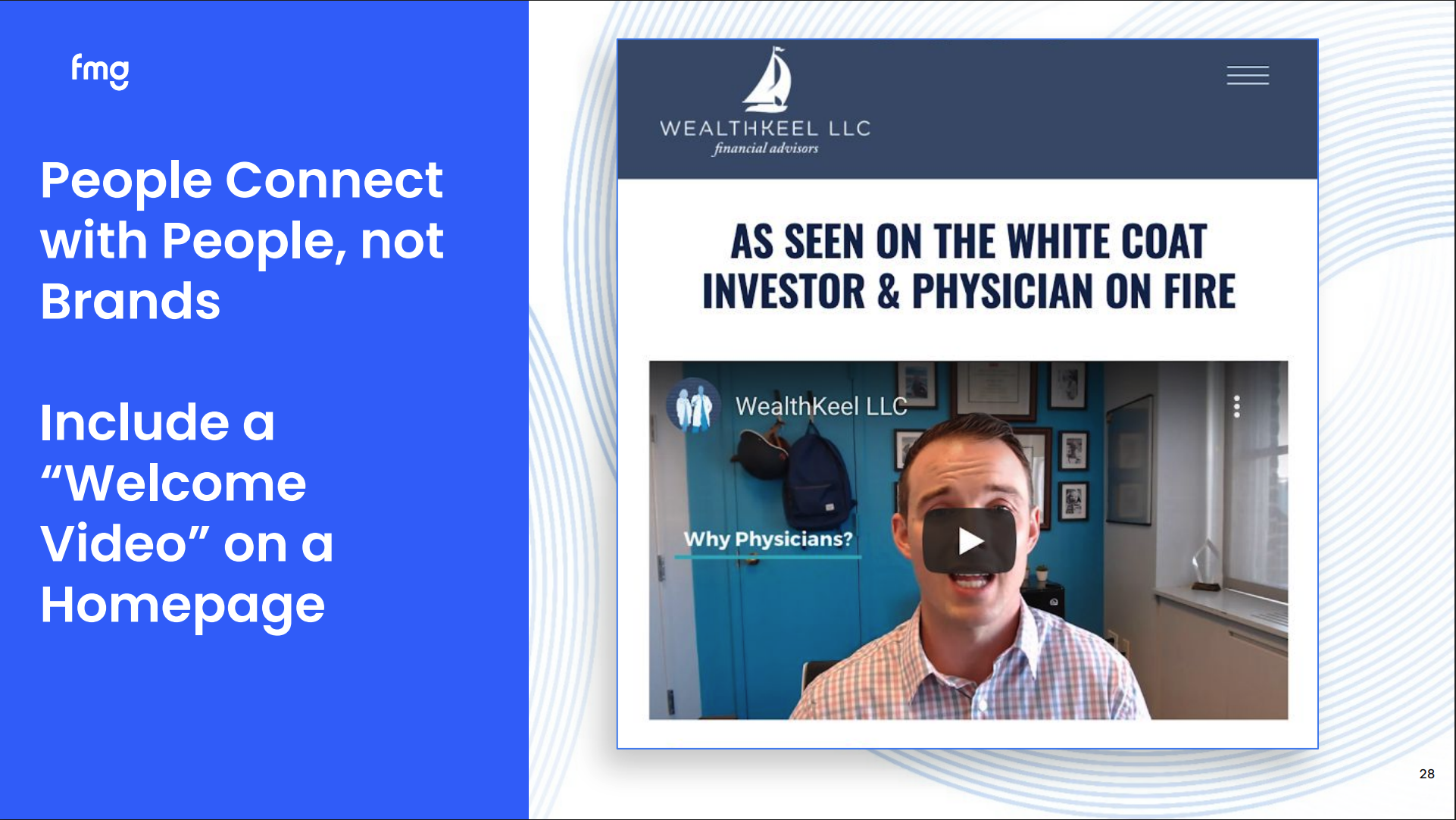
Another way to do this is to go in and update your bios, your team pages, and just another example to showcase who you are, put a name with the face. If you’ve come to my Did You Knows, I use this slide a lot, and it’s because I think not enough people are doing this, but do you have a video on your website saying, hey, this is who we are, these are the services we provide, and these are ways that which we can provide value for you.
If anyone has examples of the dual headshots, feel free to add that to the chat, we would love to see how you guys are showcasing your personality and letting it shine through.
Adding that welcome video at bare minimum is a great way to do this. And you can reuse this video in your emails, in your blog, on your website. So thinking about when you create these videos, how else can you maximize your efforts and reuse them?
And people remember this. I think that is something that we also need to think about is when they come to your website, they’re going to remember that you have your chief rollover officer, sweet little Maggie over here that is on your website, right? People remember that. That is something that stands out. That is something that that people remember and so, we want to encourage you again, add your dog in there, add pictures of your family, make sure in your bio it’s written of course professionally, but add pieces of information like where you went to school, the type of wine you like to drink, the places you like to travel, your favorite golf course, whatever it might be, making sure we are adding these personal tidbits because it gives people things to talk about, it gives you commonality with your clients and prospects in those first and second meetings, and again they’re going to remember it.
And just again another way to showcase updating our content on our website, we can search niche content on our website, you can rewrite the content on our website using AI to specify it toward your specific niche audience as well. So we’ll talk about that in our demo. But within here, we have blogs, we have social posts, and so making sure that the content you’re creating is applicable to whoever you work with. White coat professionals, business owners, military professionals, whatever it might be.
And of course, you all work so hard in creating doing what you do, creating value for your community, and so don’t be afraid to toot your own horn. Let’s highlight all the great things you’re doing, the awards you’ve won, where you’ve been featured, and so making sure that you are adding these to your website because these are badges of credibility that when me, the first time prospect comes to your website, I’m going say, wow, this person, you know, is MDRT, this person has been featured in the news, anything like that. So making sure we’re highlighting all the great work you’re doing. And
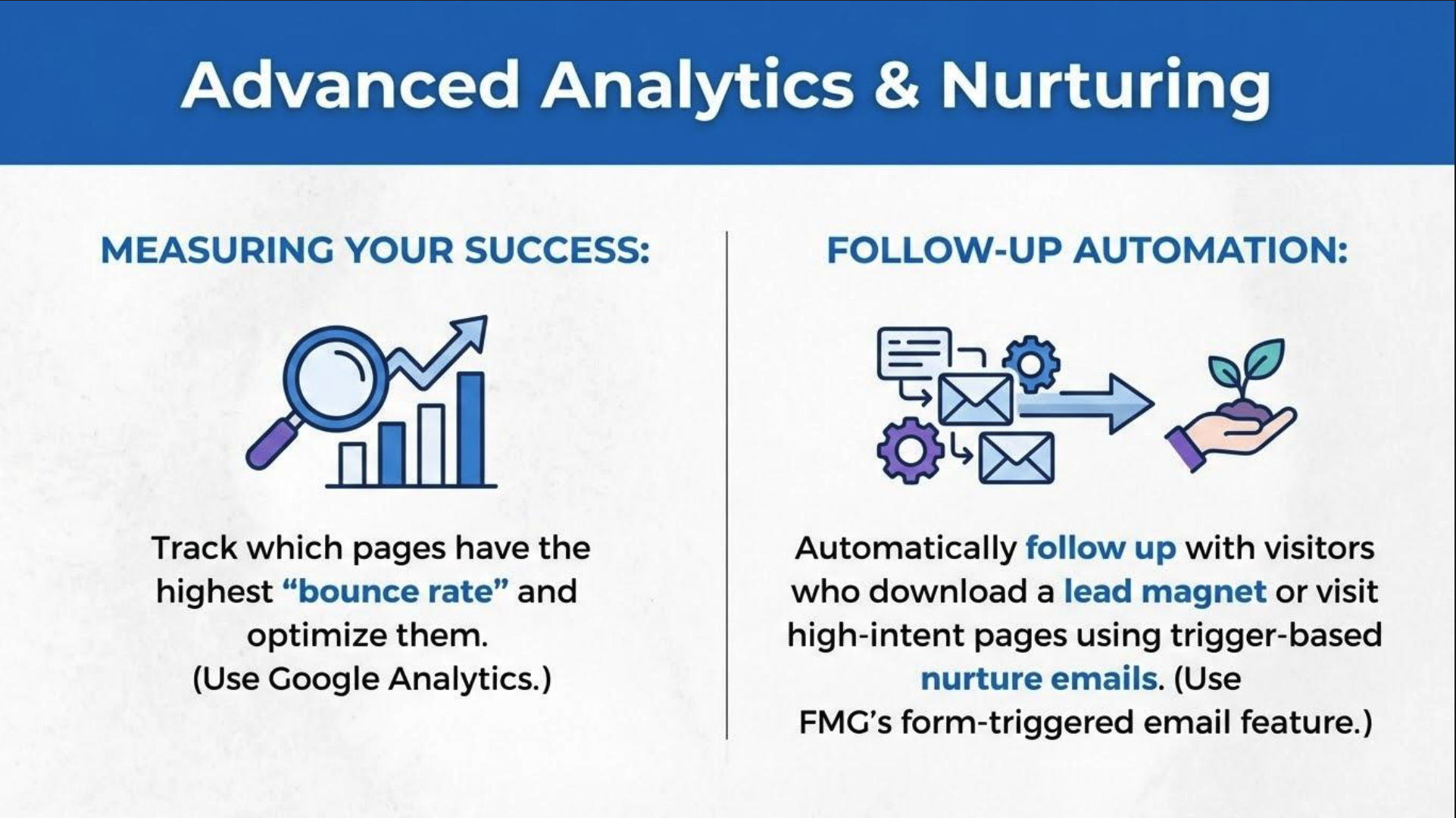
if we’re looking to take our website strategies up a notch, right? If you haven’t added your website to Google Analytics to be able to track our traffic, your bounce rates, what pages are visited most, This is something we encourage you to do. You can do this in the FMG dashboard. You will need to create a Google Analytics account separately, but then once you’ve done that, can link that.
We will share the how to here in the chat. And also, did you guys know that you can automate an email to people that fill out a form on your website? So we call these form triggered emails. So someone fills out a contact me form on your website, you can automate an email to them that goes out automatically.
We’re gonna demo this today as well. So form triggered emails, I think this is a feature and show of hands, I think not a lot of people know we have this, and so I really wanted to highlight this one today because this is a really, really neat feature that lives there.
And so if you’re looking to add your Google Analytics, so again, first you need to create a Google Analytics profile within Google. But then once you’ve done that, you can toggle over here to websites, come down to the SEO section, and then be able to add your Google Analytics tracking ID, and we will share those step by step pieces within the chat right here.
And now let’s talk about form triggered emails and go into our demo. So follow along with me as we head over to the content library, and I’m making sure you all can still see my screen, which you can. Yay. Show show of hands or a little heart if if if we’re if we’re still following along. Yay. Love it. Okay.
Perfect. So let’s start out with I’m trying to think there’s so much we can do. Let’s start out today with adding a form triggered email. So let’s go and build out a frequently asked question page and create a form triggered email. So if I want to create a form triggered email, first things first, I need to create an email template. So I’m going to come here to email, and come down to email template right here.
And within this email template section, I can create an email template. So what I am going to do is, I made this in ahead of time just so you wouldn’t have to watch me build out an email, but I created this email right here. A thank you email after I have a question form. So I named it something that I knew would you can name it form trigger email response. You can name it whatever you would like. So the idea is this is the email that will be triggered when someone fills out the contact me form on my website.
You guys can get creative with this, so you could create a form triggered email on your social security ebook, so whatever your lead generation is, you can then trigger that. So thank you email after you have a question, So here’s my email. I’ve gone through. I’ve created it.
Thank you for filling out the form. We look forward to answering your question. We’ll reach out within twenty four hours. If you would like to go ahead and book a meeting with our team, click the link below so it has again a clear call to action for them.
And so then you can hit book a meeting.
Okay. So now that’s the first step is I need to create that email template. Once I’ve done that, we can now go to that form and add that. Okay. So I’m going slow. Please ask any questions you might have, or if you guys would like, our support team to reach out to add this, you can fill out our Q and A to have us reach out to you.
So now that we’ve done that, I’m going to come up to websites. I’m going to come to page. Right? So I want this form to be triggered on a certain page. So I’m going to say, for today, we’re gonna talk about adding a frequently asked question page to our website.
So I’m gonna add page. I’m gonna come to frequently asked questions.
And here, we’re going to do a couple things. I’m going to show you how to add that FAQ widget.
So here, and there’s a great question. Can you have multiple forms on your website? Absolutely. We encourage you to have multiple forms on your website, which then you can trigger multiple customized emails to be triggered.
So if I want to add that FAQ schema markups, this is a premium feature, so if you haven’t updated your website in two years, you probably won’t have this. So if you come to add section and then we come down to widgets. So here we can come down to widgets and I’m going to scroll. So again, there are so many different calls to actions you can add. So we talked about these. This is where you can find some of those call to actions to make sure you’ve added these to your website.
And here we can come down to the bottom, so it just added, so it’s at the bottom, but it’s called FAQ Schema Markup. And this is what we’re going to do to add our questions. So this is made the formatting of this is formatted specifically for answer engine optimization so when you add this this template right here it’s helping with your answer engine optimization. And then I can type in your questions and your answers here and we will add in the chat. We have a blog on FAQs, so we will add that. How long should they be? What types of FAQs we should add specifically?
And yes, you can add add questions and it just does it does default to three, but feel free to add more of these if you would like. So I added some examples here. You know, I went to Chatuchipatine and I said, hey, what are some of the top questions prospects have for financial professionals? Right? How does a financial advisor get paid?
Do I really need a financial advisor? What should I bring to my first meeting? So here’s just some examples of some FAQs you can add to your website.
So we’ve gone over adding FAQs to our website. Now let’s we’re gonna come back to that form triggered email. So we talked about adding that email to a form. So I can come in here and I can come down to forms right here. You can select which form you would like, whether it’s a contact us, an ebook, quiz, appointment request, right? So if you don’t have a calendar Calendly or Microsoft Bookings, you can add a form easily to your website, feedback form, a lot of great options. So again, if you haven’t come in and looked at some of these widgets recently, we’ve added some over the years and specifically in the most recent couple months.
And so let’s just use the contact us form. We talked about this earlier, lot of you, this is one of your most visited pages. So let’s say I have a question. I, of course, I can edit this form.
You know, want to get ahold of us, right? Or whatever you might say, your personality, your verbiage to shine through.
You know, bare minimum, contact us is great.
And then if I want to add that form triggered email, so there is a little, little, little button right here called form follow-up.
And it is right here, it says form follow-up. And now this allows for me to add that email template. Right? I named it my thank you email after have a question form.
And I can hit.
Yes, that’s the one I want.
And then we add that. So I wanted to show you all as well. Okay, so that is how we add that. I always want to hit publish, right? Everything needs to go through compliance. So hit publish.
And then from here, I want you to see that this is the email that we created. So it automatically gets sent to that person that filled out the form.
Hi. Thank you for filling out the form. We look forward. And within the FMG dashboard, you are also, you’re gonna get a notifications in your email saying someone filled out a form, which is great, right? We all need a little reminder. So just letting you know that you will receive an email notification saying someone filled out a form so you won’t miss it.
So yes, so this is how we can add an FAQ widget. This is how we can add a form triggered email. And again, about having multiple forms on your website and creating custom pieces as well, custom forms and custom emails after those forms.
K. And one more thing I wanna demo is our blog feature. So we talked about creating timely content on our website, updating it on a regular basis, and a really great way for us to do that is adding a blog on a regular basis. So let’s say I want to take a piece of content from the content library and add it as a blog.
And so here, and of course it’s going to take a second, but it will come here in a second. So I want to add, I want to take maybe a timely content piece that lives in the content library and add this as a blog.
So as and of course, it’s gonna go slow because I’m on a demo with lots of people. So my my content library, it’s gonna take a second to show up.
But I can come here and we’ll just pull something from the web.
And it only goes slow, I think, because we have so many amazing people on this webinar, which is exciting.
But let’s go ahead. Let’s say I want to share ah, here we go.
Love this. How you know, we can come in here and find a timely article.
Here, assess your life insurance needs. Right? So what I can do is maybe this is something I want to take a look at. This is an article in here assessing your life insurance needs. So I can come in here and I’m going to copy some of this content right here and I’m going to come back over to follow along.
So let’s share I want to share a piece of content and I want to create it as a blog. So I’m going to come over here to my blog feature, create blog post.
And I’m going to now write with AI.
And with this AI tool, I’m going to prompt it. So I’m going to say, write a blog post using the information below.
Optimize for question and answer formatting.
And optimize for AEO, answer engine optimization.
And I’m going to add some keywords here, right, specifically for my niche audience, I’m just gonna say business owners in Texas. And I’m also gonna say add some frequently asked questions at the end.
Prompt to add a meeting. I’m just throwing out some ideas and some prompt ideas for you when creating this. And then we get to choose our writing style. So I’m gonna copy and paste below this information from the article.
And what’s my writing style? I want it to be the steady captain, the trusted confidant. Let’s pick the trusted confidant and hit save. And I want you to be short, medium, medium in length, and then it will generate this piece of content we we took from the content library.
I have now added specific keywords regarding my target audience, adding frequently asked questions, and then I’m going to hit use once it’s done, so it’s thinking, you know, the AI is working, and I’m going to hit use as draft.
And it’s going to pull this over into a beautiful blog post that of course we encourage you to come in, take a look, make sure it looks good, make sure it meets your requirements from your voice, and you can see that we’ve added the FAQs in here.
You can add a button down here to schedule a meeting.
And then you can and it automatically adds a title as well here.
And then we can hit publish. So that is how we can take content from the content library, utilize artificial intelligence to then create a relevant post that we can then add as a blog. So very exciting. Let’s go back to our presentation.
And don’t worry everyone, the recording will be sent as well as all of the FAQ pieces, frequently asked questions, are knowledge based articles on each one of these topics we covered today. So if for whatever reason I went too fast or maybe you missed a step, have no fear. We have we’re sending this afterwards. And let’s go back to our slideshow.
And I just wanted to give a gold star, and we would love to give gold stars. We love to hear about your marketing wins. So if you’ve received a compliment from a client, or a prospect’s given you or you’ve reached a prospect from your website, we would love to hear your success stories. And with that, we would love to send you some swag. So we want to celebrate your marketing wins with you and in the chat, if you have had any recent marketing wins, Maybe someone you’ve been emailing for years finally booked a meeting or maybe you saw an uptick in traffic on your website. We would love to hear some of these, so if you guys want in the chat, share some of your most recent marketing wins.
Oh this is one, our FMG website went live today, that is spectacular, we can’t wait to hear about what is to come, and we chose a winner last month, so of everyone that reached out and told us about your marketing wins, we had Ted reach out to us and he received an email from a client as a result of the holiday email campaign.
And so it just shows the importance and valuable regular contact with clients and prospects. And so Ted we’ve been trying to reach you if you’re seeing this, if you’re here, we would love to send you some FNG swag so check your inbox of course.
And so let’s talk about content and you guys we’ve been here for forty five minutes. If you have to jump, I totally get it.
We will also send this to you. So feel free if you have to jump, your world’s busy. I get it. We’re going to go over content as well as some other features and product features within the FMG family, and so recommended content for February. Of course, as most of you know, if you’ve been here before, coming to our Did You Know, you get the first look at that ten minute marketing calendar, so we’re going to share that here in the chat. And so we have that ten minute marketing calendar up and ready to go for February, so you can get ahead of sharing content.
There is that. If you’re thinking about planning content for the month of February, just some days and observations for you to think about. Of course, Valentine’s Day, Black History Month, National Financial Aid Awareness, IRA contributions, tax planning is a really big one that we’re thinking about.
So adding that, so if you guys are looking to redesign your website, it’s been far too long, or if you want you know just someone to contact you about adding a website because you don’t have one, we’ll put up a poll right here so if you want us to reach out to you we’re happy to do so. So just we’ll have that going And as we go through, again, thinking about content, the state of the markets is now up. This is a presentation. This is an event template that you can run, and this is a really great lead generation information, you can take some of the State of the Market’s content and recreate it as a blog, so so much that you can do here with that and of course if you’re like man this sounds like a lot, I really just want someone to do it for me, we have our Do It For Me program where you get a dedicated marketing concierge help execute marketing on your behalf.
You get premium content created by our marketing thought leaders company. And so if you’re like, man, I just really want someone to it for me, we also have that available for you. So just want to showcase that. And of course, we have some people on here that are already a part of our do it for me program, so just highlighting that and save the date, come hang out with me next month, our next Did You Know.
Come and hang out with us on February eighteenth where we are going to be talking about some new products and features and some more ideas.
So come hang out, and I will stay on for just a couple quick seconds. But again, if you have to jump, no problem. We totally get it. Thanks for spending time with us.
Look for that checklist coming. Look for the replay, the slides, the the chat dialogue, everything coming your way. I hope this was helpful. I hope it wasn’t too much.
And again, our team is here to support you. So reach out to us. We want to celebrate your marketing success with you. Thank you.
Thank you. Thank you. And just a couple commercial items. So again, jump off if you need to.
But we love feedback. So if you have feedback regarding our platform, things you would like us to see, you can reach out to us. And also, if you didn’t know, we have an FMG app so you can send compliant emails and use AI in social posts from your phone. So make sure to do that.
And if you’re not using compliant texts, great thing to do. So we, we have acquired MyRepChat. So if you are looking to add texting to your marketing, tool belt this year, you can do that.
So again, thank you so much.
Thanks for joining, and I’ll stick around for a second or two just to see if there are any specific questions, and we’ve gotten a lot because there’s some really great, a lot of great dialogue.
But yes, the replay will be shared, slides will be shared, content will be shared, and most importantly, we will reach out to you if you’ve reached out wanting some more information. But with that being said, thank you everyone. Thanks for joining and we’ll see you next month. Thank you.
Book some time to chat or call us at 858-251-2400.


